
As an Amazon Associate we earn from qualifying purchases.
Unlocking the World of Mechanical Keyboards: A Beginner's Guide
Mechanical keyboards have garnered significant attention, moving beyond niche enthusiast circles to capture the curiosity of many seeking a superior typing or gaming experience. They stand apart from the common keyboards found in most offices and homes, often recognized for their distinctive feel and sound. This guide will demystify what makes these devices unique, exploring their fundamental mechanics, the advantages they offer, and key considerations to help you determine if a mechanical keyboard aligns with your personal needs.
At its core, a mechanical keyboard distinguishes itself by employing an individual mechanical switch beneath each keycap, rather than a single rubber membrane layer that registers multiple key presses. This design provides a more precise and consistent response with every keystroke. The allure of mechanical keyboards often stems from this tangible difference: a satisfying tactile feedback, a distinct auditory profile that varies by switch type, and a reputation for greater longevity compared to their membrane counterparts. This article will delve into how these components work, the practical benefits they deliver, and the trade-offs involved, empowering you to make an informed decision.
The Core Difference: How Mechanical Keyboards Work
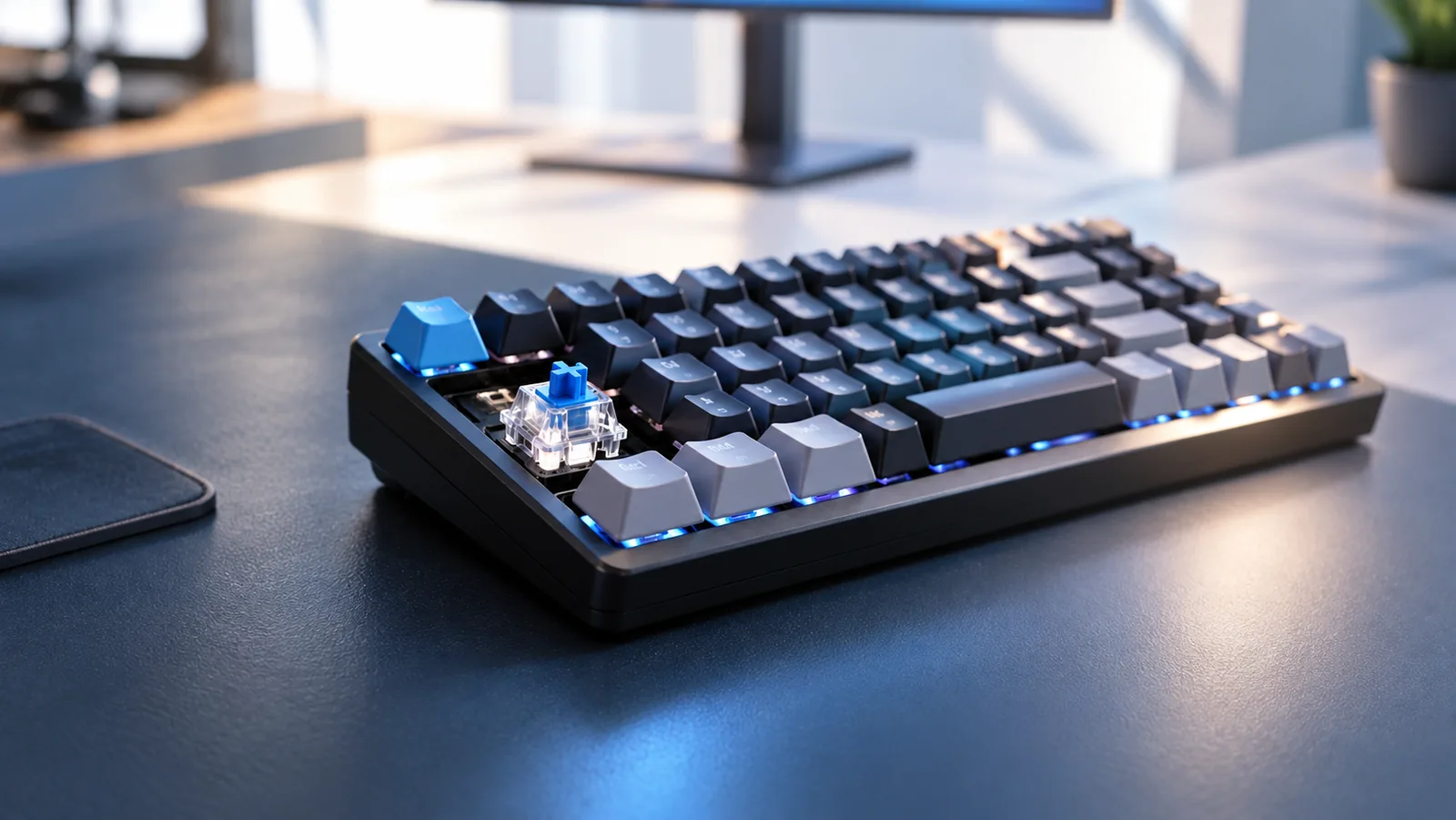
The fundamental distinction of a mechanical keyboard lies in its construction: each key features an individual mechanical switch. Unlike the shared rubber dome or membrane layers found in conventional keyboards, this dedicated mechanism beneath every keycap is responsible for registering your input. This design allows for a precise and consistent response, contributing significantly to the unique feel and performance associated with these devices.
At the heart of every mechanical key lies a switch, typically composed of several key parts working in concert:
- Stem: This is the moving part that the keycap attaches to. Its shape and internal design largely determine the switch's tactile feel (linear, tactile, or clicky).
- Housing: The upper and lower casings that enclose and protect the internal components of the switch.
- Spring: Provides resistance to the keypress and returns the stem to its original position after actuation. The spring's weight influences the force required to press the key.
- Contact Leaves: Two small metal pieces that complete an electrical circuit when the stem is pressed down, signaling the keypress to the computer.
Understanding how a keypress is registered is crucial. The actuation point is the specific distance a key must travel downward for the electrical circuit to close and register the input. This point often occurs before the key reaches its maximum downward travel, known as bottoming out. Many mechanical switches allow for actuation without fully bottoming out, which can potentially lead to faster typing and reduced finger fatigue over long sessions.
The overall responsiveness and feel are also influenced by key travel and the reset point. Key travel refers to the total distance a key can be pressed from its resting position to bottoming out. The reset point is the distance the key must travel back upwards before the switch is ready to be actuated again. A short reset point can be advantageous for rapid, repeated key presses, particularly in gaming scenarios where quick double-taps are common. Different switch types are engineered with varying actuation points, key travel distances, and reset points to offer distinct typing and gaming experiences.
In stark contrast, membrane keyboards typically rely on a single, flexible rubber or silicone sheet with domes that sit over a circuit board. When a key is pressed, it pushes down a rubber dome, which then makes contact with the circuit board beneath to register the input. This design often requires the key to be pressed all the way down (bottomed out) for reliable registration. The lack of individual mechanical components often results in a less precise, "mushier" feel, less consistent feedback across keys, and generally a shorter operational lifespan compared to the individual switches found in mechanical keyboards.
Why Choose a Mechanical Keyboard? The Advantages Unpacked
Opting for a mechanical keyboard often stems from a desire for a more engaging and efficient interaction with your computer. Beyond aesthetics, these keyboards offer distinct practical advantages that can significantly enhance daily use for various tasks. Understanding these benefits helps clarify why many users consider them a worthwhile investment.
A primary draw is the enhanced typing experience. Unlike membrane keyboards, each key on a mechanical keyboard has its own switch, providing consistent tactile feedback—a distinct bump or resistance—that signals a key press has registered. This physical confirmation can lead to fewer typing errors and, for frequent typists, potentially reduced finger fatigue over extended periods. Coupled with this is the auditory cue, a satisfying click or thock sound, which further reinforces successful key actuation and can contribute to a more rhythmic and enjoyable typing flow.
Durability and longevity are also key factors. Mechanical switches are engineered to withstand millions of keystrokes, often boasting a significantly higher lifespan compared to the rubber domes found in many standard keyboards. This robust construction means a mechanical keyboard can endure heavy use for many years, potentially outlasting several membrane keyboards. This makes them a reliable choice for those who spend considerable time at their desk.
The customization potential of mechanical keyboards is extensive, allowing users to tailor their device to specific preferences. This includes swapping out keycaps to change the keyboard's look and feel, or even replacing the switches themselves to alter the typing experience—from light and linear to heavy and clicky. Additionally, mechanical keyboards come in a wide array of form factors, from full-size layouts to compact 60% designs, enabling users to choose a size that perfectly fits their workspace and workflow.
For gamers, mechanical keyboards often translate to improved gaming performance. The precise and consistent actuation of mechanical switches can offer a competitive edge, as key presses register quickly and reliably. Features like N-key rollover (NKRO) and anti-ghosting ensure that every simultaneous key press is detected, preventing missed inputs during intense gaming sessions. This responsiveness can be crucial for fast-paced games where split-second decisions matter.
Finally, many users are drawn to the satisfying sound profile that mechanical keyboards offer. While subjective, the distinctive acoustics produced by different switch types—from the crisp click of blue switches to the deep thock of linear switches—are often considered a pleasing and integral part of the mechanical keyboard experience. This auditory feedback provides a unique sensory dimension that enhances the overall interaction with the device.
Beyond the Basics: Understanding Mechanical Switch Types and Customization
While the fundamental concept of individual switches defines mechanical keyboards, the true depth of their user experience, sound, and feel emerges from the variety of components that comprise them. Understanding these elements is crucial for appreciating the nuances that differentiate one mechanical keyboard from another and for identifying what might best suit your preferences.
The heart of any mechanical keyboard lies in its switches, which dictate the primary typing sensation. These are broadly categorized by their feedback mechanism:
- Linear Switches: Offer a smooth, consistent keystroke from top to bottom, without any tactile bump or audible click. They are often favored by gamers for rapid, uninterrupted key presses. Common examples include variations of Cherry MX Red.
- Tactile Switches: Provide a discernible "bump" partway through the key travel, signaling that the key has registered. This feedback can enhance typing accuracy by confirming actuation without requiring the key to be bottomed out. Cherry MX Brown is a widely recognized tactile switch.
- Clicky Switches: Combine the tactile bump with an audible "click" sound at the actuation point. This dual feedback can be very satisfying for typists who enjoy both physical and auditory confirmation of each keystroke. Cherry MX Blue is a classic example of a clicky switch.
Beyond the switch type, how switches are integrated into the keyboard significantly impacts customization and maintenance. Hot-swappable keyboards allow users to easily remove and replace switches without soldering, offering unparalleled flexibility to experiment with different switch types or replace a faulty switch. In contrast, soldered switches are permanently affixed to the circuit board, providing a highly secure connection but requiring specialized tools and skill for any changes or repairs.
The keycaps, the plastic covers on top of each switch, also play a substantial role in the keyboard's feel and durability. Common materials include ABS (Acrylonitrile Butadiene Styrene), which tends to be smoother and can develop a shine over time, and PBT (Polybutylene Terephthalate), known for its textured feel and greater resistance to wear and shine. Keycap profiles refer to their shape and height, influencing ergonomics and the overall typing experience; common profiles range from the sculpted OEM and Cherry profiles to uniform, flat designs.
The physical size, or form factor, of a mechanical keyboard dictates its footprint and available keys. A full-size keyboard includes a numpad, function row, and navigation cluster, suitable for data entry or users who require all standard keys. Tenkeyless (TKL) boards omit the numpad, saving desk space while retaining most functionality. More compact options like 60% keyboards remove the numpad, function row, and navigation cluster, relying on layered functions (accessed via a combination of keys) for a minimalist setup ideal for maximizing desk space or portability. Choosing a form factor involves balancing desk space efficiency with functional needs.
Finally, the construction materials of the keyboard's internal components and external casing contribute significantly to its sound profile, typing feel, and overall durability. The plate, which sits between the switches and the PCB, can be made from materials like steel, aluminum, or polycarbonate, each imparting a different level of stiffness and influencing the sound of keystrokes. The PCB (Printed Circuit Board) is the core electronic component, determining layout compatibility and features like hot-swappability or backlighting. The keyboard's case material, ranging from various plastics to aluminum or even wood, affects the keyboard's weight, acoustic properties (how sound resonates or is dampened), and aesthetic appeal. These material choices collectively shape the tactile and auditory experience of using a mechanical keyboard.
Is a Mechanical Keyboard Right for You? Weighing the Trade-offs
While mechanical keyboards offer distinct advantages, they also come with considerations that prospective users should evaluate. Understanding these potential downsides and complexities is crucial for determining if a mechanical keyboard aligns with your expectations and usage patterns.
One significant factor is the higher initial cost. Mechanical keyboards generally represent a more substantial investment compared to standard membrane keyboards. This premium often reflects the individual switch mechanisms, durable materials, and advanced features, but it's a budget consideration for many.
Another common point of discussion is noise level. The distinct sound of mechanical switches, often celebrated by enthusiasts, can be a drawback in certain environments. Clicky switches, in particular, produce an audible "click" with each actuation, which may be disruptive in quiet offices or shared living spaces. Even tactile and linear switches, while quieter, can still produce more sound than a typical membrane keyboard.
For users accustomed to membrane keyboards, there can be a learning curve involved. The precise actuation points, varying key travel distances, and tactile feedback of mechanical switches differ significantly from the soft, often mushy feel of membrane keys. Adjusting to these differences can take time, impacting initial typing speed and accuracy until muscle memory adapts.
Maintenance and cleaning also present a different challenge. Due to the individual keycaps and exposed switch mechanisms, mechanical keyboards can accumulate dust, crumbs, and debris more readily than sealed membrane designs. While thorough cleaning can restore performance and aesthetics, it typically involves removing keycaps and more intricate procedures compared to simply wiping down a membrane keyboard.
Like any complex electronic device, mechanical keyboards can occasionally encounter potential issues. Some users have reported experiences with firmware bugs that affect functionality or inconsistent key registration over time. While not universal, these instances highlight that even premium devices can have operational quirks that may require troubleshooting.
Finally, the sheer complexity of choices can be overwhelming for beginners. The market offers a vast array of switch types (linear, tactile, clicky), form factors (full-size, TKL, 60%), keycap materials, and customization options. Navigating this extensive landscape to find the ideal combination without prior experience can be a daunting task, making the initial selection process feel less straightforward than choosing a standard peripheral.
Who Should Consider a Mechanical Keyboard, and Who Might Not?
Deciding whether a mechanical keyboard is the right choice involves evaluating your personal usage patterns, priorities, and budget. While these keyboards offer distinct advantages, they also come with trade-offs that might not suit everyone. Understanding these factors can help align your expectations with the unique characteristics of mechanical keyboards.
For certain users, the investment in a mechanical keyboard often translates into a significantly enhanced experience:
- Frequent Typists and Writers: Individuals who spend extended periods typing can benefit from the tactile feedback and consistent actuation, which may reduce typing fatigue and improve accuracy. The durability of individual switches often means a longer lifespan under heavy use.
- Professional Gamers: The precise and rapid response of mechanical switches can provide a competitive edge. The ability to register multiple key presses simultaneously (N-key rollover) is also a significant advantage in fast-paced games.
- Programmers and Data Entry Professionals: Similar to frequent typists, these users often value the distinct feedback and reliability of each keystroke, which can contribute to efficiency and reduce errors over long sessions.
- Content Creators and Enthusiasts: Those who appreciate customization, specific aesthetics, or unique sound profiles often find mechanical keyboards appealing due to the vast array of switch types, keycaps, and build options available.
Conversely, a mechanical keyboard might not be the optimal choice for everyone:
- Casual Users: If your keyboard use is infrequent or limited to basic tasks like occasional browsing or email, the added cost and features of a mechanical keyboard might not offer a noticeable improvement over a standard membrane keyboard.
- Budget-Conscious Individuals: Mechanical keyboards typically have a higher upfront cost than membrane alternatives, and specialized or custom options can be significantly more expensive.
- Those Prioritizing Absolute Silence: While quiet mechanical switches exist, many mechanical keyboards are inherently louder than membrane keyboards due to the physical mechanism of the switches. For shared workspaces or environments where noise is a critical concern, even "silent" mechanical options might still be too audible.
To determine if a mechanical keyboard aligns with your needs, consider these key questions:
- How much time do I spend typing or gaming daily? More intensive use cases tend to benefit most.
- Do I value tactile feedback or a distinct sound from my key presses? This is a core characteristic of mechanical keyboards.
- Is durability and longevity important for my keyboard? Mechanical switches are generally rated for many more key presses than membrane domes.
- Am I interested in customizing my keyboard's feel, sound, or appearance? Mechanical keyboards offer extensive personalization options.
- What is my budget, and am I willing to invest more for these benefits?
- Is keyboard noise a significant concern in my environment?
Frequently Asked Questions About Mechanical Keyboards
As you explore the world of mechanical keyboards, several common questions often arise. Addressing these can help clarify misconceptions and solidify your understanding of their unique characteristics and potential fit for your needs.
Are mechanical keyboards worth the cost?
Mechanical keyboards typically have a higher initial price point than standard membrane keyboards. The "worth" is subjective and depends on your usage patterns and priorities. For frequent typists, gamers, or professionals who spend extended periods at their computer, many find the investment worthwhile due to:
- Durability: Individual mechanical switches are generally rated for millions of keystrokes, often significantly outlasting membrane alternatives.
- Typing Experience: The distinct tactile feedback and consistent actuation can lead to a more comfortable and precise typing experience, potentially reducing fatigue.
- Customization: The ability to change keycaps and, in many cases, switches, allows for personalization in both aesthetics and feel.
For casual users with minimal typing needs, the benefits might be less pronounced, making the higher cost a more significant consideration.
Are mechanical keyboards noisy?
The sound profile of a mechanical keyboard varies significantly based on the type of switch used. It's a common misconception that all mechanical keyboards are loud.
- Clicky switches are designed to produce an audible "click" sound in addition to tactile feedback, making them the loudest category.
- Tactile switches offer a noticeable bump during actuation but generally lack the loud click, producing a more muted sound.
- Linear switches provide a smooth, consistent press without a tactile bump or click, making them the quietest of the three main types.
Beyond switch type, factors like keycap material, keyboard case construction, and internal dampening can also influence the overall sound. While some mechanical keyboards can be louder than membrane keyboards, many options exist for those seeking a quieter experience.
What's the best switch type for gaming or typing?
There isn't a single "best" switch type, as preference is highly personal. The ideal switch depends on individual feel, sound preference, and primary use case.
- For Gaming: Many gamers prefer linear switches (e.g., "Red" or "Black" equivalents). Their smooth, consistent travel without a tactile bump can allow for faster, unimpeded key presses, which some find advantageous for rapid-fire actions and quick reflexes.
- For Typing: Many typists gravitate towards tactile switches (e.g., "Brown" or "Clear" equivalents). The tactile bump provides feedback that a keypress has registered without needing to "bottom out" the key, which can help improve typing accuracy and speed for some users. Clicky switches (e.g., "Blue" or "Green" equivalents) are also popular for typing due to their distinct auditory and tactile feedback, though their noise level can be a drawback in shared environments.
The most effective way to determine your preference is often to try various switch types, perhaps using a switch tester, before committing to a full keyboard.
How long do mechanical keyboards typically last?
Mechanical keyboards are generally known for their robust durability. The individual mechanical switches are engineered for a high number of actuations, typically ranging from 50 million to 100 million keystrokes per switch. This far exceeds the lifespan of many membrane keyboards, which often wear out much faster.
The overall lifespan of a mechanical keyboard also depends on the quality of its other components, such as the circuit board, case, and keycaps, as well as how well it is maintained. With proper care, a mechanical keyboard can reliably serve you for many years, making it a long-term investment.
Can I change the keycaps or switches on any mechanical keyboard?
- Keycaps: Most mechanical keyboards allow for easy keycap replacement. Keycaps are designed to fit standard switch stems (often cross-shaped, like Cherry MX style stems), offering a wide range of aftermarket customization options for aesthetics and material feel.
- Switches: Changing switches is possible but depends on the keyboard's design.
- Hot-swappable keyboards are designed specifically to allow users to pull out and replace switches without soldering. This feature is increasingly common and offers significant flexibility for customization and maintenance.
- Soldered keyboards require desoldering the existing switches and soldering in new ones. This process requires specialized tools and technical skill, making it less accessible for beginners.
If switch customization or replacement is a priority, look for keyboards explicitly advertised as "hot-swappable."
Embracing the Mechanical Keyboard Experience
Mechanical keyboards offer a distinct and often more satisfying interaction than conventional alternatives, defined by their individual switch mechanisms that deliver precise feedback and robust durability. The unique tactile responses and varied sound profiles contribute to a typing or gaming experience that many users find significantly more engaging and efficient. This core design principle underpins their growing popularity and enduring appeal.
Ultimately, the "best" mechanical keyboard is not a universal standard but a highly personal choice. Your ideal keyboard will depend on your specific activities, whether it's demanding gaming, extensive writing, or general productivity, alongside your preferences for key feel and acoustic feedback. Considering your daily usage and what sensations you value most will guide you toward a suitable option.
For those who align with its benefits, a mechanical keyboard can transform daily computer interaction from a mundane task into a more enjoyable and responsive experience. The investment often translates into enhanced comfort and a sense of control, fostering a deeper connection with your digital workspace.
Decision checklist for what is a mechanical keyboard
- Confirm the layout includes the keys and navigation functions required by your daily workflow.
- Verify switch, socket, keycap, firmware, operating-system, and connection compatibility before ordering.
- Compare sound, typing feel, ergonomics, repairability, and desk-space tradeoffs rather than one headline specification.
- Read the current warranty, return policy, and manufacturer documentation before making a final choice.