
As an Amazon Associate we earn from qualifying purchases.
Unlock a Better Sound: The Guide to Mechanical Keyboard Foam
Mechanical keyboard foam is a popular modification among enthusiasts seeking to refine their typing experience. Placed strategically within the keyboard's case or between components, this material serves as an acoustic dampener. Its primary purpose is to absorb unwanted vibrations and resonance that can contribute to a less desirable sound profile.
By integrating foam, users often aim to achieve a more subdued and pleasing acoustic output. Key improvements include:
- Sound Dampening: Reducing the overall volume and harshness of keystrokes.
- Hollowness Reduction: Eliminating the "ping" or empty sound that can emanate from the keyboard's case.
- Vibration Isolation: Preventing the transmission of vibrations between different keyboard components.
This guide will delve into the various types of mechanical keyboard foam available, the criteria for selecting the right material and thickness for your specific build, and a detailed overview of the installation process. We will also address potential risks and trade-offs associated with foam modification, empowering you to make informed decisions for enhancing your keyboard's acoustics.
The Acoustic Transformation: How Foam Changes Your Keyboard's Sound
Mechanical keyboard foam fundamentally alters the auditory experience of typing by managing sound waves and vibrations within the keyboard's structure. Its primary role is to introduce materials that absorb acoustic energy, thereby modifying the sound signature from potentially harsh or resonant tones to a more controlled and often deeper profile.
The core functions of integrating foam into a mechanical keyboard include:
- Acoustic Dampening: Foam materials absorb sound waves, preventing them from reflecting off internal surfaces and amplifying. This reduces the overall volume and sharp peaks in the sound profile.
- Vibration Absorption: Keystrokes generate kinetic energy that translates into vibrations throughout the keyboard's plate, PCB, and case. Foam acts as a buffer, absorbing these vibrations before they can propagate and create unwanted noise.
- Resonance Reduction: Empty spaces within a keyboard case can act as echo chambers, amplifying certain frequencies and creating an undesirable "hollow" sound. Foam fills these voids, disrupting the sound wave paths and minimizing resonance.
By performing these functions, foam directly addresses common acoustic issues. It effectively reduces the 'hollowness' or 'ping' sounds that can originate from the keyboard's case or plate. A metallic 'ping' often heard after a keypress is typically a result of plate or spring resonance, which foam can significantly mitigate by absorbing these specific vibrations.
The overall effect on typing noise and feel is often described as a shift towards a more muted, deeper, and sometimes "thocky" sound, as opposed to a sharper, higher-pitched "clacky" or "pingy" sound. This transformation results from the absorption of higher frequencies and the dampening of impact noises, leading to a more subdued and satisfying bottom-out sound. The perceived feel can also become slightly softer due to the absorption of impact energy.
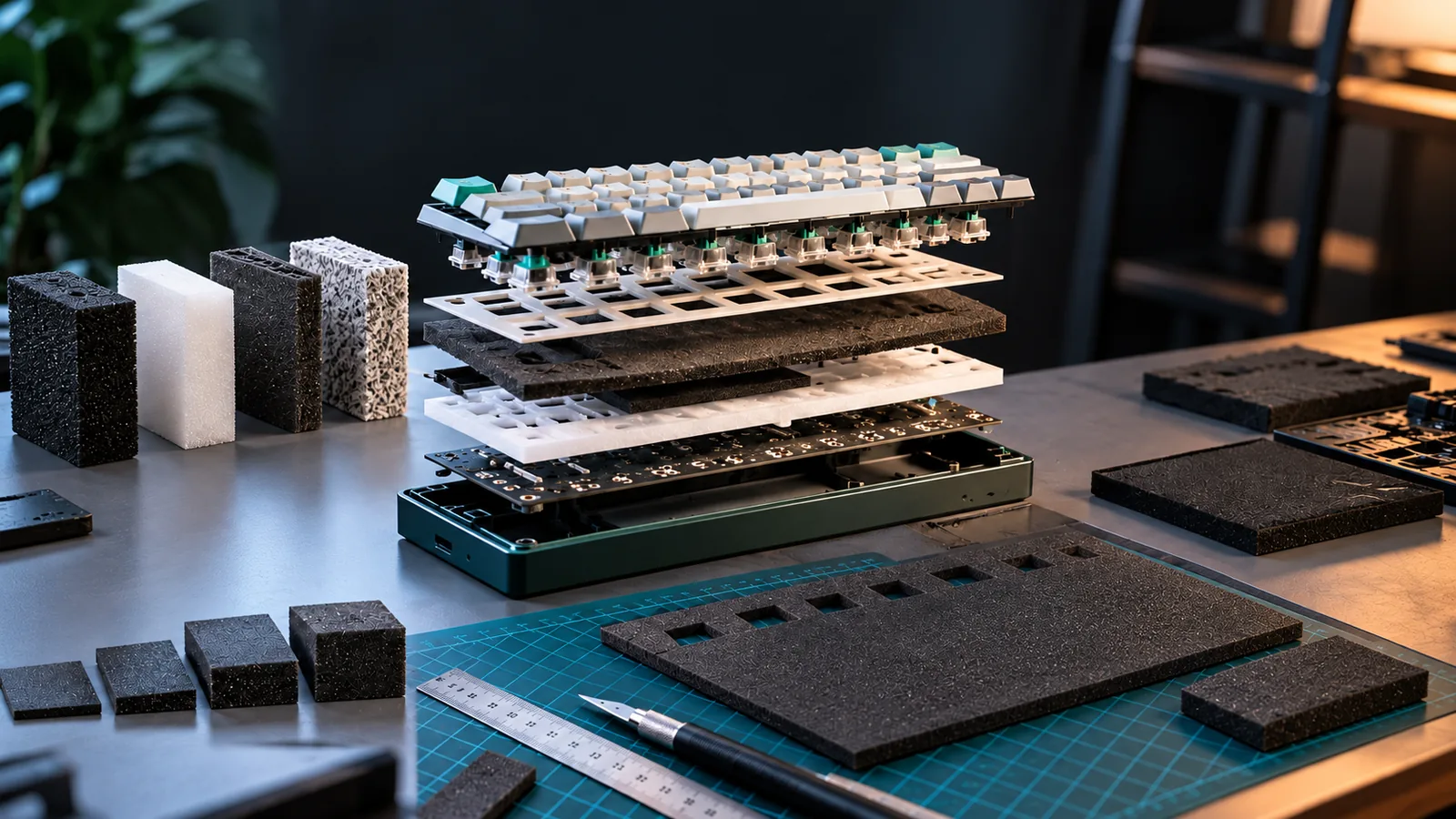
Different placements of foam within the keyboard yield distinct acoustic changes:
- Case Foam: Positioned at the bottom of the keyboard case, this foam primarily targets the empty space within the case. It is highly effective at reducing case resonance and eliminating the hollow sound, contributing to a denser and more substantial acoustic profile.
- Plate Foam: Inserted between the switch plate and the printed circuit board (PCB), plate foam directly influences the sound of the keypress and bottom-out. It dampens vibrations from the plate and switches, often leading to a more uniform and subdued sound across the keyboard.
- PCB Foam (or Switch Pads): Applied directly to the PCB, often beneath individual switches or as a thin layer, PCB foam focuses on isolating the switches from the PCB. This can further reduce switch-related vibrations and modify the switch's inherent sound, sometimes enhancing a "thocky" characteristic by controlling sound reflection.
Selecting Your Sound Signature: Types and Thickness of Keyboard Foam
The acoustic profile of a mechanical keyboard is significantly influenced by the type and dimensions of foam used. Understanding the material science behind different foam options allows modders to precisely tailor their keyboard's sound signature. Each material possesses distinct physical properties that contribute to varying degrees of sound absorption, vibration dampening, and overall typing feel.
Here's an analysis of common foam materials and their characteristics:
- Neoprene: This closed-cell foam offers a balanced approach to sound dampening. It effectively reduces general resonance and unwanted noise without completely deadening the sound. Neoprene is moderately flexible and generally cost-effective, making it a popular choice for case foam where a good blend of performance and budget is desired. It typically contributes to a more subdued, less hollow sound.
- Poron: Often favored for its superior vibration absorption, Poron is available in both open-cell and closed-cell variants. It is highly flexible and excels at creating a deeper, more muted "thocky" sound profile by dampening higher-frequency sounds and vibrations. While more expensive than EVA or neoprene, its acoustic properties are often considered premium for achieving a soft, refined typing experience.
- EVA (Ethylene-vinyl acetate): A firm, closed-cell foam, EVA is effective at filling empty case cavities and providing a solid base. It offers decent sound dampening, particularly in reducing hollowness, and can contribute to a slightly firmer bottom-out feel. EVA is generally one of the most affordable foam options, making it accessible for initial modifications or for those seeking a less aggressive sound reduction than Poron or Sorbothane.
- Sorbothane: This unique viscoelastic polymer is renowned for its exceptional vibration isolation and dampening capabilities. Sorbothane is dense and highly effective at absorbing low-frequency vibrations, leading to a very deep, muted sound profile. Its high cost reflects its specialized performance, often reserved for enthusiasts aiming for the ultimate reduction in resonance and a distinctly "deadened" sound.
Beyond material composition, foam thickness and density are critical factors. A thickness of 3-4mm is often cited as a good starting point for case foam, providing substantial dampening without excessive compression. However, thinner foams (e.g., 0.5mm-2mm) are frequently used for plate foam or between the PCB and plate. Denser foams, regardless of material, typically absorb more sound and vibration, resulting in a more muted acoustic output. Conversely, less dense foams might primarily fill space while offering less acoustic dampening.
Compatibility considerations are paramount for successful integration.
- Keyboard Cases: The internal space of your keyboard case dictates the maximum foam thickness you can use. Cases with tight tolerances or specific mounting styles (e.g., gasket mount) may have limited room, potentially causing case misalignment or uneven key travel if foam is too thick. Foam must also be precisely cut to accommodate screw posts, standoffs, and USB-C ports.
- PCBs: For hot-swap PCBs, foam needs to be accurately cut to avoid blocking switch sockets or bending switch pins during installation. Overly thick or opaque foam can also interfere with or diminish the effect of RGB lighting.
When choosing foam, consider these criteria:
- Desired Sound Profile: Aim for Sorbothane or denser Poron for a deep, muted "thock." Neoprene or Poron can achieve a softer, more subdued sound. EVA is effective for reducing hollowness and a firmer feel.
- Budget: EVA and Neoprene offer cost-effective dampening, while Poron and Sorbothane represent higher-tier investments for specific acoustic goals.
- Ease of Installation: Pre-cut foam kits simplify the process. If purchasing sheets, be prepared for precise cutting to ensure proper fit and avoid functional issues. Stiffer, thicker foams may require more effort to fit into constrained spaces.
A Modder's Guide: Installing Foam in Your Mechanical Keyboard
Integrating foam into your mechanical keyboard can significantly refine its acoustic profile, but successful installation requires careful attention to detail and a methodical approach. This guide outlines the steps to safely disassemble your keyboard, prepare and place the foam, and reassemble it to achieve the desired sound dampening without compromising functionality.
Before you begin, gather the following tools:
- Screwdriver set: Phillips head screwdrivers (PH00, PH0) are typically sufficient for most keyboard cases.
- Keycap puller: To safely remove keycaps without damage.
- Switch puller (if hot-swappable): For removing switches to access the plate and PCB.
- Plastic prying tools: To gently separate case halves without scratching.
- Tweezers: Useful for handling small components or straightening bent switch pins.
- Cutting mat and precision knife/scissors: If your foam isn't pre-cut for your specific model.
- Rubbing alcohol and microfiber cloth: For cleaning surfaces.
Installation Steps:
-
Disassemble the Keyboard:
- Begin by unplugging your keyboard from its power source.
- Use a keycap puller to remove all keycaps. Store them safely.
- Inspect the keyboard's underside for visible screws. Some keyboards may have screws hidden under rubber feet or stickers; carefully remove these if necessary.
- Once screws are removed, use plastic prying tools to gently separate the top and bottom case halves. Work slowly around the perimeter, applying even pressure to avoid snapping plastic clips. Be mindful of any internal cables connecting the top and bottom sections, such as for daughterboards or battery connections. Disconnect these carefully.
-
Access the Internals:
- If your keyboard has a hot-swappable PCB, use a switch puller to remove all switches. This grants full access to the plate and PCB assembly.
- Carefully detach the PCB assembly from the top case, noting how it sits and any standoffs or mounting points.
-
Prepare the Foam:
- Case Foam: This foam sits at the bottom of your keyboard case. If not pre-cut, use the bottom case as a template. Trace its outline onto the foam and cut precisely. Ensure to mark and cut out any screw posts, USB ports, battery compartments, or other internal structures that would interfere with a flat fit. The ideal thickness for case foam is often between 3-4mm. Using foam thicker than 1.0mm can sometimes lead to case misalignment or pressure on the PCB.
- PCB Foam (Plate Foam): This foam typically sits between the PCB and the mounting plate. If not pre-cut, use the PCB or plate as a template. It needs precise cutouts for every switch socket, stabilizer cutouts, and any screw holes that attach the PCB to the plate or case. Ensure the switch cutouts are clean and do not obstruct the switch pins or hot-swap sockets.
- Plate Foam: Some setups may also include foam placed above the plate, directly underneath the keycaps. This is less common but follows similar cutting principles if used.
-
Install the Foam Layers:
- Case Foam: Place the prepared case foam into the bottom case, ensuring it lies flat and doesn't buckle or obscure any mounting points or ports.
- PCB Foam: Carefully place the PCB foam onto the PCB, aligning all switch cutouts and stabilizer openings. Ensure it sits flush without any gaps or overlaps that could interfere with switch installation.
- Plate Foam (if applicable): If using, place this foam on top of the plate, aligning with switch holes.
-
Reassemble Components:
- Reattach the PCB assembly (with PCB foam) to the plate. If you removed switches, reinsert them into the plate and PCB, ensuring each switch clicks firmly into place. Crucially, check that no switch pins are bent before insertion. Bent pins are a common cause of non-registering keys.
- Carefully place the entire plate/PCB/switch assembly back into the top case, ensuring all mounting points align.
- Reconnect any internal cables that were disconnected earlier, such as for the battery or daughterboard.
- Align the top and bottom case halves. Gently press them together, ensuring all clips engage and screw holes align. Do not force them. If there's resistance, re-check foam placement or thickness.
- Reinsert and tighten all case screws. Do not overtighten, as this can strip threads or crack plastic.
- Replace the rubber feet or stickers if they were removed.
- Reinstall all keycaps.
-
Final Checks:
- Plug your keyboard back in.
- Test every single key to ensure it registers correctly. Pay attention to key travel; if a key feels inconsistent or stuck, it might indicate foam interference or a bent switch pin.
- Listen to the sound profile. If you're happy with the dampening, you're all set. If not, you may need to re-open and adjust foam placement or consider different foam types/thicknesses.
Throughout this process, prioritize caution. Rushing can lead to stripped screws, broken clips, bent switch pins, or damage to the PCB. Take your time, double-check alignments, and handle components with care to ensure a successful and satisfying modification.
Beyond the Buzz: Common Foam Installation Problems and How to Fix Them
While keyboard foam can significantly improve acoustics, its installation is not always straightforward. Modders may encounter several issues that can hinder performance or aesthetics if not addressed carefully. Understanding these potential pitfalls and their solutions is crucial for a successful modification.
Addressing Performance and Fit Issues
-
Unresponsive or "Dead" Keys:
- Root Cause: This often occurs when foam material obstructs the switch's electrical contacts or when a switch pin bends during insertion due to resistance from the foam. The foam might be pressing against the switch's housing, preventing it from fully actuating, or it might be directly blocking the switch socket on the PCB.
- Troubleshooting: Carefully remove the affected switch. Inspect its metal pins for any bends and gently straighten them if necessary. Verify that the foam has a clean, unobstructed hole directly beneath the switch socket, allowing the pins to pass through freely without interference.
- Prevention: Ensure the foam has precisely cut holes that align perfectly with all switch sockets. When inserting switches, apply even pressure and listen for a clear click, indicating proper seating. Avoid forcing switches into place.
-
Uneven Key Travel or Sticking:
- Root Cause: Foam that is too thick or unevenly cut can press against the bottom of the switch housing or the keycap stem, impeding its full range of motion. This can lead to keys feeling mushy, inconsistent, or even getting stuck.
- Troubleshooting: Re-seat the affected switches. If the problem persists, the foam itself might be the culprit. Consider using a thinner foam layer, especially for plate foam, or trimming any sections that appear to be causing undue pressure.
- Prevention: Select foam with an appropriate thickness for your keyboard's internal clearance, typically between 0.5mm and 1.0mm for plate foam. Ensure the foam is cut evenly and lies flat without bulging.
-
Case Misalignment or Gaps:
- Root Cause: If the case foam is too thick, or if multiple layers of foam are used without sufficient internal space, the keyboard's top and bottom case halves may not close properly. This can result in visible gaps, difficulty screwing the case together, or even damage to the case or internal components.
- Troubleshooting: If the case does not close flush, the foam is likely too thick. Remove some foam layers or replace the existing foam with a thinner alternative. Gentle compression might work for very minor issues, but persistent force can damage the case.
- Prevention: Measure the internal depth of your keyboard case before selecting foam. Choose a foam thickness that allows for comfortable closure without excessive compression. For instance, if the internal clearance is 2mm, using two 1mm foam layers might be too much if other components also occupy space.
Addressing Aesthetic Considerations
- Obscured or Diminished RGB Lighting:
- Root Cause: Opaque foam, particularly plate or PCB foam, can block the light emitted from south-facing or per-key RGB LEDs, significantly reducing or completely obscuring the lighting effect.
- Troubleshooting: If RGB is a priority, consider using translucent foam materials or foam specifically designed with cutouts for LED pass-through. Some modders manually cut small holes in the foam above each LED, though this requires precision.
- Prevention: If RGB lighting is a critical feature, plan your foam choice accordingly. Research foam types that are known to be more transparent or ensure that any opaque foam used has adequate cutouts for light transmission.
Careful planning and attention to detail during both foam selection and installation can prevent most of these common problems. Always test key functionality and case closure before fully reassembling your keyboard.
Is Keyboard Foam Right for Your Build? Key Considerations and Trade-offs
Deciding whether to incorporate foam into your mechanical keyboard build involves weighing desired acoustic improvements against potential installation complexities and material choices. While foam can significantly refine a keyboard's sound profile, it's not a universal solution and its effectiveness depends on your specific goals and hardware.
Consider these factors when evaluating if foam is the right modification for your setup:
- Acoustic Goals vs. Installation Effort: Foam excels at dampening unwanted resonance and creating a deeper, more muted sound. However, achieving optimal results requires careful selection of material and thickness, along with a precise installation that can be time-consuming. Improper installation risks issues like bent switch pins or case misalignment.
- Cost vs. Impact: Foam materials are generally affordable, offering a high impact-to-cost ratio for acoustic improvement. Yet, the overall value is diminished if the chosen foam introduces functional problems or doesn't align with your sound preferences.
Scenarios Where Foam is Highly Recommended
Foam can be a transformative modification in specific situations, addressing common acoustic shortcomings:
- Hollow-Sounding Cases: Many keyboards, particularly those with plastic or less dense metal cases, can exhibit an undesirable hollow or "pingy" sound due to empty internal space. Foam fills these cavities, absorbing reflections and vibrations to create a more solid sound.
- Desire for a Deeper Sound: If you prefer a lower-pitched, "thockier," or more subdued typing sound, foam can help achieve this by dampening higher frequencies and reducing harsh bottom-out noises.
- Eliminating Metallic Ping: Springs within switches or the keyboard plate itself can sometimes produce an audible metallic ping. Foam, especially case foam or plate foam, can effectively absorb these high-frequency sounds.
When Foam Might Be Less Necessary or Detrimental
While beneficial for many, foam isn't always the best choice. In some cases, it may offer minimal improvement or even introduce new problems:
- Already Dense or Dampened Cases: Keyboards designed with integrated dampening materials or exceptionally dense cases may not benefit significantly from additional foam, as the acoustic environment is already optimized.
- Preference for Brighter Sounds: Some users prefer a brighter, more pronounced sound profile from their switches. Foam can overly mute these characteristics, altering the intended sound.
- Specific Switch Types: For certain switches, like clicky switches, the distinct sound is a primary feature. Foam may dampen this sound to an undesirable degree.
- Installation Risks: Using foam that is too thick (e.g., exceeding 1.0mm for certain case types) can lead to problems such as switches not seating properly, inconsistent key travel, or even preventing the case from closing correctly. It can also block RGB lighting if not cut precisely.
Ultimately, the decision rests on your personal sound preferences and willingness to engage with the modification process. Prioritizing the correct thickness and material, such as closed-cell EVA or neoprene foam, is crucial for achieving the desired acoustic benefits without compromising keyboard functionality.
Frequently Asked Questions About Mechanical Keyboard Foam
Understanding the nuances of mechanical keyboard foam can clarify its role in acoustic modification and help anticipate potential challenges. This section addresses common inquiries to guide your decision-making process.
-
What is the primary purpose of mechanical keyboard foam? Mechanical keyboard foam primarily serves to enhance the acoustic profile of a keyboard by dampening unwanted sounds and vibrations. It works by absorbing acoustic energy, reducing resonance, and filling empty spaces that might otherwise create a "hollow" sound. This results in a more subdued, often deeper, and more consistent sound during typing.
-
What are the most common types of foam used and their differences? Several foam types are popular for keyboard modification, each with distinct properties:
- EVA (Ethylene-vinyl acetate): A closed-cell foam known for good density and sound absorption at a reasonable cost. It's often used for case foam and plate foam.
- Neoprene: Another closed-cell foam, often praised for balancing performance and affordability. It offers effective dampening and is a common choice for case foam.
- Sorbothane: A viscoelastic polymer known for its superior vibration isolation and dampening properties. While highly effective, it is generally more expensive and denser than other options.
-
How do I know what thickness of foam to use? The appropriate foam thickness largely depends on the internal clearance of your specific keyboard case and components. While some sources suggest an "ideal" range of 3-4mm for general dampening, it's crucial to measure the available space within your keyboard. Using foam that is too thick can lead to issues such as case misalignment, uneven key travel, or even pressure on the PCB, potentially causing damage or affecting switch function. It's often safer to start with thinner foam (e.g., 0.5mm to 1mm) or carefully compress thicker foam if space is limited.
-
Can foam damage my keyboard? Yes, improper foam selection or installation can potentially damage your keyboard or impair its functionality. Risks include:
- Switch Malfunction: Foam that is too thick or incorrectly placed can press against switch housings or PCB components, leading to unresponsive keys or bent switch pins.
- Case Misalignment: Overly thick case foam can prevent the keyboard case from closing properly, putting stress on mounting points or internal components.
- PCB Interference: Foam placed directly beneath the PCB without proper cutouts can interfere with soldered components or RGB lighting. Careful measurement and precise cutting are essential to mitigate these risks.
-
Is foam always necessary for a good-sounding keyboard? No, foam is not always necessary for a good-sounding keyboard. The perception of a "good" sound is subjective, and many factors contribute to a keyboard's acoustics, including switch type, plate material, case design, and keycap material. Foam is a modification aimed at refining the sound profile, often to reduce harshness or hollowness. Some users prefer a less dampened sound, or their keyboard's design naturally minimizes unwanted resonance without additional foam.
-
Where does foam typically go inside a keyboard? Foam is commonly placed in several strategic locations within a mechanical keyboard to target different aspects of sound and vibration:
- Case Foam: Placed at the bottom of the keyboard case, beneath the PCB, to fill empty space and absorb vibrations and resonance from the entire assembly.
- Plate Foam: Positioned between the switch plate and the PCB, it helps to dampen the sound of switches bottoming out and reduces vibrations transferred from the plate.
- PCB Foam (or Switch Pad Foam): Sometimes placed between the PCB and the switches (often as individual pads or a thin sheet) to further refine switch acoustics and reduce "ping."
Elevate Your Typing Experience with Strategic Foam Application
Integrating foam into your mechanical keyboard offers a distinct opportunity to redefine its acoustic character. By strategically dampening vibrations and filling resonant cavities, foam can transform a harsh or hollow sound profile into one that is more subdued, controlled, and audibly pleasing. This modification provides a tangible improvement for enthusiasts seeking a refined typing experience, moving beyond mere functionality to a personalized auditory feedback.
Achieving these acoustic enhancements, however, relies on a thoughtful and informed approach. Success in foam modification hinges on:
- Diligent Research: Understanding the properties of different foam materials (e.g., Poron, EVA, Neoprene) and their specific acoustic impacts is crucial. Each type offers distinct dampening characteristics.
- Careful Selection: Matching the foam's thickness and density to your keyboard's internal architecture and desired sound profile is key. Overly thick foam can introduce installation challenges or affect key travel, while insufficient material may yield minimal results.
- Precise Installation: Proper placement and secure fitting prevent issues like uneven key actuation or interference with internal components. Attention to detail during installation minimizes risks and maximizes acoustic benefits.
Ultimately, the quest for the perfect keyboard sound is a personal journey. Embrace the opportunity to experiment with various foam applications, observing how different materials and placements influence your keyboard's acoustics. With careful consideration and execution, foam modification empowers you to sculpt a typing experience that is uniquely satisfying, blending acoustic refinement with the tactile joy of mechanical switches.