As an Amazon Associate we earn from qualifying purchases.
Unlocking the Potential: Why Lube Your Keyboard Switches?
For many mechanical keyboard enthusiasts, the journey to a personalized typing experience extends beyond selecting switches or keycaps. Switch lubing, the meticulous application of specialized lubricants to the internal components of a mechanical switch, stands as a fundamental customization that can profoundly transform a keyboard's feel and sound. This process aims to reduce friction between moving parts, leading to a more refined and consistent keystroke.
The impact of properly lubed switches is often immediately noticeable. Users typically report a significant enhancement in typing comfort and responsiveness.
Key benefits of lubing your switches include:
- Smoother Keystrokes: Eliminates scratchiness and provides a fluid, consistent travel for each key press.
- Reduced Noise: Dampens unwanted sounds, such as spring ping and housing rattle, resulting in a quieter acoustic profile.
- Improved Feel: Enhances the tactile bump on tactile switches or the seamless glide of linear switches, making the typing experience more satisfying.
This guide will equip you with the knowledge to confidently approach switch lubing. We'll cover the necessary tools, step-by-step techniques, and crucial tips to avoid common mistakes, ensuring you can achieve an optimal typing experience.
The Tangible Advantages: Why Lubing Makes a Difference
While lubing keyboard switches requires time and precision, the effort yields a significantly enhanced typing experience by addressing inherent friction points within the switch mechanism. This customization transforms a standard switch into a more refined component, directly impacting both feel and sound. Understanding these benefits can clarify why many enthusiasts consider it a worthwhile investment of time.
The primary goal of applying lubricant is to create a smoother interface between moving parts, mitigating issues that can detract from an otherwise excellent keyboard. By carefully coating specific areas, the lubricant acts as a buffer, reducing metal-on-plastic or plastic-on-plastic contact that generates undesirable characteristics.
Here are the specific improvements you can expect from properly lubed switches:
- Elimination of Scratchiness and Friction: Unlubed switches, particularly those with tighter tolerances or less polished internal surfaces, can exhibit a "scratchy" feel as the stem moves against the housing. Lubricant fills microscopic imperfections, creating a slicker pathway that allows the stem to glide smoothly, resulting in a more fluid and effortless keystroke. This directly enhances the overall typing feel.
- Reduction of Unwanted Noise: Mechanical switches can produce various sounds beyond the intended click or thock. These often include spring ping (a metallic resonance from the spring), housing rattle (loose components vibrating), and the sound of the stem impacting the top or bottom housing. A thin layer of lubricant dampens these vibrations and impacts, leading to a quieter and more pleasant acoustic profile.
- Improved Consistency Across Switches: Even within the same batch, switches can have minor manufacturing variances that lead to subtle differences in feel and sound. Lubing helps to standardize these characteristics by applying a uniform layer of friction-reducing material, ensuring that each key press feels and sounds more alike across the entire keyboard. This consistency contributes to a more predictable and satisfying typing rhythm.
- Potential for Extended Switch Lifespan: By minimizing direct friction and wear between the moving parts, lubrication can theoretically reduce the rate of material degradation within the switch. Less abrasion means less stress on the plastic components and springs over countless keystrokes, potentially contributing to the longevity of the switch's operational integrity.
Gathering Your Arsenal: Essential Tools and Materials
Before embarking on the switch lubing process, assembling the correct tools and materials is crucial for a smooth and successful experience. Having everything laid out and ready minimizes interruptions and helps maintain focus, which is vital for the meticulous nature of lubing. Each item serves a specific purpose, contributing to the precision and cleanliness required to achieve optimal results.
Careful preparation ensures you can work efficiently and avoid common pitfalls. Here's what you'll need:
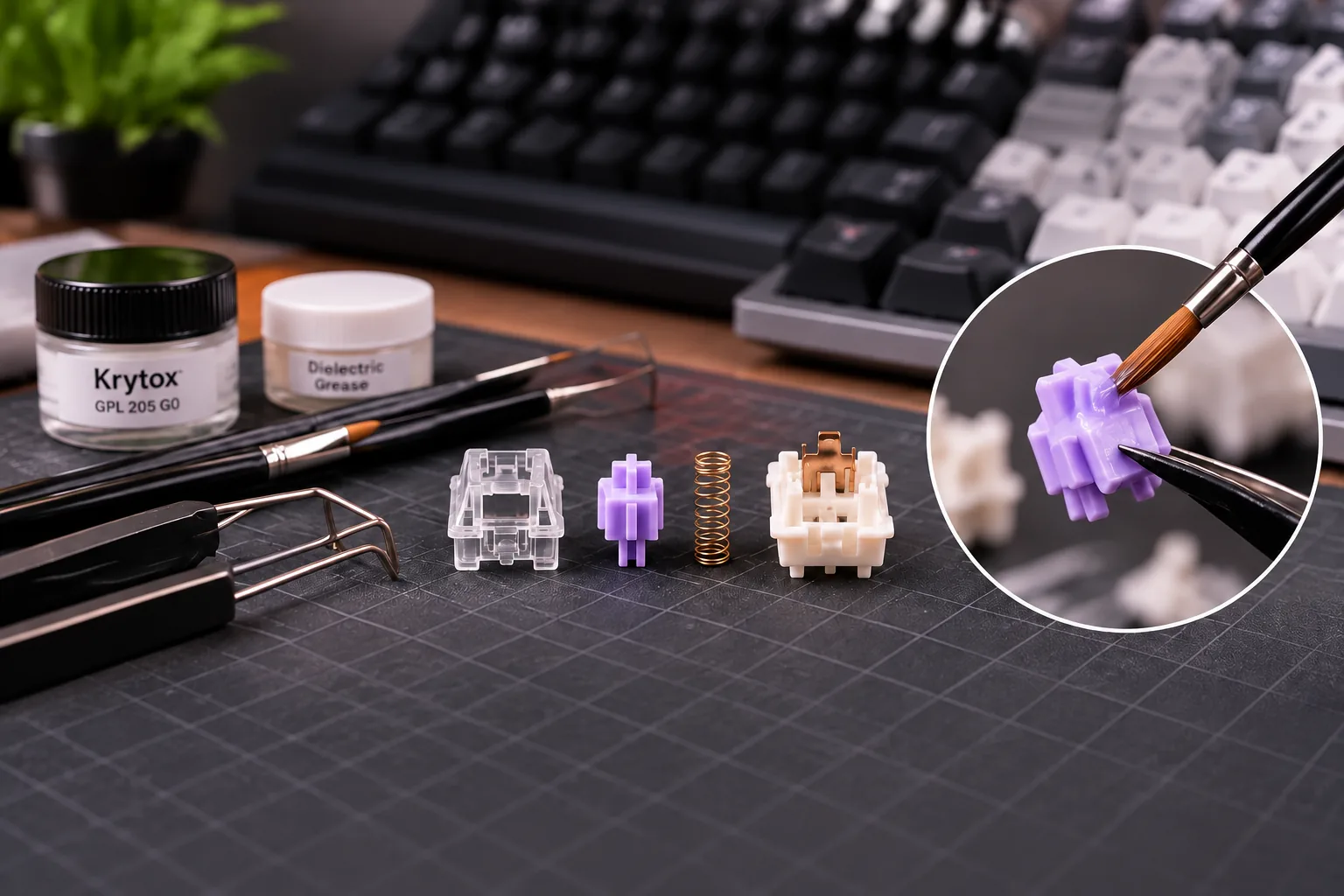
- Switch Opener: This specialized tool allows for the safe and efficient disassembly of mechanical keyboard switches without causing damage. It's designed to unclip the top housing from the bottom housing, granting access to the internal components.
- Fine-Tipped Brush (Size 00 or 000): Precision is key when applying lubricant. A small, fine-tipped brush enables you to apply a thin, even layer of lubricant to specific parts of the switch, preventing over-lubing and ensuring consistent coverage.
- Lubricant: The choice of lubricant significantly impacts the final feel and sound.
- For switch stems and housings, a thicker lubricant like Krytox 205g0 is commonly used to reduce friction and dampen sound.
- For springs, a lighter lubricant such as Krytox 105 helps eliminate "spring ping" without hindering spring compression. Applying the correct type to each component is essential for performance (Redragonshop).
- Tweezers: These are invaluable for handling the small, delicate springs within the switches. Tweezers allow for precise placement and removal of springs without bending or damaging them.
- Switch Holder or Lube Station (Optional but Recommended): While not strictly necessary, a switch holder or lube station provides a stable platform to hold disassembled switch components. This organization can significantly streamline the process, preventing parts from rolling away or getting lost.
- Container for Disassembled Parts: A small tray or container is highly recommended to keep track of the tiny components—stems, springs, and housings—as you work. This prevents loss and keeps your workspace organized.
- Cleaning Supplies: Accidents can happen. Having isopropyl alcohol and cotton swabs on hand is useful for correcting any mistakes, such as applying lubricant to the contact leaves of the switch, which can interfere with electrical conductivity (Kinetic Labs).
The Lubing Journey: A Step-by-Step Guide
Embarking on the switch lubing process requires patience and precision, but the methodical approach ensures a rewarding outcome. This section outlines the essential steps, from carefully disassembling your switches to meticulously applying lubricant and reassembling them, all while emphasizing techniques for optimal results.
Before you begin, gather your tools: a switch opener, a fine-tipped brush, your chosen lubricant, tweezers, and a tray or container to organize small components.
-
1. Switch Disassembly Begin by using a switch opener to carefully separate the top housing from the bottom housing. Once opened, gently remove the spring, followed by the stem. Keep these components organized to prevent loss and simplify reassembly.
-
2. Component Preparation Inspect all switch components for any dust, debris, or manufacturing residue. If necessary, lightly clean them with a soft cloth or brush to ensure a pristine surface for lubricant application. This step is crucial for preventing contaminants from affecting the smooth operation of the lubed switch.
-
3. Lubricating the Spring The spring is a key source of unwanted noise, often referred to as "spring ping." Lubricating it can significantly reduce this.
- Method 1 (Dipping): For a quick and even coat, lightly dip the ends of the spring into a small amount of lubricant. Blot any excess. This method is often preferred for its speed and uniform coverage.
- Method 2 (Brushing): Alternatively, use your brush to apply a very thin, even layer of lubricant across the entire coil of the spring. The goal is a light coat; avoid over-lubing, which can compress the spring or alter its feel.
-
4. Lubricating the Stem The stem is the primary moving part and requires careful lubrication to reduce friction and improve smoothness.
- Apply a thin layer of lubricant to the sides of the stem that make contact with the housing.
- Carefully lube the legs of the stem, particularly if it's a tactile switch, as this affects the tactile bump.
- Lubricate the pole of the stem, which is the central shaft that interacts with the spring. Ensure an even, consistent coat without any visible clumps.
-
5. Lubricating the Bottom Housing The bottom housing guides the stem's movement.
- Apply a thin layer of lubricant to the rails where the stem slides up and down.
- Lightly brush the inside walls of the bottom housing that the stem makes contact with. Focus on the contact points to minimize friction.
-
6. Lubricating the Top Housing The top housing also plays a role in guiding the stem.
- Apply lubricant to the inside surfaces of the top housing where the stem slides. A minimal application here is usually sufficient to ensure smooth travel.
-
7. Reassembling the Switch Reassembly is the reverse of disassembly, requiring careful alignment.
- Place the lubed spring onto the pole of the bottom housing.
- Position the lubed stem over the spring, ensuring its legs are correctly oriented towards the gold contact leaves within the bottom housing.
- Carefully align the top housing over the bottom housing, ensuring the stem is properly seated.
- Gently push down until the top and bottom housings click securely back together.
Throughout this process, the principle of "less is more" is paramount. Applying thin, even coats of lubricant is crucial. Over-lubing can lead to a sluggish or "mushy" key feel and may even attract dust and debris, diminishing the benefits you aimed to achieve. If you suspect over-lubing, it's often better to clean the component and reapply a lighter coat.
Navigating the Pitfalls: Common Mistakes and Troubleshooting
While lubing keyboard switches offers significant benefits, the process can present challenges, especially for beginners. Understanding common errors and how to address them can prevent frustration and ensure a successful outcome. Many issues are rectifiable or avoidable with careful attention to detail.
Consider these potential missteps and their solutions:
- Over-lubrication: Applying too much lubricant is a frequent error. This can lead to a "mushy" or sluggish keypress feel, a muted sound profile, and a generally unpleasant typing experience. The goal is a thin, even coat, not a thick layer. If you've over-lubed, carefully wipe off excess lubricant from the affected parts, such as the stem rails or housing, using a clean brush or lint-free cloth.
- Under-lubrication: Conversely, applying too little lubricant or missing areas can result in an inconsistent feel across switches or fail to eliminate the scratchiness you aimed to reduce. This often requires disassembling the switch again to apply a more thorough, yet still thin, layer to all intended surfaces.
- Lubing Contact Points (Crosspoint Leaves): The small metal leaves inside the switch housing are the electrical contact points. Applying lubricant to these can interfere with the switch's electrical conductivity, causing it to malfunction or register inconsistently. If lubricant accidentally gets on these leaves, carefully wipe them clean with a cotton swab or brush moistened with Isopropyl Alcohol (IPA) to restore proper function.
- Inconsistent Application: Varying the amount or coverage of lubricant from one switch to another can lead to an uneven typing experience across your keyboard. Some keys might feel smoother than others, while some may sound different. To avoid this, establish a consistent technique and take your time with each switch, ensuring uniform application.
- Bent Pins During Reassembly: When reinserting switches into the keyboard's PCB, it's possible to bend the delicate metal pins on the bottom of the switch. This prevents the switch from making proper contact and can damage the PCB's socket. Always visually inspect switch pins to ensure they are perfectly straight before attempting to insert them. If a pin is bent, gently straighten it with fine-tipped tweezers before installation.
- Faulty Switches: Occasionally, even after careful lubing and troubleshooting, a switch may still not perform as expected. In rare cases, a switch might be inherently faulty or damaged during the process. If all other troubleshooting steps fail, replacing the problematic switch with a new one is often the most straightforward solution.
Making Informed Choices: Lube Selection and Application Considerations
Selecting the appropriate lubricant and mastering its application are pivotal steps in achieving optimal results when lubing keyboard switches. The right choices can significantly enhance the switch's feel and sound, while incorrect ones can diminish performance or even alter the intended characteristics of your switches. This section guides you through the criteria for making informed decisions.
A primary consideration is matching the lubricant's viscosity to your switch type and desired outcome.
- Linear Switches: These switches typically benefit from thicker lubricants. A higher viscosity lube can provide a smoother glide, reduce friction, and often contribute to a deeper, more muted sound profile. The absence of a tactile bump means thicker lubes generally don't impede the switch's intended operation.
- Tactile Switches: For tactile switches, preserving the distinct tactile bump is crucial. Thinner lubricants are generally recommended, particularly for the tactile legs of the stem and the corresponding leaf in the bottom housing. Applying a thick lube to these specific areas can inadvertently mute or eliminate the tactile feedback, leading to a less defined bump.
Beyond viscosity, the application method also influences the final feel. The most common technique involves brush application, which offers precision for individual switch components. Using a fine brush, apply a thin, even layer of lubricant to the stem's sides, the inside of the bottom housing rails, and the spring. The goal is to coat moving surfaces without creating excess that can cause sluggishness or attract dust.
An alternative, faster method primarily for springs, is the 'dipping' technique. As noted by Redragonshop, this brushless approach involves lightly dipping the spring tip into lubricant (e.g., a thinner lube like Krytox 105 for springs) for quick, even coverage. It's essential to use this method sparingly and blot any excess to prevent over-lubing, which can lead to a sluggish or sticky key feel. While effective for springs, brush application remains superior for the intricate parts of the stem and housing where precision is paramount.
Regardless of the method, consistency in application is vital. An uneven coating can result in varying feels and sounds across your keyboard, undermining the goal of a uniform typing experience. Take your time with each switch, ensuring every component receives a similar, thin layer of lubricant.
Finally, consider the materials of your switch components. Different plastics, such as POM, Nylon, or polycarbonate, can react subtly differently with various lubricants and contribute distinct acoustic properties. While specific lube recommendations for each material are often a matter of personal preference and experimentation, understanding that material composition plays a role can guide your initial choices and subsequent fine-tuning. For instance, some materials may sound higher-pitched with certain lubes, while others might achieve a deeper thock. Experimentation with small batches of switches can help you discover the ideal combination for your specific switches and desired outcome.
Frequently Asked Questions About Lubing Switches
Lubing mechanical keyboard switches is a popular modification, but it often raises questions for those new to the process. Understanding the "why" and "how" can help you decide if it's the right customization for your typing experience.
What problem does lubing keyboard switches solve better than nearby alternatives?
Lubing primarily addresses inherent friction, inconsistency, and unwanted acoustics within mechanical switches. It creates a smoother, more uniform keystroke and significantly dampens undesirable sounds like spring ping or housing rattle. While alternatives exist, such as purchasing factory pre-lubed switches or using switch films, DIY lubing offers granular control over the lubricant type and application. This allows for precise tuning to your specific preferences, which pre-lubed options may not fully match, and directly targets internal friction in a way that other mods often don't.
What criteria should materially change my approach to lubing?
Your approach to lubing should adapt based on the switch type and your desired feel:
- Switch Type:
- Linear Switches: These benefit most from comprehensive lubing on the stem's rails, spring, and housing interior to achieve maximum smoothness. Thicker lubricants are often preferred here.
- Tactile Switches: It's crucial to avoid lubing the tactile legs of the stem or the tactile leaf within the switch housing. Lubing these areas can diminish or eliminate the tactile bump. Focus on the spring and the housing rails, often with a thinner lubricant for the spring and a slightly thicker one for the housing.
- Clicky Switches: Generally, lubing the click jacket or click bar is not recommended, as it can mute or alter the distinct click sound. If desired, only lube the spring and housing to reduce spring ping and housing wobble without affecting the click mechanism.
- Desired Feel: A lighter, thinner application of lubricant will retain more of the switch's original character while reducing friction. A heavier, thicker application will result in a more dampened sound and a potentially "cushier" feel, which some users prefer for linear switches.
What are the main trade-offs, failure points, or fit limits I should consider before lubing?
Lubing switches involves several considerations:
- Trade-offs: The process is time-intensive and requires meticulous attention to detail, especially for a full keyboard. There's also an initial investment in specialized tools and lubricants.
- Failure Points:
- Over-lubing: Applying too much lubricant can lead to a sluggish, "mushy" keypress, attract dust, or even mute the intended feel of tactile switches.
- Wrong Lubricant: Using an inappropriate lubricant (e.g., too thick on tactile legs) can negatively impact switch performance.
- Lubing Contact Points: Accidentally applying lubricant to the metal contact leaves inside the switch can prevent it from registering key presses reliably.
- Damage: Careless disassembly or reassembly can bend switch pins or break housing clips.
- Fit Limits: Not all switches are equally easy to open. Some switch designs have tighter tolerances or more fragile clips, requiring extra care.
Is lubing necessary for all mechanical switches?
No, lubing is a customization, not a requirement. Many users are content with the stock feel and sound of their mechanical switches. Some switches also come pre-lubed from the factory, which may negate the need for further modification. Lubing is primarily for enthusiasts seeking to refine their typing experience beyond factory specifications, addressing specific acoustic or tactile preferences.
Can I reverse the lubing process if I don't like the result?
Yes, the lubing process can be reversed, but it is a labor-intensive endeavor. If you are dissatisfied with the outcome, switches can be disassembled, and the lubricant can be carefully cleaned off the components using isopropyl alcohol and cotton swabs or microfiber cloths. This effectively resets the switch to its unlubed state. However, due to the time and effort involved, it's generally recommended to start with a minimal application of lubricant and add more if needed, rather than over-lubing from the outset.
Your Journey to a Superior Typing Experience
Embarking on the process of lubing keyboard switches might initially seem daunting, but it represents a significant step in customizing your mechanical keyboard. This guide has aimed to demystify the techniques, tool selection, and potential pitfalls, empowering you to undertake this rewarding modification with confidence. The transformation achieved through careful lubrication extends beyond mere maintenance; it refines the fundamental interaction you have with your keyboard, turning each keystroke into a deliberate and satisfying action.
The dedication to this detailed process culminates in tangible enhancements:
- Refined Tactility and Smoothness: Experience a noticeable reduction in scratchiness, translating to a more fluid and responsive key travel, whether you prefer linear or tactile switches.
- Acoustic Harmony: Minimize unwanted noises like spring ping and housing rattle, contributing to a quieter and more pleasant sound profile that aligns with your preferences.
- Personalized Feel: Tailor your typing experience to an unprecedented degree, creating a keyboard that feels uniquely yours and responds precisely as intended.
Embracing DIY keyboard modifications like switch lubing offers a unique sense of accomplishment. It's an opportunity to understand the intricate mechanics of your device and apply precise adjustments that directly impact your daily interactions. This hands-on approach allows you to move beyond off-the-shelf experiences, fostering a deeper connection with your tools.
As you reassemble your keyboard with its newly lubed switches, you're not just putting parts back together; you're crafting an enhanced instrument for productivity, gaming, or creative expression. The subtle yet profound improvements in feel and sound will serve as a constant reminder of the care and effort invested, allowing you to truly enjoy an elevated and personalized typing experience every time your fingers meet the keys.