
As an Amazon Associate we earn from qualifying purchases.
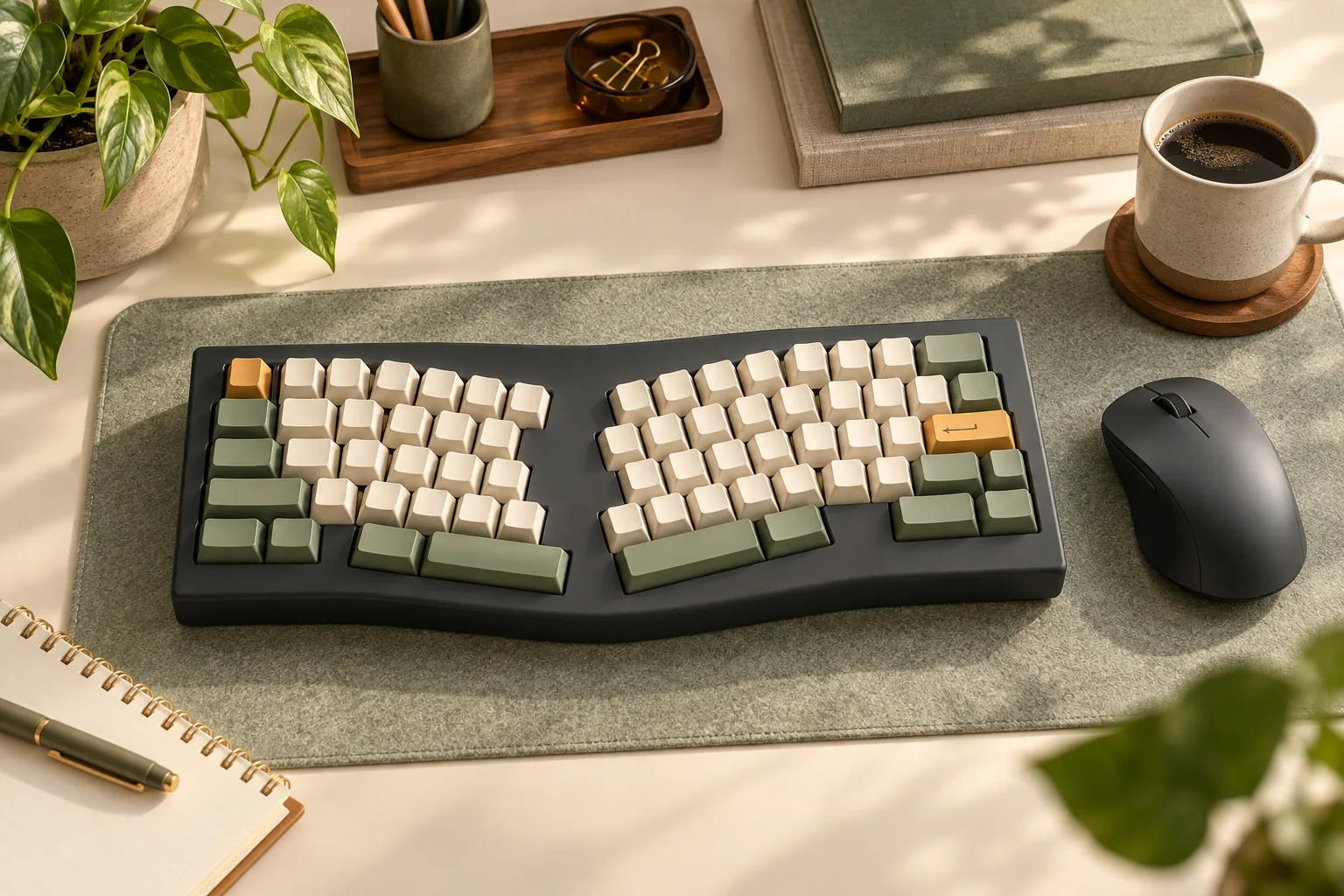
An Alice mechanical keyboard is worth considering if you want angled letter clusters and are willing to check how their key positions match your typing habits. Start with the enclosure, then check which hand types B, how each thumb uses Space, and how you reach your everyday shortcuts. Choose a model only after those details work together.
This guide is for buyers moving from a conventional keyboard who want to assess layout fit before purchasing. The documented example is the original Keychron Q8, which Keychron identifies as a 65% ANSI mechanical keyboard.
Quick takeaways
- Check whether the actual hardware lets you position the left and right halves independently.
- Trace your thumb use, B-key habit, modifiers, and function-key commands against the exact keymap.
- Match replacement keycaps to the board’s documented sizes and mounts.
- Choose fully assembled or barebone based on the parts you intend to supply.
In this guide: Physical layout · Typing worksheet · Shortcuts and remapping · Keycap fit · Package choice · Questions
Check the physical layout first
An Alice-style mechanical keyboard uses angled letter groups; the original Keychron Q8 illustrates that arrangement while retaining familiar QWERTY organization, as described in the How-To Geek Q8 review excerpt. For buying purposes, inspect the enclosure separately: angled groups and independently positionable halves answer different hand-placement questions.
If the selected design holds both groups in one fixed enclosure, moving the keyboard moves both groups together. If it has independently positionable halves, inspect how those halves can actually be placed on your desk. Treat the product’s photos, layout drawing, and instructions as the deciding evidence rather than relying on the word “Alice.”
| What you want to change | Fixed groups in one enclosure | Independently positionable halves |
|---|---|---|
| Overall keyboard position | Move the whole keyboard | Check how each half can be placed |
| Distance between letter groups | Accept the enclosure’s fixed spacing | Verify the permitted separation |
| Direction of each group | Accept the groups’ built-in relationship | Verify whether each half can rotate independently |
| Purchase check | Does the fixed arrangement suit your intended hand position? | Do the actual placement options meet your needs? |
This is a physical selection worksheet, not a ranking of split keyboards. It assumes only the construction described in each column; it makes no claim about a particular model’s separation range, tilt, or tenting.
Before buying, picture your normal desk setup. Where would the keyboard sit relative to your chair and pointing device? Would you accept the selected board’s fixed grouping, or is moving each hand’s keys separately a requirement? If independent positioning is essential, resolve that requirement before comparing switches or keycaps.
Audit your Alice mechanical keyboard habits
The original Q8 provides a useful reason to inspect the center of the layout: RTINGS reports two B keys, one in each cluster. That observation belongs to the original Q8. Check the exact layout of any other model, including the Q8 Max, separately.
Watch yourself type a familiar paragraph on your current keyboard. Notice which hand reaches B and whether that changes with the surrounding letters. Then observe which thumb presses Space during ordinary typing and while holding a modifier. The goal is to identify habits you want to preserve before deciding what to change.
Use this worksheet alongside the selected keyboard’s keymap:
| Habit or task | Observe on your current keyboard | Verify on the selected layout |
|---|---|---|
| Typing B | Which hand reaches it during normal text? | Is B available where that hand expects it? |
| Left-thumb use | Does it press Space, another key, or neither? | What does the left thumb key currently output? |
| Right-thumb use | Does its role change during shortcuts? | Can its intended Space role be preserved? |
| Capitalization | Which Shift key do you use? | Can you reach that Shift with the letters you commonly capitalize? |
| Everyday shortcuts | Which hand holds each modifier? | Can you reproduce the complete combination? |
| Function-key commands | Which applications require them? | What exact key sequence produces each command? |
Keep physical location and assigned output separate in your notes. A thumb key’s position is one question; what it sends is another. Before planning a custom assignment, confirm both the default output and the selected board’s remapping options.
For example, suppose you type B with your left hand and use your right thumb for nearly every space. Your initial requirements would be a reachable left-side B and a dependable right-thumb Space assignment. You could leave the other thumb key unchanged while evaluating the layout. That is a proposed trial plan, not a tested configuration or a claim that every Alice board permits it.
Check shortcuts before changing the keymap
The original Q8’s official description lists QMK firmware and Keychron Launcher remapping and macros. The How-To Geek excerpt also describes Windows and Mac configuration support. These features support planning a shortcut audit, but they do not establish that your preferred mapping has been tested.
Start with your actual applications. Write down the combinations you use for editing, switching windows, opening tools, and any specialized work. Include commands involving Shift and more than one modifier. Check the intended operating-system mode before deciding whether a key’s position or assignment needs changing.
Give function-key access its own check
The How-To Geek review excerpt describes the original Q8’s 65% layout as omitting a dedicated function row. If you use function-key commands, find their documented access method on the exact keymap. Record the whole sequence, including any key needed to access an alternate set of assignments.
A hypothetical buyer who repeatedly uses a function-key command should make that sequence a purchase condition. A buyer who rarely uses those commands may be comfortable with a less direct route. Neither decision requires a claim that one layout makes everyone faster.
Keep the first keymap reversible
Use the following sequence as an editorial trial plan:
- Record the starting configuration. Save an export if supported, or document assignments with screenshots and notes.
- Confirm essential outputs. Check both thumb keys, B positions, modifiers, and required function-key commands.
- Try representative work. Use familiar text and your own application shortcuts.
- Change one assignment at a time. Note the reason and whether the change helps your intended task.
- Keep a restoration route. Consult the selected model’s instructions before relying on a reset or import procedure.
Begin with ordinary typing and required commands working as expected. Consider optional thumb-key assignments afterward, subject to the exact model’s capabilities. Judge the result against your own requirements rather than a promised learning period.
Match keycaps to the exact board
A keycap kit’s inventory is evidence of what the kit contains. Compatibility requires matching that inventory to the selected keyboard.
For a concrete example, Cerakey’s H SET-Split SP description lists 2.25u and 2.75u split spacebars plus one extra B keycap. Those are the manufacturer’s stated size labels and contents. They do not establish that the set fits the original Q8 or another Alice design.
Before ordering replacement caps, obtain the board’s exact key-size and mounting information and compare:
- Both spacebars: confirm each required width separately.
- B coverage: confirm whether the layout needs an additional B and whether the kit supplies it.
- Both Shift keys: check each required size rather than inferring one from the other.
- Rows and profile: ask whether every supplied cap is intended for its destination position.
- Mounts and stabilizers: confirm the required attachment arrangement against the actual caps and board.
- Remaining keys: compare the complete layout with the complete kit inventory.
The original Q8’s exact spacebar and Shift dimensions are not verified here. Get those details before choosing a separate cap set. If either seller cannot confirm a required dimension or mounting detail, leave compatibility unresolved rather than treating “Alice-compatible” as sufficient confirmation.
For a barebone purchase, complete this comparison before ordering the board and caps together. For a fully assembled purchase, you can postpone aftermarket selection while assessing the supplied configuration.
Choose fully assembled or barebone deliberately
For the original Q8, Keychron distinguishes the packages clearly: fully assembled includes the PCB, case, plate, keycaps, and switches; barebone excludes keycaps and switches. Check the exact selected option before checkout.
Choose fully assembled if your immediate goal is to evaluate the layout using the included switches and keycaps. Consider barebone when supplying those parts is an intentional part of the purchase and you have confirmed the required inventory. Do not choose barebone while assuming keycaps are included.
At checkout, verify the exact model and variant, package contents, current price, availability, and delivery details. Read the seller’s current return conditions, especially any terms affecting an opened or assembled keyboard. This guide does not establish a current offer or return entitlement.
Frequently asked questions
Does every Alice keyboard have two B keys?
Do not assume so from the layout name. RTINGS specifically identifies two B keys on the original Keychron Q8, one per cluster. For another model, inspect its own layout and default keymap, then check whether your usual typing hand has a B where you need it.
Can remapping give me independently movable halves?
Remapping concerns assigned key outputs. Independent placement is a hardware requirement to check in the enclosure and placement instructions. The original Q8’s documented remapping support is a reason to audit assignments; it does not establish any additional physical adjustment. Resolve the hardware requirement first.
How long will it take to get used to the layout?
This guide establishes no fixed adaptation period. Use the worksheet to identify the habits you would change, then evaluate representative typing and shortcuts if you can try the board. Set your own acceptance conditions, such as dependable B access and usable application commands. No speed or health improvement is promised.
Decide from your keymap and parts checklist
An Alice mechanical keyboard is a sensible candidate when its actual geometry matches the positioning you want and its keys support your everyday work. If you need independent half placement, make that a hardware requirement. If your main concern is typing continuity, prioritize thumb roles, B access, modifiers, and function-key commands.
Before ordering, complete the worksheet against one exact model and configuration. Use the official original Keychron Q8 listing as a next step for that example, and obtain the missing key-size details before buying replacement caps.
Editorial method: This research-based guide uses manufacturer and independent-review search excerpts retrieved October 15, 2026, rather than full-page inspections or our own hands-on testing. The worksheets and trial sequence are editorial recommendations, not measured outcomes. There are no affiliate links in this article.