As an Amazon Associate we earn from qualifying purchases.
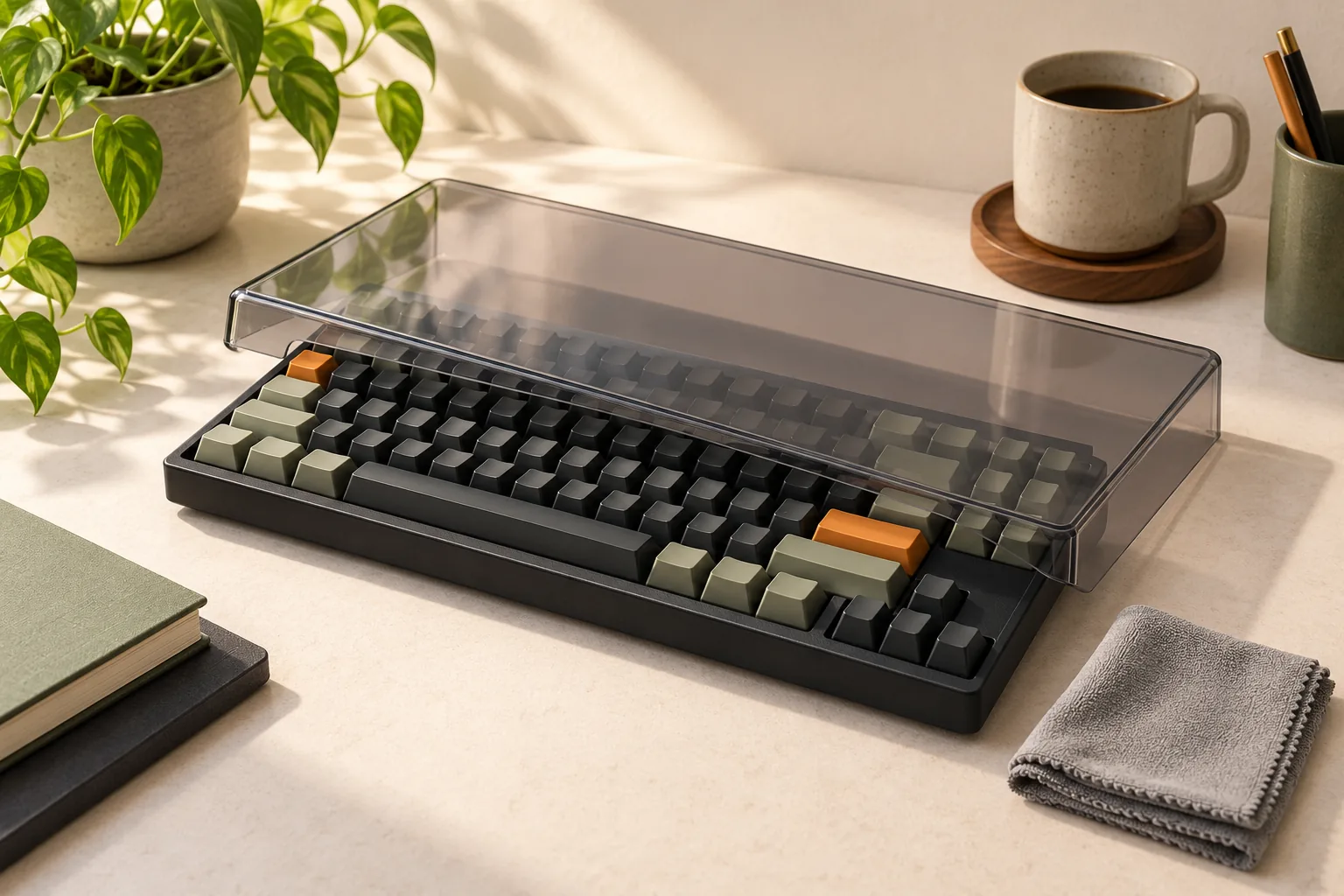
Choose a removable dust lid if you want to cover your mechanical keyboard between uses. Choose a fitted typing skin if you need a layer designed to stay over the keys while you type. For a Keychron keyboard dust cover, start with the exact keyboard model and installed keycap height: Keychron lists different model groups, dimensions, and height limits in its official compatibility table.
This guide is for mechanical keyboard owners comparing those accessory types and checking fit before ordering. It focuses on cover selection, clearance, and care.
Quick takeaways
- Match the full keyboard model and revision to the selected cover variant.
- Read keycap-height limits separately from the cover’s labeled dimensions.
- For a generic cover, request usable internal space, contact points, and cable clearance.
- Check the cover maker’s cleaning instructions before choosing a cleaning method.
Editorial method: This research-based guide uses manufacturer search excerpts captured October 15, 2026. Recommendations follow the documented descriptions and fit limits; no hands-on testing was performed.
On this page: Lid or typing skin · Keychron fit table · Generic-cover worksheet · Cover care · FAQs
Choose a dust lid or typing skin
An off-use dust lid is a removable cover placed over a keyboard between typing sessions. A typing skin is a fitted flexible layer designed to remain over the keys during use. Choose the category by when you need coverage, then verify the product’s exact model compatibility and intended function.
Keychron describes its acrylic dust cover as protection while the keyboard is not in use. Treat it as an accessory you remove before typing. Its description does not establish that it functions as a typing membrane.
For a concrete example of the other category, PROTECTCOVERS describes its Dell KB216p / KM636 family cover as flexible polyurethane intended to retain typing function. That illustrates a model-specific typing layer. It supplies no fit evidence for an unlisted Keychron keyboard and no basis for promising unchanged typing feel on one.
Choose according to the job:
- Between-use desk coverage: Look for a removable lid explicitly approved for your keyboard and keycaps.
- Coverage during typing: Look for a typing skin naming your exact keyboard and layout.
- Transport: Evaluate a carrying case separately; do not count a desk dust lid as verified travel protection.
- Changing the keyboard enclosure: Treat a replacement housing as a different project from selecting a cover.
Check Keychron keyboard dust cover compatibility
Use the full model name when reading Keychron’s table. Keep suffixes such as Pro, Max, HE, and Ultra 8K in your comparison, and check revision names such as Version 2. The useful evidence is the named variant and its conditions, rather than a broad layout description.
The following two groups come from Keychron’s product-table excerpt captured October 15, 2026. They are selected examples, not a complete catalog.
| Exact models listed together | Labeled cover size | Keycap-height limit |
|---|---|---|
| K8 / K8 Version 2 / K8 Pro / K8 Max / K8 Ultra 8K / V3 / V3 Max / V3 Ultra 8K / Q3 / Q3 Pro / Q3 Max / Q3 Ultra 8K | 352 × 123 × 21 mm | Under 18 mm |
| K10 / K10 Pro / K10 Ultra 8K / Q6 / Q6 Pro / Q6 Max / Q6 HE / Q6 HE 8K / Q6 Ultra 8K / V6 / V6 Max / V6 Ultra 8K / C2 / C2 Pro / C2 Pro 8K | 434 × 124 × 17 mm | Under 14 mm |
These are labeled cover sizes, not verified usable internal dimensions. Do not use them to calculate a clearance allowance for another keyboard. Read the keycap limit as a separate requirement: “under 18 mm” excludes a cap exactly 18 mm tall, and “under 14 mm” excludes one exactly 14 mm tall.
Keychron also states that DC-5 is incompatible with the Q3 Pro Special Edition and that the dust cover does not include the keyboard. Preserve that specific exception even though Q3 Pro appears in the general model group. See the manufacturer’s exclusion and package notice.
Example: checking a K8 Pro
Find K8 Pro in the first row and select the matching product variant. Then check the height of the keycaps actually installed against the under-18-mm requirement. If you have replaced the original caps, use the replacement set’s specifications or ask the cover maker how to verify height.
A model match and a satisfied cap-height condition establish a basis for considering that variant. Still ask about any added protrusion or unusual cable arrangement before treating your particular setup as confirmed.
Example: checking a Q6 Max
Q6 Max appears in the second row, with the 434 × 124 × 17 mm cover size and under-14-mm keycap limit. Apply that limit to its installed caps. Do not borrow the first row’s under-18-mm allowance simply because both rows describe Keychron dust covers.
The comparison shows why a wider cover does not imply a larger keycap allowance. Keychron assigns the two groups different dimensions and cap-height conditions in the same compatibility table.
Check a generic mechanical keyboard cover
For a generic mechanical keyboard cover, use your actual setup as the starting point. Record the keyboard with its current keycaps, usual feet position, and any attached accessories. If you plan to leave the cable connected, include the plug and cable path in the questions you send to the seller.
The worksheet below is a purchasing aid, not a fit certification. Use it to resolve unknowns before choosing a rigid, fabric, or flexible option.
| Check | What to record or request | Condition to resolve |
|---|---|---|
| Keyboard identity | Full brand, model, revision, and layout variant | Does the maker explicitly approve this exact version? |
| Case dimensions | Actual case length and width | Are the quoted product dimensions internal or external? |
| Installed keycaps | Current set and tallest cap, including decorative caps | Does the maker approve their height and shape? |
| Overall height | Highest point in the intended feet position | Is usable vertical clearance documented? |
| Protrusions | Knobs and other features outside the main key area | Is there room around each feature? |
| Support points | Where the cover is designed to rest | Does it sit as intended without pressing keys or controls? |
| Connected cable | Port location, plug body, and cable exit direction | Can the lid sit correctly with that cable attached? |
| Care and contents | Material instructions and included items | Are both suitable for your intended use? |
For a rigid generic lid, request usable internal dimensions and an explanation or diagram of its support points. An outer size alone leaves those questions unanswered. Keychron’s own distinction between labeled cover size and cap compatibility is a useful reason to keep those checks separate.
For a fabric cover, ask for usable dimensions in its intended position and whether the maker approves your protrusions and connected cable. For a flexible typing layer, ask for explicit keyboard and layout compatibility. The Dell-family typing-cover example demonstrates the specificity to look for; it does not establish compatibility with your mechanical board.
If the seller cannot identify the usable space or approve your exact configuration, leave fit unconfirmed. A layout percentage or a photograph is insufficient for this guide to endorse a generic model.
Questions to send before ordering
A useful support request can be short:
Can you confirm this cover for my exact keyboard model and revision with my installed keycaps? Please identify the usable internal space, where the cover rests, and whether my usual feet position and connected cable are supported.
Attach your recorded dimensions and describe any knob or decorative keycap. Ask which exact cover variant to select and what comes in the package. Check the seller’s current terms for handling a fit problem before placing the order.
Clean the cover away from the keyboard
Use the cover maker’s approved care method for the exact product. Remove the cover and clean it away from electronics. Let both the cover and keyboard dry before covering the keyboard again.
As a bounded material reference, ACRYLITE’s guidance for its own acrylic sheet recommends mild soap and lukewarm water, a clean soft cloth, and light pressure. It also warns that dry or gritty cloths can scratch its sheet. That guidance supports asking about gentle cleaning; it does not certify the resin or coating used in a Keychron cover.
A practical care check is:
- Find the instructions for the exact cover material and finish.
- Confirm whether the maker approves a soft cloth, mild soap, and lukewarm water.
- Follow that approved method with the cover detached from the keyboard.
- Return the cover only when it and the keyboard are dry.
Use separate instructions for a flexible typing skin. The polyurethane description in the Dell-family example does not establish a cleaning method for a different product. If care instructions are missing, ask the maker before cleaning.
Frequently asked questions
Can I keep typing with the Keychron dust cover on?
Choose a product specifically designed for typing if you need coverage during use. Keychron describes its acrylic dust cover for periods when the keyboard is idle. A fitted flexible typing layer serves a different function and needs its own exact-model compatibility check.
What if my keyboard variant is missing from the table?
Ask Keychron or the cover maker to approve that exact variant. Do not infer compatibility from a similar name or layout percentage. The DC-5 exclusion for Q3 Pro Special Edition is a documented reason to check exceptions even when a closely named model appears in a general group.
Will a typing skin leave my mechanical keyboard’s feel unchanged?
That outcome is unverified here. PROTECTCOVERS describes retained typing function for its exact Dell-family cover. It supplies no measured typing result for a Keychron mechanical keyboard. Ask for exact compatibility and clarify how the seller handles a fit or typing-feel problem before ordering.
Does a dust cover make the keyboard waterproof?
An off-use dust-cover description does not establish waterproof sealing. The Keychron material description supports its intended idle-use role; this guide makes no waterproofing promise. If liquid protection is a purchase requirement, request explicit evidence for the exact product and intended use.
Make the final fit check
Choose a Keychron keyboard dust cover for between-use coverage only after matching the exact model, selected cover variant, installed keycaps, and relevant clearance conditions. Choose a typing skin when you need a layer designed for typing and its maker approves your exact keyboard. Before ordering either type, use the worksheet to resolve every unanswered fit question with the manufacturer or seller.