As an Amazon Associate we earn from qualifying purchases.
The Unsung Heroes: Understanding Mechanical Keyboard Stabilizers
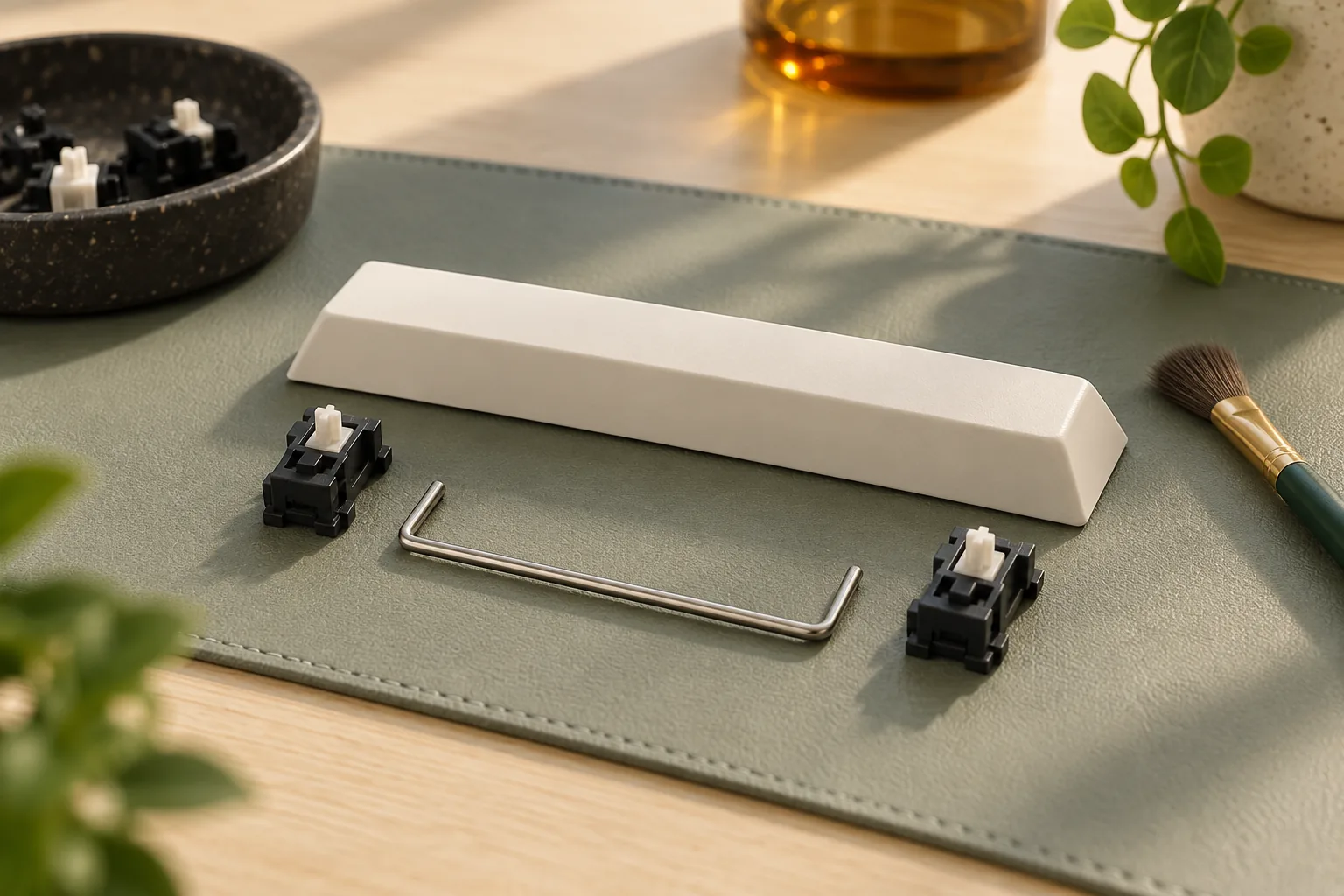
Mechanical keyboard stabilizers are often overlooked components that play a critical role in the overall typing experience, particularly for larger keys. While switches dictate the primary feel and sound of individual keys, stabilizers ensure consistency and stability for wider keycaps like the spacebar, Shift, Enter, and Backspace. Without them, these keys would wobble, tilt, or bind when pressed off-center, leading to an inconsistent and unsatisfactory feel.
The fundamental purpose of a stabilizer is to distribute pressure evenly across a large keycap, preventing it from seesawing or rocking. This mechanism allows the key to actuate smoothly, regardless of where it is pressed.
The condition of your keyboard's stabilizers directly impacts its performance and acoustics:
- Poorly-tuned stabilizers can introduce undesirable characteristics such as:
- Rattling noises: A common complaint, often due to loose tolerances or insufficient lubrication.
- Mushy or inconsistent feel: The key might feel different depending on where it's pressed, lacking a crisp, uniform response.
- Uneven key travel: The keycap may not depress or return smoothly, creating a jarring experience.
- Well-tuned stabilizers, by contrast, contribute to a premium typing experience through:
- Smooth and stable key presses: Large keys feel as consistent and responsive as smaller ones.
- Improved sound profile: Reduced rattle and wobble contribute to a cleaner, more satisfying acoustic output.
- Enhanced consistency: Every key press feels predictable, fostering confidence and comfort during extended typing sessions.
Understanding these components is key to diagnosing common issues and applying effective tuning techniques, ultimately empowering you to optimize your keyboard's performance.
Exploring the Main Types of Keyboard Stabilizers
Mechanical keyboard stabilizers are differentiated primarily by their mounting mechanism, which dictates their installation process, stability, and overall performance. Understanding these distinctions is crucial for both DIY builders and users looking to diagnose or upgrade their keyboard's large keys. Each type presents a unique balance of convenience, security, and acoustic potential.
Plate-Mount Stabilizers
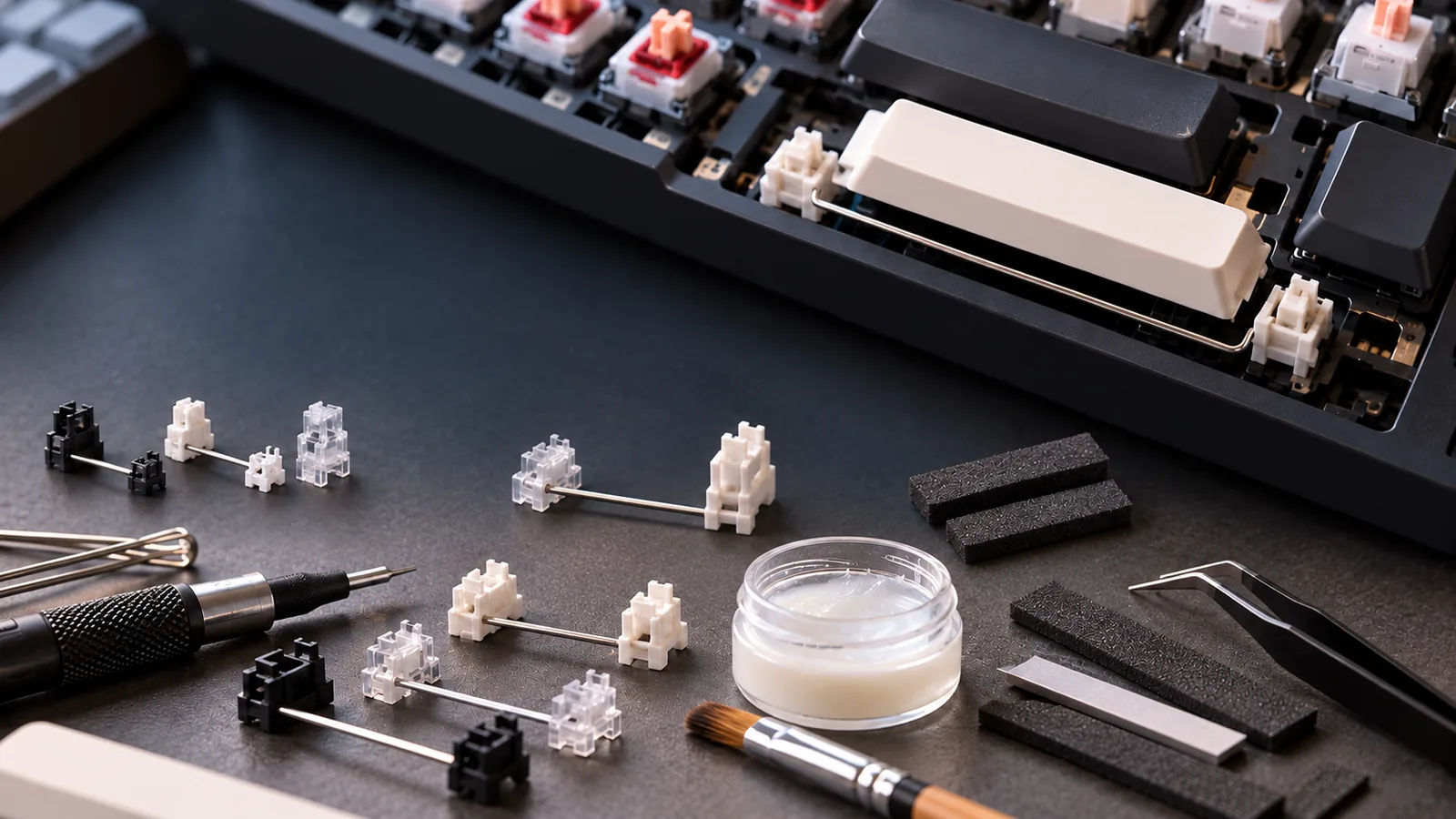
Plate-mount stabilizers attach directly to the keyboard's top plate, usually by clipping into designated slots. This design makes them relatively straightforward to install and replace, especially in hot-swappable keyboards where switches can be removed without desoldering.
- Attachment: Clip into the metal or plastic plate that sits above the PCB.
- Installation: Often considered the easiest to install or remove, as they don't require direct interaction with the PCB's solder points.
- Common Issues: Due to their clip-on nature, plate-mount stabilizers can sometimes exhibit more wobble or rattle compared to their PCB-mounted counterparts if tolerances are loose or if they are not properly lubed and tuned. Certain brands, like Sumgsn, are noted for providing a more secure plate attachment than others.
PCB-Mount Stabilizers
PCB-mount stabilizers attach directly to the keyboard's printed circuit board (PCB), offering a more secure connection. This category is further divided by how they fasten to the PCB.
Screw-in Stabilizers
Screw-in stabilizers are considered a premium option, particularly in custom mechanical keyboard builds, due to their superior stability. They are physically screwed into the PCB, creating a very firm and secure connection.
- Attachment: Fasten to the PCB using small screws, typically requiring access to the underside of the PCB during installation.
- Stability: The screw-in mechanism significantly reduces movement and flex, leading to a more consistent and less rattly key press. This secure mounting is a primary reason for their prevalence in enthusiast-grade keyboards.
- Prevalence: Widely adopted in higher-end custom keyboard kits and pre-built models where performance and sound quality are paramount.
Clip-in Stabilizers
PCB-mount clip-in stabilizers, often exemplified by Cherry-style clip-ins, are designed for ease of installation directly onto the PCB without screws. They clip into specific holes on the board.
- Attachment: Clip directly into the PCB without additional fasteners.
- Ease of Installation: They are generally simple to install and remove, making them a budget-friendly and accessible option for many builds. Cherry Clip-in stabilizers are a common and iconic example, known for their moddability.
- Common Issues: While convenient, clip-in stabilizers can be prone to detaching or popping out, especially during aggressive keycap removal or if not seated perfectly. This can lead to increased wobble, rattle, or an inconsistent feel compared to screw-in variants.
Integrated and Specialized Designs
Beyond the primary mounting types, some manufacturers integrate unique features or designs into their stabilizers to enhance performance or simplify tuning. For instance, Akko stabilizers are recognized for their high-precision manufacturing and internal designs that aim to reduce noise and minimize the need for common modifications like the "holee mod," which addresses stem-housing friction. These specialized designs often focus on tighter tolerances and material choices to improve the typing experience directly out of the box.
Diagnosing Common Stabilizer Issues and Their Causes
Even with a fundamental understanding of stabilizer types, users frequently encounter specific issues that detract from the typing experience. Identifying the root cause is the first step toward effective troubleshooting and tuning. These problems often stem from manufacturing tolerances, installation errors, or a lack of proper maintenance.
Rattling or Ticking Sounds
One of the most prevalent complaints is a metallic rattling or high-pitched ticking sound, particularly from larger keys like the spacebar. This noise often occurs when the key returns to its unpressed position or when pressed off-center.
- Loose Wires: The stabilizer wire, which connects the two ends of the keycap, may not be securely seated in its plastic housing clips. Any play here allows the wire to vibrate against the plastic.
- Lack of Lubrication: Dry friction between the stabilizer wire and its housing, or between the stabilizer stem and its housing, generates noise. Many factory stabilizers come with little to no lubricant, exacerbating this issue.
- Poor Tolerances: Inconsistent manufacturing quality can result in components that fit loosely together, creating excessive play and noise. This is a common reason why many stabilizers require tuning out of the box.
Mushiness or Sluggishness
A mushy or sluggish feel means the stabilized key lacks crispness, feels heavy, or returns slowly after being pressed. This can make the key feel inconsistent compared to smaller, unstabilized keys.
- Over-lubrication: Applying too much lubricant, especially thick grease, can create hydraulic resistance. This excess material can impede the smooth movement of the stabilizer stem and wire, causing a dampened or slow response.
- Tight Housings: If the stabilizer stems or wires fit too snugly within their plastic housings, increased friction can lead to a sluggish feel.
- Bent Wires: A stabilizer wire that is not perfectly straight can bind against the housing or the keycap, creating inconsistent resistance and preventing a smooth, unhindered press and return.
Uneven Key Travel or Wobble
This issue manifests as a stabilized keycap that tilts, wiggles excessively, or does not depress evenly across its surface. One side of the key might feel different from the other.
- Improper Installation: Stabilizer housings or wires not being fully seated or correctly aligned during assembly can lead to uneven pressure distribution and movement.
- Bent Wires: Similar to mushiness, a bent wire can cause the keycap to travel unevenly, as the wire exerts unequal force on the keycap's two mounting points.
- Poor Keycap Fit: The keycap's mounting points might be too loose on the stabilizer stems, or the keycap itself could be warped, leading to instability and wobble.
- Inconsistent Stem Friction: Variations in the contact points between the keycap's internal cross-mounts and the stabilizer stems can create an uneven feel.
Keycap Damage
While less common, tight-fitting keycaps can sometimes cause damage to the stabilizer stems over time, or even during initial installation or removal.
- Tight Keycap Fit: Keycaps with undersized or poorly molded cross-mounts can exert significant stress on the plastic stabilizer stems. This stress can lead to cracks, splits, or deformation of the stabilizer stems, compromising their function and stability.
The persistence of these common issues has led to the long-standing recognition of the "Stabilizer Problem" within the mechanical keyboard community. Despite their relatively simple mechanical function—to prevent large keys from seesawing—achieving consistent, quiet, and smooth performance out of the box has historically been a significant design and manufacturing challenge, often requiring user intervention to optimize.
Essential Techniques for Tuning and Modifying Stabilizers
Optimizing mechanical keyboard stabilizers often involves a series of modifications designed to reduce unwanted noise, improve key feel, and ensure consistent performance across larger keys. These techniques address common issues like rattling, mushiness, and uneven key travel, transforming an ordinary typing experience into a more refined one.
Lubrication for Enhanced Smoothness
Lubricating stabilizers is a foundational modification that significantly reduces friction and dampens sound. The goal is to create a smooth, silent glide for the stabilizer components.
- Why it's crucial: Lubrication minimizes plastic-on-plastic and plastic-on-wire friction, eliminating scratchiness and reducing the hollow, rattling sound often associated with unlubricated stabilizers. It also contributes to a more consistent and fluid key press.
- Types of lubricant:
- Thicker lubricants (e.g., Krytox 205g0): Ideal for stabilizer wires and the inside of the housing where the wire snaps in. Its higher viscosity helps to dampen vibrations and stay in place.
- Thinner lubricants (e.g., Krytox 203g0, Tribosys 3203): Suitable for the stabilizer stems (the part that slides into the housing) and the inside walls of the stabilizer housing. These provide a smooth glide without adding too much resistance.
- Proper application techniques:
- For stems: Apply a thin, even coat to all four sides of the stabilizer stem and the inside of the housing where the stem slides. Avoid getting lubricant on the stem's feet, as this can interfere with switch actuation.
- For wires: Apply a thin layer to the bent ends of the wire that clip into the stabilizer housing. Focus on the points of contact. Over-lubricating the wire can lead to a sluggish or "mushy" feel. The aim is to coat surfaces where friction occurs, not to fill cavities.
The Band-Aid Mod for Acoustic Dampening
The Band-Aid mod is a simple yet effective technique aimed at reducing the bottom-out noise of the stabilizer stem against the PCB.
- Purpose: When a large key is pressed, the stabilizer stem can hit the PCB, creating a distinct "clack" or "thock" sound. Placing a soft material between the stem and the PCB cushions this impact, resulting in a quieter, more muted sound profile.
- Application:
- Cut small pieces from a fabric adhesive bandage (the "Band-Aid" material, not the plastic film).
- Carefully place these small fabric squares onto the PCB directly underneath where the stabilizer stem makes contact when fully depressed.
- Ensure the adhesive side is firmly attached to the PCB and the fabric side faces upwards to cushion the stem. Avoid using overly thick material, as this can restrict key travel.
Wire Balancing and Straightening for Consistency
A bent or uneven stabilizer wire is a primary culprit for rattling and inconsistent key feel. Ensuring the wire is perfectly straight and balanced is critical for optimal performance.
- Why it's crucial: A perfectly straight wire moves uniformly within the stabilizer housing, preventing it from knocking against the housing walls. This eliminates rattling and ensures the keycap depresses and returns evenly, regardless of where it's pressed.
- How to ensure consistency:
- Remove the stabilizer wire from its housing.
- Place the wire on a flat, level surface (e.g., a glass table or mirror).
- Observe if any part of the wire lifts off the surface. Even a slight bend can cause issues.
- Gently bend the wire by hand or with pliers, applying minimal pressure, until it lies perfectly flat against the surface. Check both ends and the middle section. Repeat for all stabilizer wires. This process requires patience and a delicate touch to avoid over-bending.
The 'Holee Mod' for Friction Reduction
The 'Holee Mod' (or similar friction-reducing modifications) targets wire rattle by creating a small, lubricated friction point between the stabilizer wire and the stem.
- Purpose: This modification aims to further reduce the metallic "clack" of the stabilizer wire hitting the inside of the stem's slider. By inserting a small piece of soft material, it provides a cushioned contact point, significantly dampening wire-related noise.
- Application:
- Cut a very small, thin strip of fabric (e.g., from a cloth bandage or medical tape, ensuring it's non-adhesive on the contact side).
- Carefully thread this fabric strip into the small slot within the stabilizer stem where the wire passes through.
- Apply a small amount of lubricant to the fabric and the wire. The fabric acts as a buffer, preventing direct metal-on-plastic contact and absorbing vibrations.
- Potential considerations: While effective, this mod can be difficult to execute consistently and may make stabilizer wire removal more challenging in the future. If not done precisely, it can introduce inconsistency or resistance. Some newer stabilizer designs incorporate similar friction-reducing features directly into their construction, potentially negating the need for this mod.
Key Considerations When Choosing Stabilizers for Your Build
Selecting the right stabilizers for your mechanical keyboard build goes beyond simply picking a type; it involves a series of decisions that impact compatibility, typing feel, and the overall acoustic profile. Understanding these critical factors can help you make informed choices that align with your build goals and personal preferences.
-
Keyboard Compatibility The most fundamental consideration is ensuring the stabilizer type matches your keyboard's design. Mechanical keyboards primarily support two types: plate-mount and PCB-mount. Plate-mount stabilizers clip directly into the keyboard's top plate, offering easier initial installation but often requiring switch desoldering for later removal or maintenance. PCB-mount stabilizers, which can be either snap-in or screw-in, attach directly to the printed circuit board (PCB). Screw-in PCB-mount stabilizers are generally considered more secure, reducing wobble and rattle, but they require a PCB designed with dedicated mounting holes. Choosing the incorrect type will prevent installation.
-
Material Quality The materials used for stabilizer housings and stems significantly influence their performance and acoustics. Common materials include various plastics like POM (Polyoxymethylene), nylon, and UHMWPE (Ultra-High Molecular Weight Polyethylene). Higher quality plastics can offer smoother travel, reduced friction, and less susceptibility to rattle. For instance, some materials might contribute to a deeper, more muted sound, while others might result in a crisper, higher-pitched acoustic. Evaluating the material composition can provide insight into the potential sound and feel characteristics of the stabilizers.
-
Pre-lubed vs. DIY Lubrication Stabilizers are often available either pre-lubricated or unlubricated, presenting a trade-off between convenience and customization. Pre-lubed stabilizers offer a plug-and-play solution, saving time and effort, which can be ideal for new builders. However, the factory lubrication might not always meet specific preferences for sound or feel, or the application might be inconsistent. Opting for unlubricated stabilizers allows for precise, custom lubrication with your preferred lubricant, enabling fine-tuning of the sound and feel to achieve optimal performance and eliminate common issues like rattle or mushiness. This DIY approach offers greater control but requires additional time and tools.
-
Sound Profile Goals Stabilizers play a crucial role in the overall sound signature of your keyboard, particularly for larger keys. Rattling or ticking sounds from poorly tuned stabilizers can detract significantly from an otherwise premium typing experience. When choosing stabilizers, consider how their design and material might contribute to your desired sound profile. Paired with proper lubrication and modifications, certain stabilizer designs and materials can help achieve a more uniform, muted, or "thocky" sound across all keys, contributing to a cohesive acoustic experience.
-
Ease of Installation and Maintenance Consider the long-term implications for installation and potential future maintenance. While plate-mount stabilizers are often simpler to install initially, accessing them for re-lubrication or modification on an assembled board can be challenging, often requiring switch removal. PCB-mount stabilizers, especially screw-in variants, can be more involved during the initial build but may offer easier access for future tuning or repairs without full keyboard disassembly, depending on the case and PCB design. Brands like Akko, Sumgsn, NovelKeys, and Cherry Clip-In are examples of options often cited for their quality or specific characteristics, providing a reference point for what to look for when evaluating ease of use and long-term durability.
Avoiding Common Pitfalls and Ensuring Stabilizer Longevity
While mechanical keyboard stabilizers are crucial for a consistent typing experience, their installation, tuning, and ongoing use present several common pitfalls that can undermine performance or shorten their lifespan. Understanding these risks before they occur can save time and effort, ensuring your large keys operate as intended.
Careful attention to detail during assembly and maintenance is key to preventing issues:
- Improper Seating During Installation: Stabilizers must be fully and correctly seated, whether they are plate-mount, PCB-mount, or screw-in types. If a stabilizer housing isn't clipped in completely to the plate or screwed down firmly to the PCB, it can lead to excessive rattle, a mushy feel, or even cause the keycap to bind. Ensure all clips are engaged and screws are snug, but not overtightened, to avoid warping.
- Excessive Lubrication: While lubing stabilizers is a common practice to reduce rattle and improve smoothness, applying too much lubricant can be detrimental. Over-lubrication can result in a "mushy" or sluggish key press, diminishing tactile feedback. It can also attract and trap dust and debris over time, leading to a gritty feel or requiring more frequent cleaning. A thin, even coat is typically sufficient.
- Damage from Forceful Keycap Installation: Keycaps, especially those for larger keys, need to be installed with care. Forcing a tight keycap onto a stabilizer stem can bend the stabilizer wire, crack the plastic housing, or even break the stem itself. Always align the keycap stems precisely with both the switch stem and the stabilizer stems, applying gentle, even pressure until it clicks into place. If a keycap is excessively tight, consider gently widening its stem openings or using a different keycap.
- Compatibility Oversights: Stabilizers come in different sizes (e.g., 2u for Shift, 6.25u or 7u for spacebar) and mounting types (plate-mount, PCB-mount, screw-in). Purchasing or attempting to install stabilizers that do not match your keyboard's PCB or plate design will lead to incompatibility issues, preventing proper installation and function. Always verify the required stabilizer type and size for your specific keyboard model before acquisition.
Beyond initial setup, periodic inspection and cleaning can significantly prolong the life and performance of your stabilizers. Dust and hair can accumulate around the wires and housings, causing friction or noise. A simple cleaning with a soft brush or compressed air, followed by a light re-lubrication if necessary, can maintain optimal function over years of use.
Frequently Asked Questions About Mechanical Keyboard Stabilizers
Understanding the nuances of mechanical keyboard stabilizers can significantly enhance your typing experience. Here are answers to common questions that arise when dealing with these crucial components.
What is the difference between plate-mount and PCB-mount stabilizers?
The primary distinction lies in how they attach to the keyboard assembly.
- Plate-mount stabilizers clip directly into the keyboard's top plate. They are generally easier to install or remove without needing to desolder switches, making them a convenient option for quick modifications. However, their stability can sometimes be influenced by the plate's material and thickness, potentially leading to more wobble if tolerances are loose.
- PCB-mount stabilizers attach directly to the printed circuit board (PCB). This category includes both clip-in and screw-in variants. They are typically more secure, offering greater stability and a reduction in unwanted movement or rattle compared to plate-mount designs. Installation or removal often requires access to the PCB, which might mean desoldering switches if the keyboard is not hot-swappable.
Why do my stabilizers sound rattly?
Rattling is one of the most common complaints with mechanical keyboard stabilizers and usually indicates an issue with friction or loose components.
- Insufficient Lubrication: The most frequent cause. Dry contact points between the stabilizer housing, stem, and especially the metal wire can produce an audible rattle.
- Loose Tolerances: Manufacturing inconsistencies can lead to excessive play between the stabilizer components, allowing them to vibrate against each other.
- Uneven Wires: If the metal stabilizer wire is bent or not perfectly flat, it can cause the keycap to wobble and rattle against the housing.
- Keycap Fit: A poorly fitting or warped keycap can also contribute to perceived rattle, even with well-tuned stabilizers.
How often should I lubricate my stabilizers?
Stabilizer lubrication is generally considered a one-time process during initial assembly or when issues like rattling or mushiness first appear. There isn't a fixed schedule for re-lubrication, as its necessity depends on several factors:
- Usage Frequency: Heavily used keyboards might show signs of lube degradation sooner.
- Lube Application Quality: A thorough and even application will last longer than a sparse one.
- Environment: Extreme temperature changes or dust exposure could potentially affect lubricant longevity.
If your stabilized keys begin to feel inconsistent or sound rattly again, it's an indication that re-lubrication might be beneficial.
Can I use any lubricant for stabilizers?
No, using the correct type of lubricant is crucial for effective and safe stabilizer tuning.
- Recommended Lubricants:
- Thicker greases (e.g., Krytox 205g0): Ideal for the stabilizer housings and stems to reduce friction and dampen sound.
- Dielectric grease: Excellent for coating the stabilizer wires, as it adheres well and provides significant dampening to eliminate wire rattle.
- Lubricants to Avoid:
- Thin oils: While they might offer temporary smoothness, they often dissipate quickly and don't provide sufficient dampening for stabilizers.
- Household lubricants (e.g., WD-40): These are typically not safe for plastics and can degrade stabilizer components over time, leading to further issues.
What is the 'Holee Mod' and is it necessary?
The 'Holee Mod' is a popular modification technique designed to reduce stabilizer rattle. It involves placing a small piece of fabric (like medical tape or a band-aid strip) inside the stabilizer stem, specifically where the stabilizer wire makes contact.
- Purpose: The fabric acts as a cushion, dampening the impact and reducing the metal-on-plastic rattle that often occurs when the stabilizer wire moves within the stem.
- Necessity: While not strictly mandatory for all stabilizers, it is highly effective for improving the sound profile of many stabilizer sets, particularly those with looser tolerances. Some newer stabilizer designs incorporate features that aim to achieve a similar effect, potentially reducing the need for this mod. It's an optional step that many enthusiasts find worthwhile for achieving a premium sound.
Are screw-in stabilizers always better than clip-in?
While screw-in stabilizers are generally favored for their superior stability, the "better" choice depends on your priorities and keyboard design.
- Screw-in Stabilizers:
- Pros: Offer the most secure attachment to the PCB, minimizing movement and significantly reducing the potential for rattle and wobble. This leads to a more consistent and premium feel.
- Cons: Installation and removal can be more involved, often requiring screws and potentially desoldering switches if the PCB is not hot-swappable.
- Clip-in Stabilizers (both plate-mount and PCB-mount):
- Pros: Easier and quicker to install and remove, making them convenient for initial builds or frequent modifications.
- Cons: Can be less secure than screw-in variants, potentially leading to more wobble and requiring more extensive tuning (like lubing and the Holee Mod) to achieve optimal performance.
For maximum stability and a refined typing experience, screw-in stabilizers are often the preferred choice among enthusiasts. However, well-tuned clip-in stabilizers can still provide a very satisfying experience, especially for those prioritizing ease of assembly.
Elevating Your Typing Experience Through Tuned Stabilizers
Stabilizers, though often unseen, are fundamental components that profoundly influence the tactile and auditory experience of a mechanical keyboard. They are the unsung mechanisms ensuring that larger keys, from the spacebar to the Shift keys, operate with the same consistency and precision as their smaller counterparts. Their proper function prevents the undesirable wobble, rattle, and inconsistent feel that can detract from an otherwise premium build.
By understanding the distinct characteristics of different stabilizer types, learning to diagnose common issues like rattling or mushiness, and applying practical tuning techniques, users gain significant control over their keyboard's performance. This knowledge empowers you to move beyond factory defaults, addressing specific pain points and refining the feel and sound of your large keys. The benefits extend to a smoother, more uniform keypress, a cleaner sound profile, and an overall more satisfying interaction with your keyboard.
The journey to perfectly tuned stabilizers is often one of experimentation and refinement. Each keyboard and set of stabilizers can respond differently to various modifications, from careful lubrication to selective clipping. We encourage exploring these techniques to discover what best suits your specific setup and personal typing preferences. This iterative process allows for a tailored approach, optimizing your keyboard to your exact standards.
Ultimately, dedicated attention to your mechanical keyboard's stabilizers transforms it from a mere input device into a finely calibrated instrument. The result is a typing experience marked by exceptional consistency, reduced acoustic distractions, and a heightened sense of quality that contributes significantly to a truly premium and personalized interaction.
Decision checklist for mechanical keyboard stabilizers
- Confirm the layout includes the keys and navigation functions required by your daily workflow.
- Verify switch, socket, keycap, firmware, operating-system, and connection compatibility before ordering.
- Compare sound, typing feel, ergonomics, repairability, and desk-space tradeoffs rather than one headline specification.
- Read the current warranty, return policy, and manufacturer documentation before making a final choice.