As an Amazon Associate we earn from qualifying purchases.
Doubleshot keycaps use separately molded plastic for the legends—the letters or symbols—and the surrounding keycap body. The term describes how the lettering is formed. Material, backlight support, and keyboard fit remain separate specifications, as the different conditions documented by CORSAIR and GMK demonstrate.
If you are replacing your keyboard's original caps or choosing your first separate set, start with the legend method, then check the features your keyboard needs. This guide explains the process and uses documented examples to show what to verify before buying.
Quick takeaways
- Look for an explicit description of molded legends.
- Check shine-through support separately from the doubleshot label.
- Confirm the exact kit, key widths, row positions, switch mount, and stabilizer connections before ordering.
On this page: Manufacturing · Documented examples · Compatibility · Visual checks · Buying worksheet · FAQs
How doubleshot keycaps are made
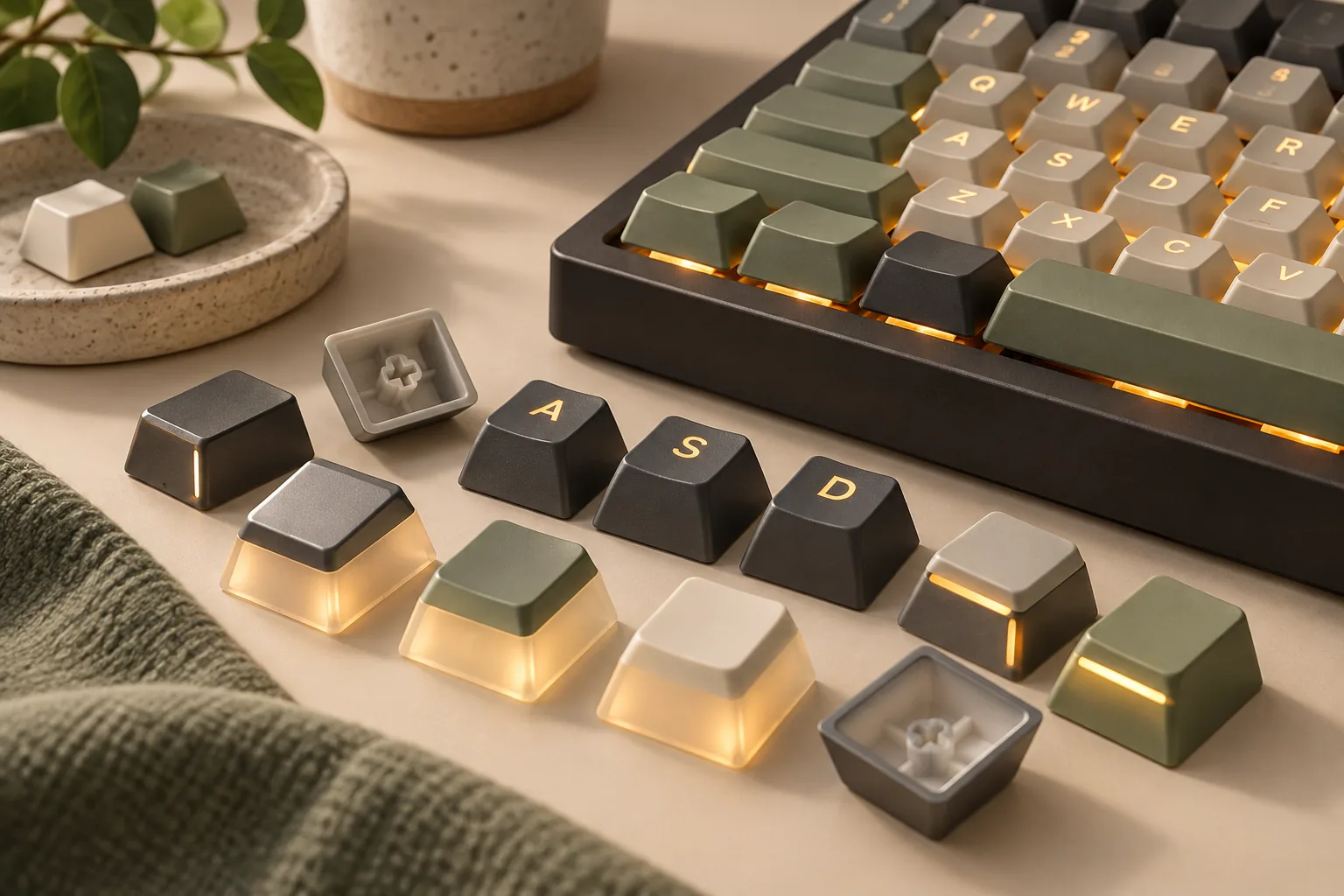
For a doubleshot legend, one molded plastic component forms the character and another forms the surrounding body. CORSAIR describes injecting plastic into separate molds; GMK identifies its process as two-component injection molding. The visible character therefore has its own molded construction, rather than being surface-printed lettering. See CORSAIR's process explanation and GMK's Winkler specifications.
That construction is the useful meaning of “double-shot.” Treat it as a manufacturing specification when comparing sets. Evaluate the finished lettering, included keys, and mounting details through their own documentation and photos.
How doubleshot differs from dye-sub
Dye-sublimation uses a different method: heat and pressure transfer dye into the keycap surface. It does not create the character from a separate molded plastic component. MonsGeek's manufacturing explanation, published July 22, 2026, describes this distinction.
When reading a listing, keep the material and legend fields separate. “ABS” or “PBT” identifies the stated material; “doubleshot” identifies the molding method. The examples below include both ABS and PBT doubleshot products, so the process name alone cannot select the material for you.
For this purchase decision, record both fields. Sound, surface feel, and comparative wear performance require evidence beyond these product descriptions; they should not become automatic conclusions from the molding label.
Two documented examples with different lighting support
The clearest comparison is between an explicitly non-backlit doubleshot set and a doubleshot family with translucent legends. The table summarizes GMK's exact CYL Winkler Combo listing and CORSAIR's PBT Double-Shot Pro compatibility page. These are examples of documented features, rather than tested product rankings.
| Decision field | GMK CYL Winkler Combo Keycaps | CORSAIR PBT Double-Shot Pro Keycap Mod Kit family |
|---|---|---|
| Stated material | ABS | PBT |
| Legend process | Double-shot injection molding | Separate molded legend and outer construction |
| Lighting documentation | Backlight: no | Translucent legends allow switch backlighting through |
| Mounting documentation | MX-cross stem compatibility | For non-CORSAIR keyboards: standard bottom row, MX-stem switches, and MX-stem stabilizers |
| Profile and coverage | CYL; selected Base Set + Beer Mug package lists 178 keycaps | Check the selected kit's profile and supplied-key diagram |
| Remaining purchase check | Match required key widths and rows to the selected kit diagram | Confirm exact Pro kit identity and every required key |
If you need illuminated lettering
Use explicit translucent or shine-through legend documentation as a selection condition. CORSAIR confirms that the Pro-family legends allow backlighting through. GMK's Winkler listing explicitly specifies no backlight support, making it unsuitable if illuminated lettering is a requirement. Both findings come from the manufacturer pages linked above.
This contrast answers a common buying question: doubleshot does not automatically mean shine-through. The manufacturing method and the lighting specification need separate checks. Use the backlit-keycap buying checks if illuminated lettering is required.
If illuminated lettering is optional
The GMK example documents an ABS set with a CYL shape and MX-cross mounting. Its exact combo identifier is FPTK2119+MRCH0015. That gives you a specific item to investigate if those specifications match your plans; it does not establish a typing-quality advantage over the CORSAIR family. Source: GMK product listing. To compare other GMK editions, continue with the GMK set and kit guide.
Avoid choosing between these examples solely because one says ABS and the other says PBT. First decide whether their documented lighting, shape, and kit coverage meet your requirements. Keep detailed material preferences as a separate comparison.
Check the exact kit against your keyboard
A useful compatibility check starts with your keyboard's exact model and regional layout. Compare those details with the particular package you intend to order. Keep its full name, selected variant, and product identifier together throughout the check.
Confirm Pro versus non-Pro identity
CORSAIR lists PBT Double-Shot Pro Keycap Mod Kit and PBT Double-Shot Keycap Kit separately, with different keyboard compatibility lists. Several older CORSAIR keyboards appear under the non-Pro kit. Use the entry for your exact keyboard instead of treating the similar product names as interchangeable. Source: CORSAIR compatibility information. The Corsair replacement-keycap model guide works through the model distinctions.
For a keyboard from another brand, CORSAIR specifies a standard bottom row, MX-stem switches, and MX-stem stabilizers. Verify all three conditions, then compare the actual supplied keys with your layout. The compatibility statement is a starting point for that check.
Match key widths and row positions
Use the selected kit diagram to account for each key you need, including the spacebar, Shift, Enter, bottom-row modifiers, and regional characters. Record both the required width and the intended row position. If a diagram or keyboard specification leaves one unclear, ask for confirmation before ordering.
Row placement deserves attention because GMK describes its CYL design as having different heights and angles. A correct character alone is therefore an incomplete matching check. The Winkler listing names the shape, but its broad layout claims and total cap count do not substitute for matching your required keys to a diagram.
Check switch and stabilizer connections
CORSAIR describes an MX stem as cross-shaped. It also explains that larger keys, including Shift and the spacebar, use stabilizers, with MX stabilizer connections using the same cross shape. Check the main switch connection and the additional stabilizer sockets on those larger caps. Source: CORSAIR's stem and stabilizer explanations.
Keep key width, stabilizer spacing, and row coverage on your checklist even after confirming the cross-shaped mount. The evidence here does not establish those dimensions for every keyboard and kit combination.
Inspect legends and actual product photos
Request clear photos of manufactured caps from above and underneath. Inspect character alignment, boundaries between legend and body, readability, and the condition of the mounting sockets. Use questionable marks as a reason to request clarification rather than assigning a quality grade from the doubleshot label.
Distinguish those photos from design renderings. GMK explicitly identifies the Winkler images as 3D renderings and says final colors may vary slightly. Use the listing's rendering disclosure when deciding how much confidence to place in a color match.
Also check the method used for any decoration that matters to you. GMK's page includes general information about UV printing for special-color legends; that statement does not identify which, if any, Winkler decorations use it. Ask about a particular novelty, secondary character, or accent instead of assuming the set-level doubleshot description documents every marking.
This is especially useful when a purchase depends on a specific symbol or artwork. Request the method and an actual-item close-up for that marking. Keep the seller's answer tied to the exact variant you are considering.
A practical doubleshot keycap buying worksheet
Use this worksheet while comparing your keyboard documentation with the selected kit listing. It turns the separate checks illustrated by GMK and CORSAIR into a purchase record.
| Check | What to record | Ready to proceed when… |
|---|---|---|
| Product identity | Full kit name, variant, and SKU | Every specification refers to the selected package |
| Legend method | Molding or printing description | The method for important legends and decorations is clear |
| Material | Manufacturer's stated material | It matches the material you intended to choose |
| Lighting | Explicit legend-translucency statement | It meets your need for illuminated lettering |
| Layout coverage | Required widths, regional keys, and row positions | The kit diagram accounts for every required cap |
| Mounting | Switch stem, stabilizer sockets, and spacing | Documentation confirms the required connections |
| Appearance | Actual-item photos and any rendering disclosure | You have enough evidence to assess the details that matter |
| Seller terms | Selected item, total checkout cost, and return conditions | You understand the offer before paying |
The last row is a checkout task. This comparison does not establish current prices, stock, seller authenticity, or return terms.
Worked example: a promising set with one unresolved key
Suppose your keyboard documentation confirms MX switch stems, MX stabilizers, and a standard bottom row. You want illuminated lettering, so the CORSAIR Pro family's documented translucent legends make it a candidate. However, you have not matched one regional key to the selected kit diagram.
Keep that candidate on your shortlist while you resolve the missing key. Ask for a diagram showing its width and row position. If the supplied package cannot document that replacement, continue comparing kits even though the switch-mount and lighting checks passed.
Frequently asked questions
What does “double-shot keycaps” mean?
It means the legend and surrounding keycap body use separately molded plastic components. CORSAIR describes the separate molds, while GMK calls its process two-component injection molding. Read material, lighting, and compatibility fields separately when choosing a set.
Are all doubleshot keycaps shine-through?
No. GMK CYL Winkler is documented as doubleshot ABS with no backlight support. CORSAIR PBT Double-Shot Pro has translucent legends that allow backlighting through. Look for an explicit lighting statement for the exact product you intend to buy.
Does MX compatibility mean the whole set will fit?
MX compatibility addresses the mount, while a whole-keyboard replacement still requires the right supplied keys. Check widths, row positions, regional characters, and stabilizer connections. CORSAIR's requirements explicitly include the bottom row and stabilizers alongside MX switch stems.
What to buy after making these checks
Choose doubleshot keycaps whose documented legend construction, lighting support, and exact kit coverage match your requirements. Use the CORSAIR Pro family as an example of translucent doubleshot legends and GMK CYL Winkler as an example with no backlight support. Finish by matching your keyboard to the selected kit diagram before checking the seller's current terms.
Editorial method and sources: This comparison uses documentation captured on October 15, 2026, rather than hands-on product testing. Sources are GMK's CYL Winkler Combo listing, CORSAIR's compatibility and manufacturing information, and MonsGeek's manufacturing explainer, published July 22, 2026. The product examples establish documented specifications, not measured lifespan, sound, or feel.