As an Amazon Associate we earn from qualifying purchases.
Try switch films when the top and bottom switch housings move against each other and you want to reduce that movement. First confirm that your exact switch supports opening and modification, then test a small sample. Movement of the stem alone does not establish a need for films: Kinetic Labs distinguishes housing wobble from expected play in a moving stem. See its explanation of housing and stem movement.
Keyboard switch films are small pieces fitted between a mechanical switch’s upper and lower housings to reduce movement between those parts. Their position inside the switch distinguishes them from keyboard case or plate foam. Film selection therefore starts with the housing you want to modify. Switch and Click explains their placement.
This guide is for keyboard owners considering their first film trial on an openable mechanical switch. It draws on published source excerpts collected October 15, 2026, and does not report hands-on testing. Use your exact switch and keyboard instructions for removal, opening, and modification permission.
Key takeaways
- Identify housing movement before choosing a film.
- Check film shape, material, and thickness separately.
- Continue only after the sample closes, moves, registers, and seats correctly.
On this page: Diagnose movement · Choose a film · Confirm tools and board access · Install a sample · Check fit · Compare results · FAQ
Check whether the housing needs attention
Start by identifying the parts that move. The housing is the switch body; the stem is the moving part that carries the keycap. Kinetic Labs recommends researching your switch and examining samples before deciding whether films are needed. Its guidance specifically identifies housing wobble as the target of filming. Read the diagnostic guidance.
For your initial check, watch the seam between the upper and lower housings while gently checking for relative movement. Compare several switches from the batch, using the same approach. Record whether you can see the upper housing shifting against the lower housing, rather than describing every movement as “wobble.”
If the housing feels secure and your concern is only stem movement, pause the film project. If the housings move against each other, a trial may be worthwhile. Set a concrete goal, such as reducing that housing movement while preserving the switch’s original travel and return.
Avoid making sound your only starting criterion. The useful question is whether the modification addresses the issue you identified and leaves the switch working properly. You can record a sound preference during the comparison without treating a deeper or better sound as a promised result.
Choose keyboard switch films by shape, material, and thickness
Treat these as separate selection questions: Does the cutout match the housing? What is the film made of? What nominal thickness does the description specify? A thickness label alone does not establish compatibility.
Kinetic Labs describes the following Kelowna constructions in its guide. These are documented examples, not recommendations for an unidentified switch. Source: Kinetic Labs’ film guide, captured October 15, 2026.
| Documented construction | Nominal thickness | What to check before trying it |
|---|---|---|
| Kelowna PC/HTV composite, double layer | 0.16 mm | Exact cutout, orientation, and housing closure |
| Kelowna single-layer MDI foam | 0.30 mm | Exact cutout, orientation, and housing closure |
The thicker example also uses a different material construction. Do not interpret this table as a ranking or assume the thicker film is the better choice. Neither example establishes a universal size for mechanical switches.
Before ordering, look for information that identifies your exact switch housing and the film’s intended shape. If the description gives only thickness and a broad compatibility label, ask for the missing fit information. Check the selected variant, quantity, current availability, and purchase terms at checkout; those details are separate from whether a film fits.
Confirm your opener and keyboard removal path
Match the opener to the housing
Confirm that the switch manufacturer permits opening and modification, then identify the housing’s latch arrangement. Choose an opening method documented for that exact switch. An MX-looking stem or familiar outer shape is insufficient confirmation.
For a bounded example, Gateron specifies its four-snap-lock switch opener for MX-style switches only. Its instructions show aligning the switch with the corresponding clips before pressing. That specification describes the opener’s intended use; it does not establish film compatibility or warranty coverage for your switch.
Do not extend that example to BOX, magnetic, optical, or low-profile switches without exact supporting instructions. If the switch does not align with the opener as documented, stop and verify the tool instead of pressing harder.
Separate hot-swap and soldered board work
Establish how your keyboard holds its switches before attempting removal. Switch and Click distinguishes hot-swappable reinstallation with aligned pins from soldered-board work, whose steps depend on the keyboard build. See its installation guidance.
For a hot-swappable board, follow the keyboard manufacturer’s removal and reinstallation instructions. For a soldered board, use its documented desoldering and soldering procedure or seek someone equipped to perform that work. This guide provides a film trial workflow; it does not supply a desoldering procedure. For a supported hot-swap removal route, the switch-puller guide explains tool engagement and stopping conditions; use your model’s instructions for installation.
Resolve the access question before opening switches. A small film experiment should begin with a clear, supported route for removing and reinstalling the sample.
Install a film in a supported switch
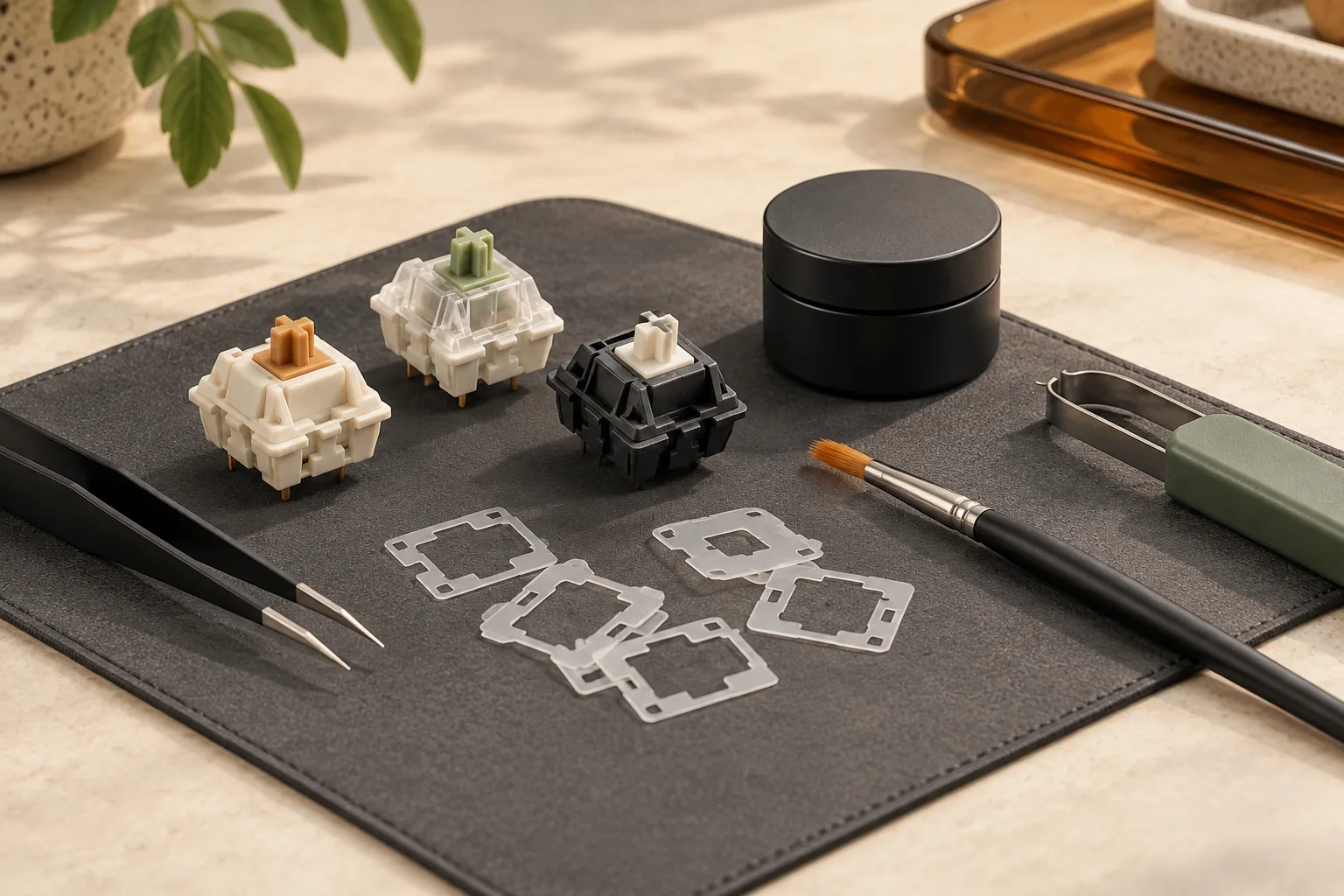
Have the candidate film, a compatible switch opener, and precision tweezers ready. Kinetic Labs lists an opener and tweezers for film installation. The following sequence combines its placement guidance with the conventional-switch reassembly guidance from Switch and Click. Follow model-specific instructions whenever the construction differs. Placement source · Reassembly source.
Step 1: Prepare the sample and preserve orientation
Keep an unchanged switch from the same batch as a reference. Note the sample’s original housing movement and operation before modifying it. Open the sample using its supported method, keeping the upper housing, lower housing, spring, and stem organized.
Record their original orientation as you work. If you cannot identify the parts or their correct placement, return to the exact switch documentation before proceeding. Do not use a generic illustration to guess how a different mechanism fits together.
Step 2: Position a single film on the lower housing
Separate one film and place it on the lower housing with tweezers. Kinetic Labs directs readers to use the correct orientation and keep both lower-housing rails inside the film. See the lower-rail placement instructions.
Inspect the cutout before replacing the other parts. It should sit in the intended position around the housing features. If the shape cannot be placed as documented, stop the trial and recheck the film specification rather than forcing it into place.
Step 3: Restore the internal parts and align the top
In the conventional switch procedure described by Switch and Click, the spring is restored to the lower housing and the stem is placed over it with its legs facing the metal leaf. The upper housing must also be aligned correctly before closure. See the illustrated procedure’s reassembly instructions.
Apply that geometry only when it matches your documented switch construction. Preserve the spring, stem, and leaf arrangement specified for your model. Align the upper housing before attempting to latch it.
Step 4: Check closure before reinstalling
Treat normal closure as a requirement for continuing. Inspect the latches and housing seam, comparing them with the unchanged sample. Do not accept a housing that needs extra force to close or stays visibly displaced.
If closure fails, remove the film using the supported opening method and recheck its orientation, cutout, and intended fit. Reconsider the candidate film if correct placement still prevents closure. A different nominal thickness is a new candidate to verify, not an automatic fix.
Check the sample before modifying more switches
The worksheet below is a suggested acceptance check, not a manufacturer certification or a report of measured results. It combines the sources’ placement and reassembly guidance with practical checks before repeating the modification. Placement guidance · Reassembly and board installation guidance.
| Check | What to record | Decision if it fails |
|---|---|---|
| Housing closure | Latches engage without force; seam resembles the reference | Remove the film and review placement or fit |
| Stem travel | Stem moves through its full intended travel freely | Stop and inspect reassembly using model instructions |
| Return | Stem returns fully after release | Stop; do not proceed to a full-board modification |
| Original-board seating | Switch reinstalls and seats as specified by the keyboard maker | Remove it using the supported method and reassess |
| Electrical registration | Keypresses register and releases behave normally | Stop and troubleshoot before repeating |
| Original goal | Housing movement is reduced enough to justify the work | Leave the remaining switches unchanged if there is no useful benefit |
Perform the mechanical checks before reinstalling the sample. Then follow the board’s installation instructions, including pin alignment where applicable, before checking registration. Passing the closure check alone is insufficient for the decision to continue.
For example, suppose a filmed sample has less housing movement but its stem does not return freely. Reject that trial: the original goal has been met at the expense of normal operation. Likewise, a sample that works outside the board still needs to pass the seating and registration checks in its intended keyboard.
Compare the modified sample with an unchanged switch
Compare samples from the same batch under consistent conditions. Keep the keyboard, keycap, and other modifications the same where practical. If you record sound, keep the microphone position and recording settings consistent too.
Write down housing movement, travel and return, registration, and your subjective preference. Separate observations such as “less movement at the housing seam” from preferences such as “I like the sound more.” Avoid assigning a numerical improvement unless you actually measure it with a suitable method. Keep modified samples labeled with the switch-storage workflow so their condition remains traceable.
If the first sample passes and provides a useful benefit, repeat the trial on a few more switches before committing to the whole batch. Kinetic Labs describes housing wobble as varying across switches and recommends sampling. Read its sampling discussion.
Continue only when the benefit remains worthwhile and each modified switch passes the fit and function checks. Leaving a satisfactory switch unchanged is a valid outcome.
Frequently asked questions
Will films fix stem wobble?
Films target movement between the upper and lower housings. Kinetic Labs distinguishes that movement from expected play in the moving stem. If stem movement is your only concern, that observation does not establish a reason to film the switch. Source: Kinetic Labs.
Is a thicker switch film better?
Thickness alone cannot establish the better fit. Kinetic Labs’ 0.16 mm composite and 0.30 mm foam examples have different constructions. Check the exact cutout and orientation, then require normal closure and operation during the trial. Neither example is a universal recommendation. Source: Kinetic Labs.
Can I use an MX-style opener with any switch?
Confirm the exact tool and switch pairing first. Gateron limits its cited four-snap-lock opener to MX-style switches and directs alignment with its clips. That statement does not establish compatibility with every housing or film, and it does not grant modification permission. Source: Gateron.
Your next step
Start by checking whether the upper and lower housings actually move against each other. If a film trial is justified, verify the exact opening method and candidate film shape, then complete the worksheet on a small sample. Expand the modification only when the switch works normally and the result addresses your original concern.