As an Amazon Associate we earn from qualifying purchases.
The Essential Tool for Switch Selection: Understanding Mechanical Keyboard Switch Testers
Choosing the right mechanical keyboard switches can be a daunting task for newcomers and experienced enthusiasts alike. With an extensive array of options—from smooth linear switches to those with a distinct tactile bump or an audible click—the sheer variety makes an informed decision challenging without direct experience. A mechanical keyboard switch tester addresses this by providing a hands-on way to evaluate different switch types.
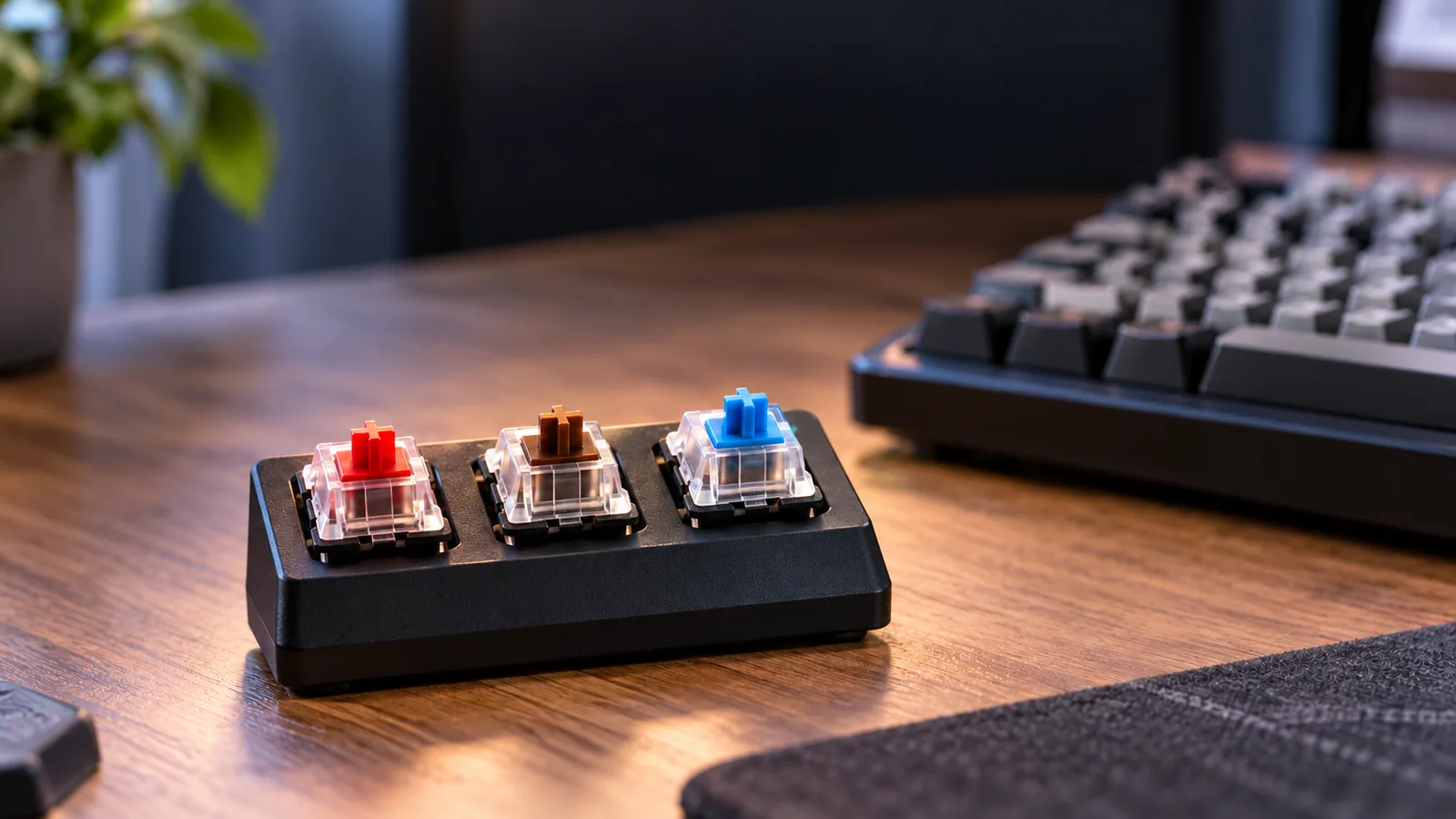
A switch tester is a small, often compact, board or plate designed to hold multiple individual mechanical keyboard switches. It allows users to physically press and compare various switches side-by-side, experiencing their unique feel and sound profiles without committing to a full set for an entire keyboard. This direct comparison is crucial because written descriptions or video demonstrations can only convey so much about a switch's true characteristics.
This article will explore the utility of these testers, detailing what they can realistically tell you about a switch's performance and how to use them effectively to inform your purchasing decisions. We will also examine their inherent limitations and factors to consider when selecting a tester that aligns with your needs, helping you manage expectations and make a confident choice.
Why a Switch Tester is Indispensable for Keyboard Enthusiasts
For anyone navigating the extensive world of mechanical keyboard switches, a dedicated switch tester serves as a crucial tool for informed decision-making. It transforms an abstract choice into a tangible experience, allowing users to directly interact with various switch types before committing to a full keyboard or a batch of switches. This hands-on evaluation is vital given the subjective nature of typing preferences.
A primary benefit of a switch tester is the ability to conduct side-by-side comparisons of different switch categories. With hundreds of options available, switches are broadly categorized by their operational feel:
- Linear switches offer a smooth, consistent press from top to bottom.
- Tactile switches provide a noticeable bump or resistance during the keypress, indicating actuation.
- Clicky switches combine a tactile bump with an audible click sound.
By having multiple examples mounted on a single tester, users can repeatedly press and compare these distinct characteristics, discerning subtle differences in actuation force, travel distance, and overall feedback. This direct comparison helps clarify which type aligns best with individual typing styles or gaming preferences.
Experiencing switches firsthand is critical for avoiding purchasing decisions that ultimately lead to dissatisfaction. Relying solely on online descriptions or reviews can be misleading, as the subjective "feel" and "sound" of a switch cannot be fully conveyed through text or even video. A tester provides an authentic preview, allowing users to:
- Gauge tactile feedback: Understand the intensity and placement of a tactile bump.
- Assess sound profile: Determine if the auditory feedback (or lack thereof, for silent switches) is suitable for their environment.
- Evaluate spring weight: Feel the resistance and responsiveness of different springs.
This direct interaction helps prevent the common pitfall of investing in a full set of switches that do not meet personal expectations for comfort, sound, or performance. Ultimately, a switch tester empowers enthusiasts to make a personalized selection, ensuring their eventual keyboard build truly matches their desired typing experience.
Exploring the Landscape of Switch Testers: Types and Key Features
Mechanical keyboard switch testers come in various forms, each offering distinct advantages and limitations for evaluating switch characteristics. Understanding these differences can help align a tester with specific exploration needs, from basic comparison to in-depth analysis.
-
Size and Capacity Switch testers range from compact samplers holding a handful of switches (e.g., 4-9) to larger arrays accommodating dozens. Smaller testers are ideal for direct A/B comparisons of a few specific switch types, providing a quick reference for fundamental differences like linear versus tactile. Larger testers, conversely, allow for a broader exploration of the market, enabling users to test a wide variety of switches side-by-side, including different brands, spring weights, and actuation points. The trade-off often lies between portability and comprehensive selection.
-
Switch Mounting Mechanism Testers primarily feature either hot-swappable or fixed switch designs. Hot-swappable testers utilize sockets that allow switches to be easily inserted and removed without soldering. This offers significant flexibility, enabling users to swap in new switches as they become available or to test a personal collection. Fixed switch testers, often with switches permanently mounted or soldered, are less adaptable but can sometimes offer a more stable platform for consistent testing of the included switches.
-
Construction Materials The base material of a switch tester can influence the perceived feel and sound. Common materials include:
- Acrylic: Often transparent or translucent, acrylic testers are lightweight and can showcase the internal components of switches. They tend to have a brighter, sometimes hollower, sound profile compared to denser materials.
- Metal: Aluminum or steel testers provide a more premium, weighty feel, which can contribute to a more solid and resonant sound. The increased mass can also reduce unwanted vibrations.
- PCB-based: Some advanced testers are built on a printed circuit board (PCB), allowing for integrated features like backlighting or even basic connectivity for more dynamic testing scenarios. The PCB itself, combined with a plate material, contributes to the overall sound signature.
-
Keycap Integration The presence of keycaps, or the ability to add your own, significantly impacts the testing experience. Many testers come with generic keycaps, which provide a basic feel but may not accurately represent the typing experience on a full keyboard with preferred keycap profiles and materials. Testers that allow users to mount their own keycaps offer a more realistic simulation, as keycap weight, material, and profile can alter a switch's sound and tactile response.
-
Additional Features While the core function remains consistent, some testers incorporate extra elements. Basic backlighting can demonstrate how switches interact with RGB illumination, relevant for those planning a lit keyboard. Sound dampening or amplification features are less common in dedicated testers but the inherent material properties of the tester itself can subtly affect the perceived sound, making a switch sound louder or quieter than it might in a fully built keyboard.
Optimizing Your Experience: How to Effectively Evaluate Switches with a Tester
A mechanical keyboard switch tester is a valuable preliminary tool, but its effectiveness hinges on a systematic approach to evaluation. To truly understand what a switch offers, move beyond simple presses and engage with its characteristics deliberately.
Begin by populating your tester. Carefully insert each switch into its designated slot on the tester plate. Once switches are mounted, attach keycaps to each one. Using keycaps is crucial because they significantly alter the sound profile and can subtly change the feel due to their weight and material. Ideally, use keycaps similar to those you intend to use on a full keyboard for the most representative experience.
When evaluating, focus on these key aspects:
- Tactile Feedback: For tactile and clicky switches, pay close attention to the "bump" or "click." Is it sharp or rounded? Does it occur early in the press, mid-way, or closer to the bottom? For linear switches, note the absence of any bump and the consistent travel.
- Actuation Force and Weight: Press each switch slowly and deliberately. Observe the amount of resistance required to initiate a keypress (actuation point). Compare switches by how "heavy" or "light" they feel under your finger. This directly relates to the spring weight inside the switch.
- Bottom-Out Feel: Continue pressing past the actuation point until the stem hits the switch housing. Is this bottom-out cushioned, firm, or harsh? Some switches offer a softer landing, while others provide a more solid impact.
- Sound Profile: Listen intently to both the downstroke (when the key is pressed) and the upstroke (when it returns). Does the switch produce a high-pitched "clack," a deeper "thock," a sharp "click," or is it relatively silent? Note how the keycap influences this sound.
To identify subtle differences, compare switches side-by-side. Press one switch several times, then immediately switch to another of a similar type. This rapid comparison helps highlight nuances in tactile events, spring weights, and sound. Don't just press once; try pressing at different speeds and with varying finger pressures, mimicking your actual typing habits. A switch that feels good with a light tap might feel different when bottomed out forcefully.
Remember that finding your ideal switch is an iterative process. Your preferences may evolve, and what feels "perfect" one day might be re-evaluated after a break. Revisit switches on your tester, perhaps even swapping keycaps, to confirm your impressions. While a tester provides invaluable initial insight, the true test comes with extended use on a full keyboard, where plate materials, case acoustics, and your typing rhythm will further influence the overall experience.
Beyond the Tester: What a Switch Sampler Cannot Fully Replicate
While mechanical keyboard switch testers offer invaluable insight into a switch's fundamental characteristics, they cannot entirely replicate the comprehensive typing experience of a full keyboard. Understanding these limitations is crucial for setting realistic expectations and making an informed final decision. The isolated nature of a tester means several key factors influencing feel and sound are absent or altered.
The acoustic and tactile feedback from a single switch on a tester often differs significantly from its performance within a complete keyboard. A full keyboard's construction—including its case material (e.g., plastic, aluminum), internal dampening foam, and plate material (e.g., polycarbonate, brass)—all contribute to the overall sound profile and typing feel. A small, usually plastic, switch tester cannot reproduce these complex interactions, meaning the sound heard on a tester is only a partial representation of how the switch will sound in a finished build.
Furthermore, most switch testers do not include stabilizers, which are critical components for larger keys like the spacebar, Enter, and Shift. Stabilizers prevent wobble and ensure consistent keypresses across the width of these longer keys. Without them, a tester cannot convey how a switch will feel or sound when paired with a stabilized key, which is a significant part of the overall typing experience.
A switch tester also falls short in simulating the dynamic experience of continuous typing. The rhythm, muscle memory, and flow developed during prolonged typing sessions on a full layout cannot be assessed by pressing individual switches. A tester provides isolated feedback, not the cumulative sensation of typing words, sentences, or paragraphs.
Finally, relying solely on a switch tester carries inherent risks related to its accuracy and scope:
- Inconsistent Readings: Some testers may exhibit slight variations in switch performance due to manufacturing tolerances or how switches are mounted, leading to potentially inconsistent feedback.
- Wear Over Time: Frequent use or swapping of switches on a tester can lead to wear, potentially altering the feel of the switches themselves over time.
- Lack of Detailed Instructions: Certain testers may not come with comprehensive instructions, making it challenging for new users to interpret the nuances of different switch types.
- Durability Assessment: A brief interaction with a switch on a tester cannot predict its long-term durability or how its performance might evolve after millions of keystrokes, such as potential changes in spring fatigue or stem wobble.
These limitations mean that while a switch tester is an excellent starting point for narrowing down preferences, it should be viewed as a foundational tool rather than a definitive simulation of the complete mechanical keyboard experience.
Selecting Your Ideal Switch Tester: Key Criteria for a Smart Purchase
Choosing a mechanical keyboard switch tester involves more than just picking one with many switches. A thoughtful selection process ensures the tester genuinely aids your decision-making and aligns with your long-term interests. Consider these criteria to make an informed purchase.
-
Range and Diversity of Switches: Evaluate the number of switches included, but prioritize the variety. A good tester should offer a spectrum of linear, tactile, and clicky switches, ideally from different manufacturers or with varying actuation forces. This breadth allows for a comprehensive comparison of distinct typing experiences, moving beyond just a few popular options.
-
Construction Material and Durability: The tester's base material can influence how accurately a switch's sound profile is represented. Acrylic, aluminum, or even robust plastics offer different acoustic properties and levels of sturdiness. A well-built tester provides a stable platform, preventing wobble and ensuring that the feel and sound you experience are as close to a mounted switch as possible.
-
Hot-Swap Capability vs. Fixed Design: Decide if you need the flexibility to change switches. Hot-swappable testers allow you to easily add or remove switches, making them ideal for future testing as new switch types emerge. Fixed designs, where switches are soldered or permanently mounted, are often more economical but limit your ability to experiment beyond the initial selection.
-
Cost-Benefit Balance: Assess the value proposition by weighing the tester's price against its features. A higher cost might be justified for a broader selection of switches, premium build materials, or hot-swap functionality. Conversely, a basic, fixed tester might suffice if you only need to compare a few specific switch types.
-
Community Feedback and Accuracy: Before committing, consult reviews and discussions from the mechanical keyboard community. Users often highlight whether a tester accurately represents the feel and sound of switches in a real keyboard. Look for mentions of consistent quality, switch retention issues, or any discrepancies between the tester's experience and actual keyboard use.
-
Keycap Compatibility (if applicable): While some testers include keycaps, many do not. If you plan to use your own keycaps to get a more authentic feel, ensure the tester's switch stems are compatible with common keycap profiles (e.g., Cherry, OEM, SA). This allows you to test not just the switch, but also how different keycap shapes interact with it.
Common Questions About Mechanical Keyboard Switch Testers
Understanding what a mechanical keyboard switch tester can and cannot do is key to leveraging it effectively for your purchasing decisions. Here are answers to common questions that can help clarify its utility and limitations.
-
Are switch testers necessary, or can I just read reviews? While reviews and sound tests offer valuable insights, they are subjective. A switch tester provides direct, tactile, and auditory feedback, allowing you to physically experience different switches side-by-side. This personal interaction is crucial for identifying your preferred feel and sound, which can prevent dissatisfaction with a full keyboard purchase. It bridges the gap between theoretical understanding and personal preference.
-
How many switches should a good tester have? The ideal number of switches depends on your objective. For initial exploration of the main switch categories (linear, tactile, clicky), a tester with 6-12 diverse switches often suffices. If you're comparing specific models within a category or exploring variations from a particular manufacturer, a smaller tester focused on those targeted options can be more practical. The goal is variety relevant to your decision, not simply quantity.
-
Can I use a switch tester to test keycaps? A switch tester's primary function is to evaluate switches. While you can mount a single keycap onto a switch on the tester, it offers limited insight into the overall feel or acoustic properties of a full keycap set on a complete keyboard. It can give you a basic sense of a keycap's profile and material when paired with a specific switch, but it won't replicate the typing experience of a full layout.
-
Do switch testers accurately represent the feel of a full keyboard? Switch testers provide a good approximation of an individual switch's fundamental feel and sound characteristics. However, they do not fully replicate the experience of a full keyboard. Factors such as the keyboard's plate material, case acoustics, mounting style, and the collective sound of multiple switches being pressed significantly influence the final typing feel and sound. Testers are best used for evaluating the core properties of a switch in isolation.
-
What's the difference between a fixed and a hot-swappable switch tester? A fixed switch tester typically has switches permanently mounted or soldered into place. This offers a consistent comparison point for the included switches but limits future customization. A hot-swappable switch tester, conversely, allows you to easily insert and remove switches without soldering. This flexibility enables you to test a wider array of switches over time, making it a more versatile option for enthusiasts who frequently explore new switch types.
Making the Right Choice: Your Path to Perfect Mechanical Keyboard Switches
A mechanical keyboard switch tester serves as a crucial, albeit imperfect, tool in your quest for the ideal typing experience. It offers a tangible preview of switch characteristics, helping you narrow down options and avoid costly missteps. However, its utility is maximized when you thoughtfully consider its limitations—environmental factors and the full keyboard feel remain variables that a small tester cannot fully replicate.
To confidently select switches for your keyboard:
- Embrace the Insights: Use the tester to discern fundamental differences in actuation force, tactile feedback, and sound profile.
- Acknowledge the Gaps: Understand that a tester provides a foundational feel, not the complete ergonomic or acoustic experience of a full board.
- Trust Your Senses: Leverage the direct comparison a tester offers, but recognize that the ultimate arbiter of a switch's suitability is your own hand and ear.
Ultimately, personal preference is the definitive factor in finding your perfect mechanical keyboard switches. The tester is your guide, not the destination.
Frequently Asked Questions About mechanical keyboard switch tester
Is mechanical keyboard switch tester the right choice for every user?
No. The right fit depends on layout, switch feel, sound tolerance, operating-system support, connection needs, desk space, and whether the user values repairability or customization.
What should I verify before buying mechanical keyboard switch tester?
Confirm the physical layout, switch and socket compatibility, keycap support, firmware features, connection modes, operating-system mappings, warranty, and return policy using current manufacturer documentation.