As an Amazon Associate we earn from qualifying purchases.
Introduction: Unlocking the World of Mechanical Keyboards
Mechanical keyboards are increasingly popular for their distinct feel and robust performance, moving beyond niche enthusiast circles into mainstream appeal. Unlike standard membrane keyboards, mechanical versions feature individual switches beneath each key, providing precise control, tactile feedback, or audible clicks. This design contributes to their popularity among gamers seeking responsive input, typists aiming for improved accuracy and speed, and programmers valuing durable, reliable tools.
For first-time buyers, the array of choices can seem overwhelming. This guide aims to demystify mechanical keyboards, providing a clear framework to confidently select a model that aligns with your specific needs and preferences. We will explore:
- The various types of mechanical switches and their characteristics.
- Common keyboard layouts and their implications for usability.
- Essential buying criteria to evaluate build quality, features, and connectivity.
- Potential trade-offs and considerations to ensure a well-informed purchase.
Why Upgrade to a Mechanical Keyboard?
Transitioning to a mechanical keyboard offers distinct advantages that address common limitations of traditional membrane keyboards, enhancing user experience across various applications. These benefits often justify the initial investment by providing improved comfort, longevity, and performance.
-
Enhanced Typing Experience Mechanical keyboards deliver a more deliberate and satisfying typing feel. Depending on the switch type, users can experience a distinct tactile "bump" that confirms keystroke registration without needing to bottom out the key. Some switches also produce an audible click, offering auditory feedback that many typists find reassuring and helpful for maintaining rhythm. This combination of physical and auditory cues can contribute to greater typing comfort and reduce fatigue during extended sessions.
-
Durability and Longevity A significant draw of mechanical keyboards is their robust construction. Unlike membrane keyboards, which rely on a rubber dome beneath each key, mechanical keyboards utilize individual switches for each key. These switches are engineered for a substantially longer lifespan. Research indicates that mechanical keyboards offer a significantly longer lifespan compared to their membrane counterparts, making them a more durable long-term investment (Market Research Future).
-
Precision and Performance The design of mechanical switches provides consistent and precise actuation, meaning a keypress registers at a specific point with a predictable force. This characteristic is highly valued in scenarios requiring rapid and accurate input. Programmers and gamers, for instance, frequently prefer mechanical keyboards for their precise control, which can directly contribute to improved typing speed and accuracy in coding, and critical performance in competitive gaming (Market Research Future).
-
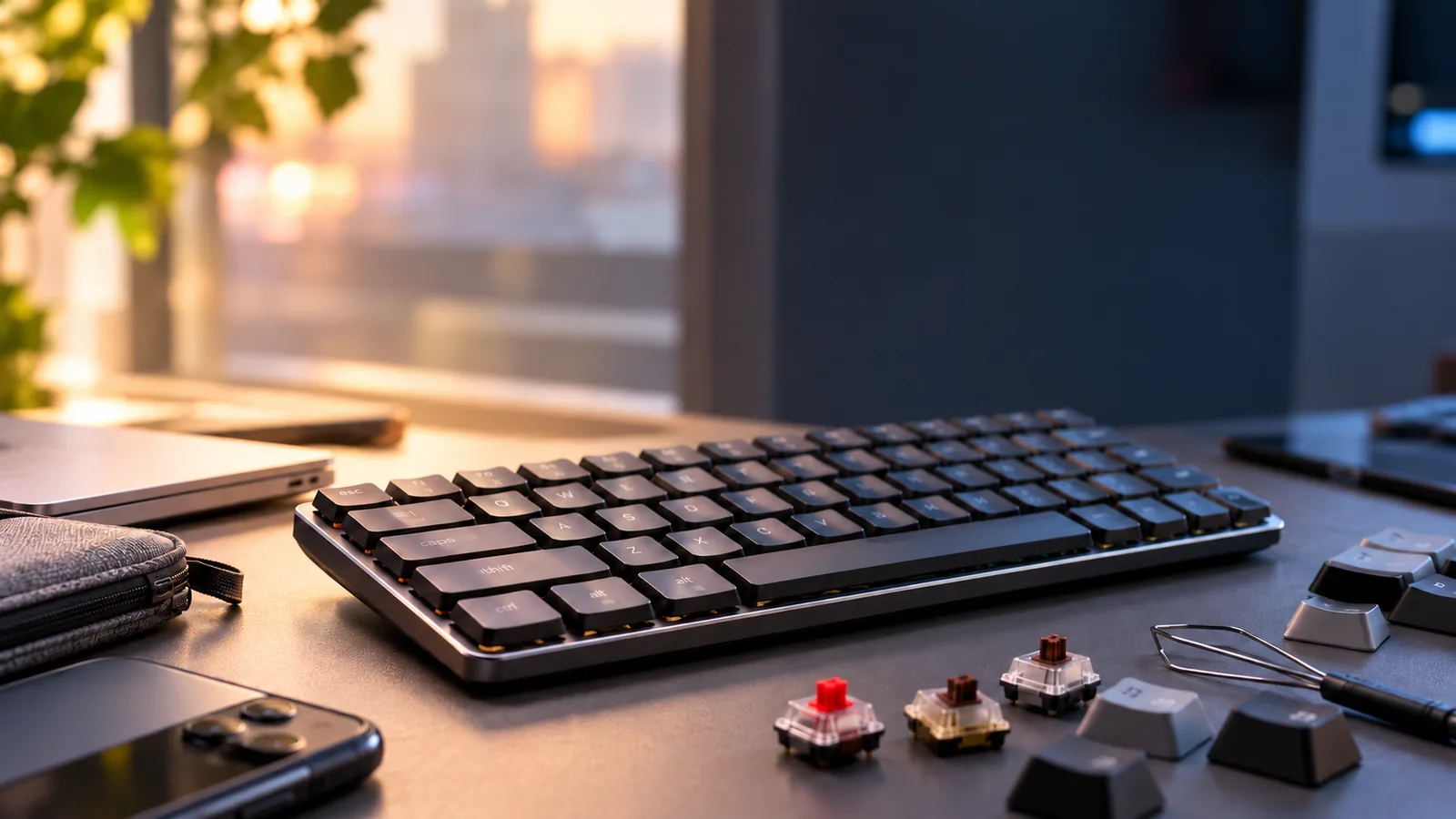
Customization Potential Mechanical keyboards often provide a high degree of personalization. Many models allow users to easily swap out keycaps to alter aesthetics or improve ergonomics. More advanced options include hot-swappable switch sockets, enabling users to change the underlying switches without soldering, thereby fine-tuning the typing feel and sound to their exact preference. This modularity allows for a keyboard that evolves with user needs and tastes.
Decoding Mechanical Keyboard Essentials: Switches, Keycaps, and Layouts
Understanding the core components of a mechanical keyboard is fundamental to making an informed choice. Each element—switches, keycaps, and layout—contributes significantly to the keyboard's feel, sound, and overall usability. Familiarizing yourself with these basics helps in aligning a keyboard's characteristics with your personal preferences and intended use.
Mechanical Switches: The Heart of the Keyboard
Mechanical switches are the individual mechanisms beneath each keycap that register a keystroke. Unlike membrane keyboards, where a rubber dome provides resistance, mechanical switches use a spring-loaded stem, offering distinct tactile and auditory feedback. This design contributes to their durability and precise actuation. Switches broadly fall into three main categories:
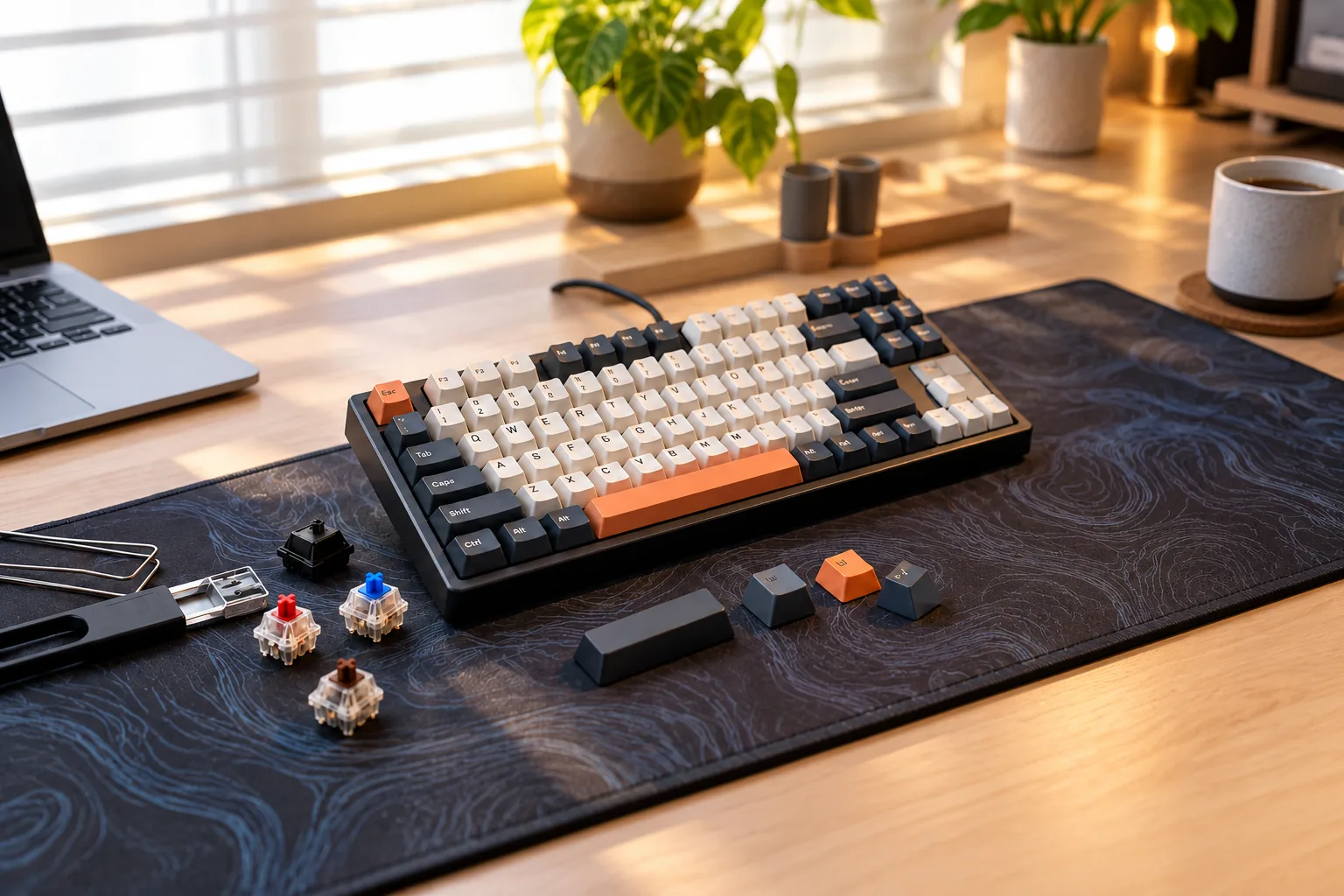
- Linear Switches: These switches offer a smooth, consistent keypress from top to bottom, without any tactile bump or audible click. They are known for their rapid, unobstructed travel.
- Feel: Smooth, no interruption.
- Common Examples: Red switches.
- Impact: Often favored by gamers for quick, repeated key presses, as there's no resistance point to overcome. They tend to be quieter than other types, making them suitable for shared environments.
- Tactile Switches: These switches feature a noticeable "bump" midway through the keypress, providing physical feedback that a key has been actuated without requiring a full bottom-out. They do not typically produce a loud click.
- Feel: A distinct, non-audible bump.
- Common Examples: Brown switches.
- Impact: A popular choice for typists and programmers, as the tactile feedback helps confirm keystrokes, potentially improving typing accuracy and speed. They offer a balance between responsiveness and quiet operation.
- Clicky Switches: Combining the tactile bump with an audible "click" sound, these switches provide both physical and auditory confirmation of a keystroke.
- Feel: A distinct bump accompanied by a sharp click.
- Common Examples: Blue switches.
- Impact: Highly preferred by typists who enjoy the satisfying sound and clear feedback. However, the audible click can be a consideration in quiet office spaces or shared living environments.
Your switch choice profoundly impacts the typing experience, sound profile, and suitability for specific tasks. Consider your primary use—whether it's high-speed gaming, extensive typing, or a mix of both—and your tolerance for noise.
Keycaps: Material, Profile, and Aesthetics
Keycaps are the individual caps that sit atop the mechanical switches, providing the surface your fingers interact with. Beyond aesthetics, their material and profile influence durability, feel, and ergonomics.
- Materials:
- ABS (Acrylonitrile Butadiene Styrene): A common, cost-effective plastic. ABS keycaps often feel smoother and can develop a shiny, "greasy" look over time with heavy use.
- PBT (Polybutylene Terephthalate): Generally more durable and resistant to shine compared to ABS. PBT keycaps often have a slightly textured, matte finish that can feel pleasant to the touch and maintain its appearance longer.
- Profiles: The profile refers to the shape and height of the keycaps across the keyboard.
- Sculpted Profiles (e.g., OEM, Cherry): These are the most common, featuring varying heights and angles for different rows, designed to conform to the natural curve of your fingers. OEM is standard on many pre-built keyboards, while Cherry is often slightly lower and more refined.
- Uniform Profiles (e.g., XDA, DSA): All keycaps in these profiles have the same height and shape across every row. This can offer a different typing feel and allows for greater flexibility in rearranging keys without affecting ergonomics.
The choice of keycap material and profile can affect long-term comfort and the keyboard's overall aesthetic. PBT offers enhanced durability, while sculpted profiles can enhance typing comfort for many users.
Keyboard Layouts and Sizes: Finding Your Fit
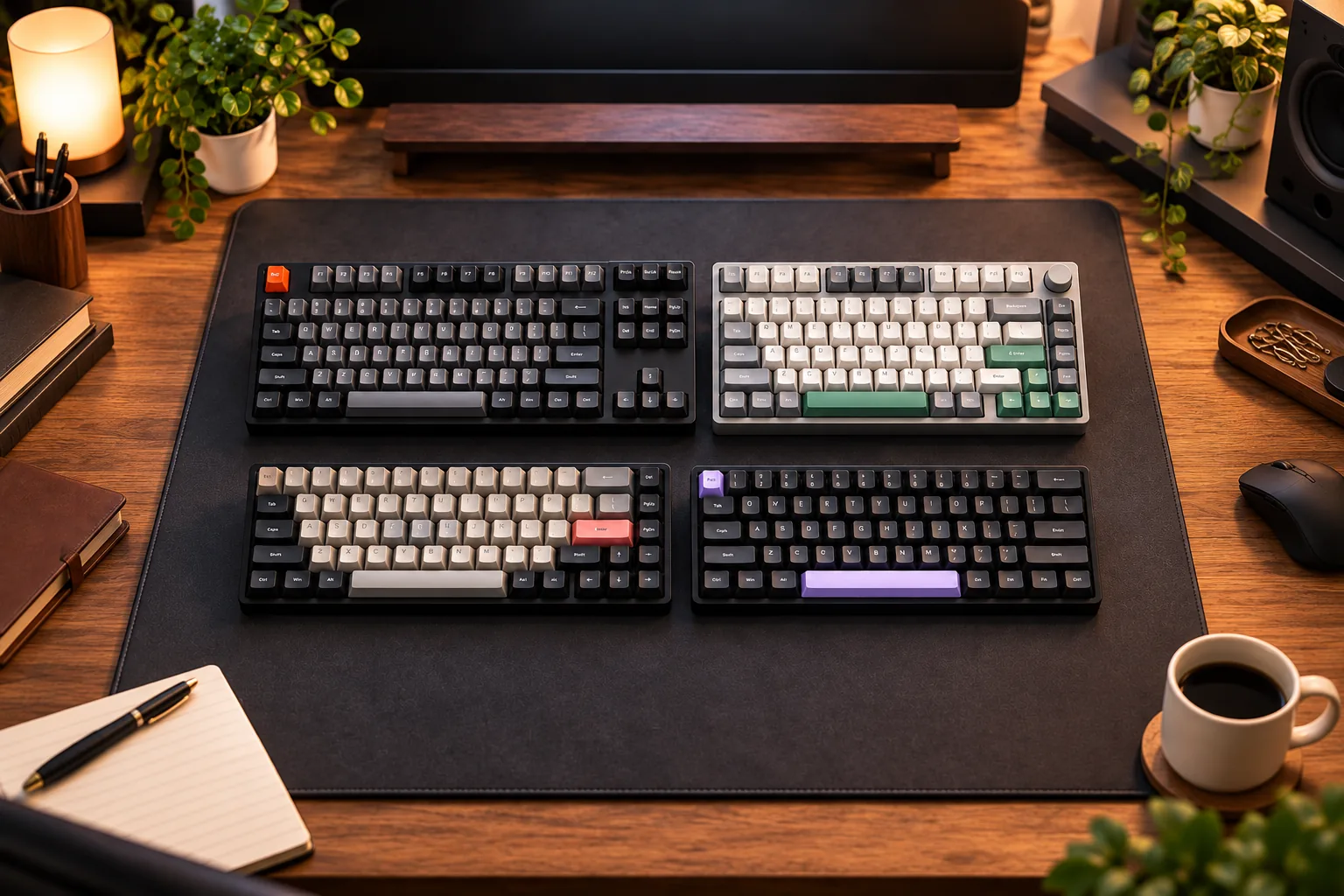
The layout and physical size of a mechanical keyboard dictate its functionality and how much desk space it occupies. Different layouts remove or condense sections of a full-sized keyboard (typically 104-108 keys) to achieve a smaller footprint.
- Full-Size: Includes a dedicated numpad, function row, and navigation cluster. Offers maximum functionality but requires the most desk space.
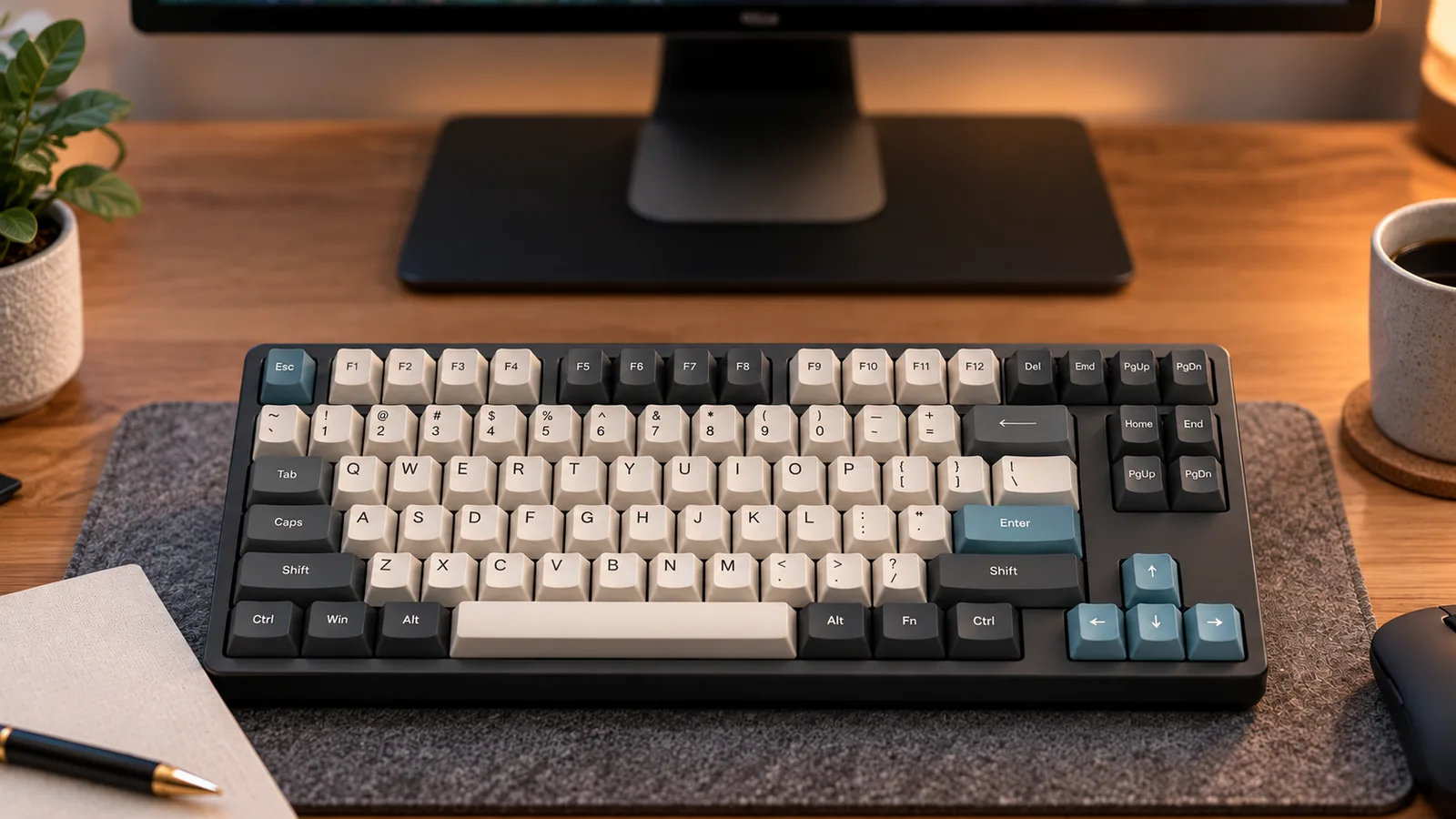
- Tenkeyless (TKL): Removes the numpad, resulting in a more compact design than a full-size keyboard. Still retains the function row and navigation keys. Ideal for users who don't frequently use a numpad but need dedicated function and arrow keys.
- Compact Layouts (e.g., 75%, 65%, 60%): These layouts progressively reduce the keyboard's size by consolidating or removing keys, often requiring the use of "layers" (accessed via a function key) for certain commands.
- 75%: Similar to TKL but compresses the navigation cluster, often without gaps between key blocks.
- 65%: Eliminates the function row and numpad, but typically retains dedicated arrow keys and a few navigation keys.
- 60%: The most compact common layout, removing the function row, numpad, and most navigation keys. Relies heavily on function layers.
Choosing a layout involves a trade-off between desk space and immediate access to all keys. Consider your workflow: do you need a numpad for data entry? Are dedicated function keys essential for your software? A smaller layout offers portability and more room for mouse movement, but may require a learning curve to adapt to layered functions.
Beyond the Basics: Advanced Buying Considerations
Once you've considered switch types and layouts, several other features significantly influence a mechanical keyboard's usability, build quality, and long-term value. Understanding these advanced aspects can refine your choice to perfectly match your expectations.
Connectivity Options: Bridging the Gap
How your keyboard connects to your device impacts convenience, performance, and portability. Most mechanical keyboards offer wired, wireless, or hybrid connectivity.
- Wired (USB-C)
- Pros: Offers the most reliable connection with virtually no latency, making it ideal for competitive gaming or sensitive tasks. No battery management is required. USB-C is a modern, reversible standard.
- Cons: Limits portability and requires cable management, potentially cluttering your desk.
- Wireless (Bluetooth)
- Pros: Provides ultimate flexibility, allowing connection to multiple devices (PC, tablet, phone) without cables. Great for clean desk setups or travel.
- Cons: Typically has higher latency than wired or 2.4GHz connections, which can be noticeable in fast-paced gaming. Battery life is a consideration, requiring periodic recharging.
- Wireless (2.4GHz)
- Pros: Utilizes a dedicated USB dongle for a low-latency connection that often rivals wired performance, making it a strong option for wireless gaming.
- Cons: Requires a USB port for the dongle, which can be misplaced. Like Bluetooth, it relies on battery power.
- Hybrid Options: Many modern keyboards offer both wired (USB-C) and wireless (Bluetooth or 2.4GHz) modes, providing the best of both worlds for different scenarios.
Build Quality and Materials: Foundation for Durability
The materials and construction of a mechanical keyboard significantly affect its feel, acoustics, and longevity. This aspect often dictates the keyboard's perceived premium quality.
- Case Materials:
- Plastic: Often found in more affordable models, plastic cases make keyboards lighter and less expensive. However, as noted by TechRadar, some budget-friendly plastic builds can feel less substantial and may contribute to a hollower sound profile (TechRadar).
- Metal (Aluminum/Steel): Higher-end keyboards frequently use aluminum or steel for their cases. These materials provide a more premium, rigid feel, significantly increase durability, and add weight, which prevents the keyboard from shifting during intense use. Metal cases can also contribute to a deeper, more satisfying sound profile by reducing resonance.
- Internal Structure: Beyond the outer case, internal components like steel or aluminum backplates (the plate holding the switches) enhance structural integrity, prevent flex, and further influence the keyboard's acoustics and typing feel. A well-built keyboard minimizes creaking or unwanted vibrations.
Essential Features: Customization and Longevity
Certain features enhance a mechanical keyboard's adaptability and user experience, catering to personal preference and future needs.
- Hot-Swappable Switches: This feature allows users to easily remove and replace individual switches without soldering.
- Benefit: Enables deep customization, letting you experiment with different switch types (e.g., trying a clicky switch after buying a tactile one) or replace a faulty switch without needing specialized tools or replacing the entire keyboard. This significantly extends the keyboard's lifespan and upgrade potential.
- RGB Lighting: Refers to customizable backlighting that can display a wide spectrum of colors.
- Benefit: Primarily aesthetic, allowing users to personalize their setup. It can also be functional, providing visibility in low-light conditions or indicating specific keyboard states (e.g., Caps Lock, profile changes).
- Companion Software: Many mechanical keyboards come with dedicated software for advanced customization.
- Benefit: Allows users to remap keys, create complex macros, fine-tune RGB lighting effects, and update firmware. The quality and intuitiveness of this software can vary widely between brands.
Navigating the Downsides: Common Problems and Trade-offs
While mechanical keyboards offer numerous benefits, it is crucial for first-time buyers to understand potential drawbacks and compromises. Being aware of these aspects helps in setting realistic expectations and making a choice that aligns with individual preferences and circumstances.
Noise Levels: A Potential Concern
One of the most frequently discussed characteristics of mechanical keyboards is their sound. While some users appreciate the auditory feedback, others find it disruptive.
- Inherent Loudness: Certain mechanical switches, particularly "clicky" types, are designed to produce a distinct audible click with each keystroke. This sound can be significantly louder than a typical membrane keyboard.
- Impact on Shared Environments: The noise from clicky or even some tactile switches can be a major consideration in shared spaces like open-plan offices, quiet libraries, or homes where others might be sensitive to sound.
- Mitigation Strategies:
- O-rings: Small rubber rings placed on keycaps can dampen the sound of the keycap bottoming out against the switch housing, reducing overall noise.
- Silent Switches: Specifically designed switches incorporate internal dampeners to significantly reduce both the bottom-out and top-out sound, offering a much quieter typing experience.
- Switch Choice: Opting for linear or non-clicky tactile switches generally results in a quieter keyboard compared to clicky variants.
Initial Cost and Adjustment Period
Mechanical keyboards typically represent a greater financial investment compared to their membrane counterparts, and adopting one may require an adjustment period.
- Higher Upfront Cost: Due to their more complex construction and individual switch mechanisms, mechanical keyboards generally have a higher price point. While affordable options exist, they may involve trade-offs in materials or features.
- Learning Curve for Typing Feel: The distinct feel of mechanical switches—whether linear, tactile, or clicky—differs significantly from the soft, mushy feel of membrane keyboards. Users may need time to adapt to the new key travel, actuation force, and feedback, which can initially affect typing speed or accuracy.
- Layout Changes: If transitioning to a smaller form factor (e.g., 60% or TKL), users will need to adjust to missing keys and potentially using function layers to access commands, requiring a period of muscle memory retraining.
Addressing Common Mechanical Keyboard Issues
Despite their reputation for durability, mechanical keyboards are not entirely immune to issues. Awareness of these potential problems can help in troubleshooting or making informed purchasing decisions.
- Double-Typing (Chattering): This occurs when a single key press registers multiple times. It can be caused by faulty switches, dust ingress, or firmware glitches.
- Unresponsive Keys: A key may fail to register a press at all. This can stem from a defective switch, a loose keycap, or a connection issue within the keyboard's circuit board.
- Squeaky Stabilizers: Larger keys like the spacebar, Shift, or Enter key use stabilizers to ensure even presses. These stabilizers can sometimes produce an undesirable squeaking or rattling sound, often due to a lack of lubrication or improper installation.
- Community Resources: Online communities, such as those found on platforms like Reddit, frequently discuss these issues and offer troubleshooting advice, highlighting that these are recognized, albeit not universal, occurrences. Many problems can often be resolved through cleaning, lubricating components, or, in some cases, replacing switches (especially on hot-swappable models).
Making Your Choice: Matching a Mechanical Keyboard to Your Workflow
Selecting your first mechanical keyboard involves synthesizing the information you've gathered about switches, layouts, and features with your personal needs and daily activities. The "best" keyboard isn't a universal product; it's the one that aligns most closely with your primary use case, preferences, and budget. Consider your main activities to guide your decision.
-
For Gamers: Prioritizing Speed and Precision Gamers often seek keyboards that offer rapid response times and consistent key presses. Responsiveness and low latency are critical for competitive play.
- Switch Types: Linear switches (e.g., certain red or black variants) are frequently preferred for their smooth, uninterrupted travel, allowing for quick double-taps and swift movements without a tactile bump or audible click. Optical switches, which use light for actuation, can offer even faster response times by eliminating debounce delay.
- Features: Customizable macros can provide an edge by allowing complex command sequences to be executed with a single key press. Look for software support that enables extensive remapping and macro creation.
- Trade-offs: While full-size keyboards offer all keys, many gamers opt for tenkeyless (TKL) or even smaller layouts to free up desk space for mouse movement, accepting the absence of a number pad.
-
For Typists and Programmers: Emphasizing Comfort and Feedback Users who spend extended periods typing or coding benefit most from keyboards that reduce fatigue and provide clear feedback on keystrokes.
- Switch Types: Tactile switches (e.g., certain brown variants) are popular for their noticeable bump, which confirms actuation without needing to bottom out the key. This can lead to faster, more accurate typing and reduced finger strain. Clicky switches (e.g., certain blue variants) offer both a tactile bump and an audible click, which some typists find satisfying and helpful for rhythm.
- Ergonomics: Consider ergonomic layouts, such as split or angled designs, if you experience wrist discomfort. Keycap profiles can also influence comfort; sculpted profiles may better fit finger contours.
- Feedback: The distinct feedback from mechanical switches can improve typing accuracy and speed by providing immediate confirmation of a key press.
-
For Everyday Use and Portability: Balancing Practicality and Aesthetics General users and those needing a keyboard for multiple environments often prioritize convenience, size, and overall appearance.
- Size: Compact layouts like 60% or 65% are ideal for portability and saving desk space, though they require adapting to layered functions for some keys. Full-size or TKL layouts offer familiarity and all dedicated keys.
- Connectivity: Wireless connectivity (Bluetooth or 2.4 GHz) offers flexibility and a clutter-free setup, essential for portable use or clean desktops. Ensure reliable connection stability for your intended use.
- Aesthetics: The overall design, keycap colors, and backlighting options contribute to the keyboard's visual appeal, which can be a significant factor for personal enjoyment and integration into a workspace.
Ultimately, the most suitable mechanical keyboard will be a personal choice. Reflect on your daily tasks, experiment with different switch types if possible (e.g., via switch testers), and consider how various layouts and features will integrate into your specific workflow.
Common Inquiries About Mechanical Keyboards
First-time buyers often have specific questions as they navigate the world of mechanical keyboards. Addressing these common concerns can help clarify expectations and guide a more confident purchase decision.
-
Are mechanical keyboards worth the investment? For many users, yes. While the initial cost can be higher than membrane alternatives, mechanical keyboards often offer superior durability, a more satisfying typing experience, and precise control. Their robust construction and longer lifespan can translate to better long-term value. The market for mechanical keyboards is substantial and growing, indicating widespread user satisfaction and perceived value, particularly among those who spend significant time typing or gaming. Affordable options are also available, making the benefits accessible without a prohibitive upfront cost.
-
How do I know which switch type is right for me? Determining the ideal switch type largely depends on personal preference for feel and sound. Mechanical switches generally fall into three categories:
- Linear: Offer a smooth, consistent keystroke from top to bottom without any tactile bump or audible click. Often preferred by gamers for rapid, unobstructed key presses.
- Tactile: Provide a noticeable "bump" partway through the keystroke, confirming activation without an audible click. Many typists appreciate this feedback for accuracy.
- Clicky: Feature both a tactile bump and a distinct audible "click" sound. These provide clear feedback, but the sound can be a consideration in shared environments. The best way to decide is to experience them firsthand, perhaps by using a switch tester or trying out different keyboards. Consider your primary use (typing, gaming, mixed) and your tolerance for sound.
-
Are all mechanical keyboards loud? No, not all mechanical keyboards are loud. The sound profile is primarily determined by the switch type and the keyboard's construction. Clicky switches are designed to produce an audible click, making them the loudest option. However, linear and tactile switches can be relatively quiet, especially when combined with sound-dampening features within the keyboard's casing or keycaps. Many modern mechanical keyboards are engineered to reduce noise, offering options suitable for quiet office environments or shared spaces.
-
Can I use a mechanical keyboard for both gaming and typing? Absolutely. Mechanical keyboards are highly versatile and excel in both gaming and typing tasks. Many users find that the precise actuation and consistent feedback improve their performance in both areas. While some switch types might be marginally favored for one activity over another (e.g., linear for gaming, tactile for typing), numerous switches offer a balanced experience suitable for a wide range of uses. Your personal preference for key feel and response will be the main factor in selecting a keyboard that performs well across all your activities.
Conclusion: Your Path to a Better Typing Experience
Embarking on the journey to choose your first mechanical keyboard can seem daunting, but it's a decision that promises significant upgrades to your daily computing. As you've learned, these keyboards stand apart for their robust construction, offering superior durability and a more satisfying, precise typing experience compared to their membrane counterparts. This translates to enhanced comfort during long sessions, improved typing accuracy, and a device built to last.
Your ideal mechanical keyboard isn't a one-size-fits-all solution; it's a personal tool tailored to your specific needs. The core of this choice lies in understanding the nuances of different mechanical switches, which dictate the feel and sound of every keystroke. Equally important is selecting a layout that aligns with your workflow and available desk space. Beyond these fundamental components, consider features like connectivity, keycap materials, and overall build quality to ensure the keyboard meets your expectations for performance and longevity.
Armed with this comprehensive understanding of switches, layouts, and essential buying criteria, you are now equipped to confidently explore the mechanical keyboard market. Trust your preferences, weigh the trade-offs, and prioritize what truly matters for your usage. Your path to a more engaging and efficient typing experience is now clear, allowing you to select a mechanical keyboard that perfectly complements your unique digital life.
Frequently Asked Questions About mechanical keyboard
Is mechanical keyboard the right choice for every user?
No. The right fit depends on layout, switch feel, sound tolerance, operating-system support, connection needs, desk space, and whether the user values repairability or customization.
What should I verify before buying mechanical keyboard?
Confirm the physical layout, switch and socket compatibility, keycap support, firmware features, connection modes, operating-system mappings, warranty, and return policy using current manufacturer documentation.