As an Amazon Associate we earn from qualifying purchases.
Introduction to Compact Mechanical Keyboards
The appeal of compact mechanical keyboards has surged, drawing a growing number of users with their streamlined aesthetics and promise of efficiency. These smaller form factors are more than just a trend; they represent a deliberate shift towards minimalism and functionality, particularly for those with limited desk space or a need for portability.
In the context of mechanical keyboards, "compact" typically refers to designs that reduce their physical footprint by strategically omitting or consolidating certain keys found on full-sized models. This can range from removing the numeric keypad to integrating function rows and arrow keys into a more condensed layout. The primary benefits often cited include:
- Space-saving: Freeing up valuable desk real estate.
- Portability: Easier to transport for travel or different workstations.
- Ergonomics: Potentially reducing the distance your hand travels between mouse and keyboard.
- Aesthetics: A cleaner, less cluttered look.
This guide aims to demystify these smaller layouts, exploring the diverse configurations available, the crucial role of "layers" in accessing full functionality, and the inherent trade-offs involved. Understanding these elements is key to making an informed decision, as the ideal compact mechanical keyboard is a highly personal choice, shaped by individual workflow, space constraints, and typing preferences.
Decoding Compact Keyboard Layouts and Layers
Compact mechanical keyboards achieve their smaller footprint by strategically removing or consolidating keys found on a standard full-size layout. This reduction necessitates the use of "layers" to retain full functionality, introducing both efficiency and a learning curve. Understanding these design choices is fundamental to selecting a keyboard that aligns with individual workflow and space constraints.
Common Compact Layouts
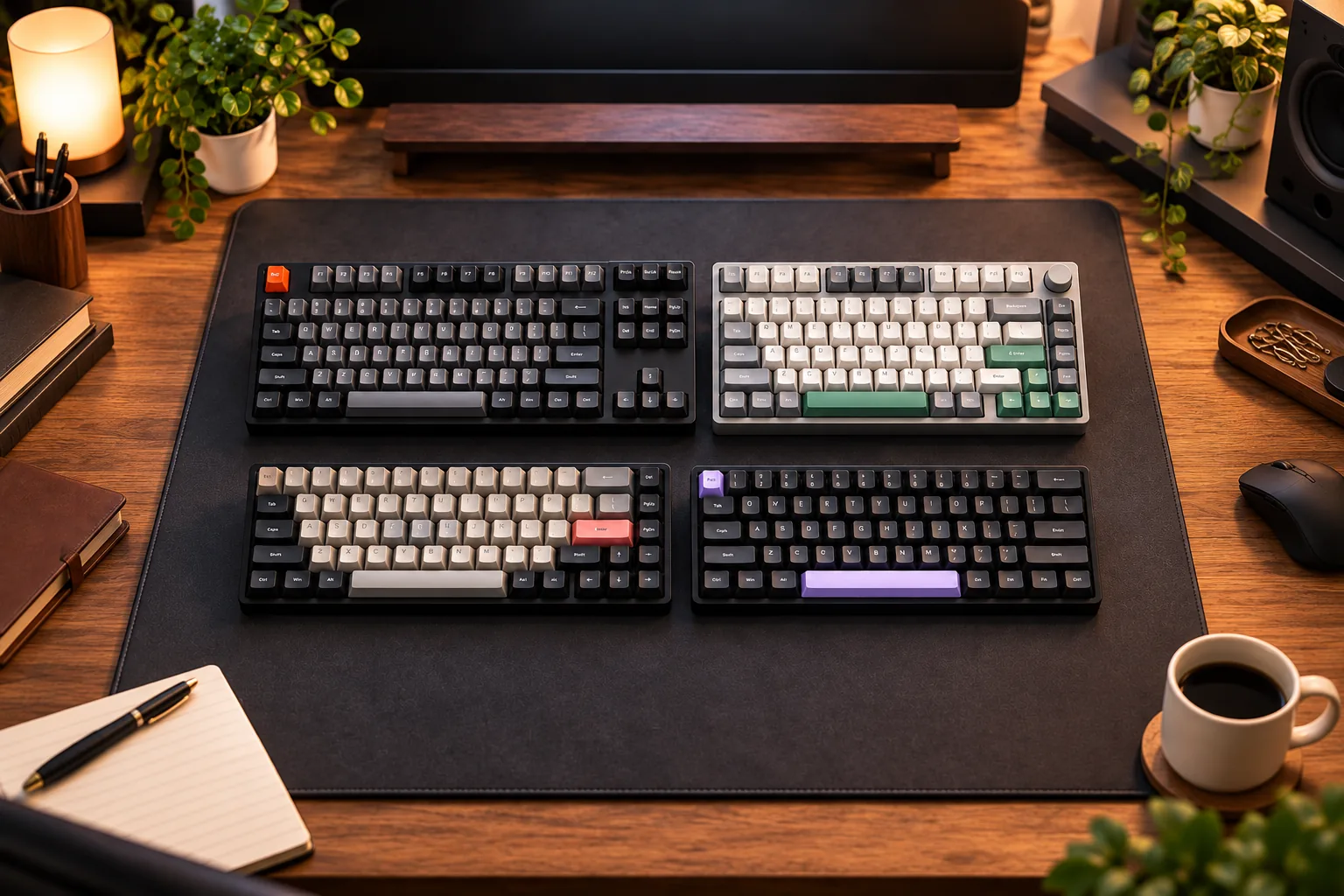
- Tenkeyless (TKL): As a common reference point for compactness, TKL keyboards remove the dedicated number pad found on the right side of a full-size keyboard. They typically retain the function row (F1-F12), the arrow cluster, and the navigation block (e.g., Home, End, Page Up, Page Down). This layout offers a significant reduction in width while keeping most essential keys readily accessible.
- 75% Layout: Building on the TKL, a 75% layout further condenses the keyboard by eliminating some keys from the navigation block (like Print Screen, Scroll Lock, Pause Break) and tightly grouping the remaining navigation keys and arrow cluster. The function row is usually present but often positioned directly above the number row with minimal spacing. This design offers a balance between a smaller size and retaining most keys without heavy reliance on layers for common functions.
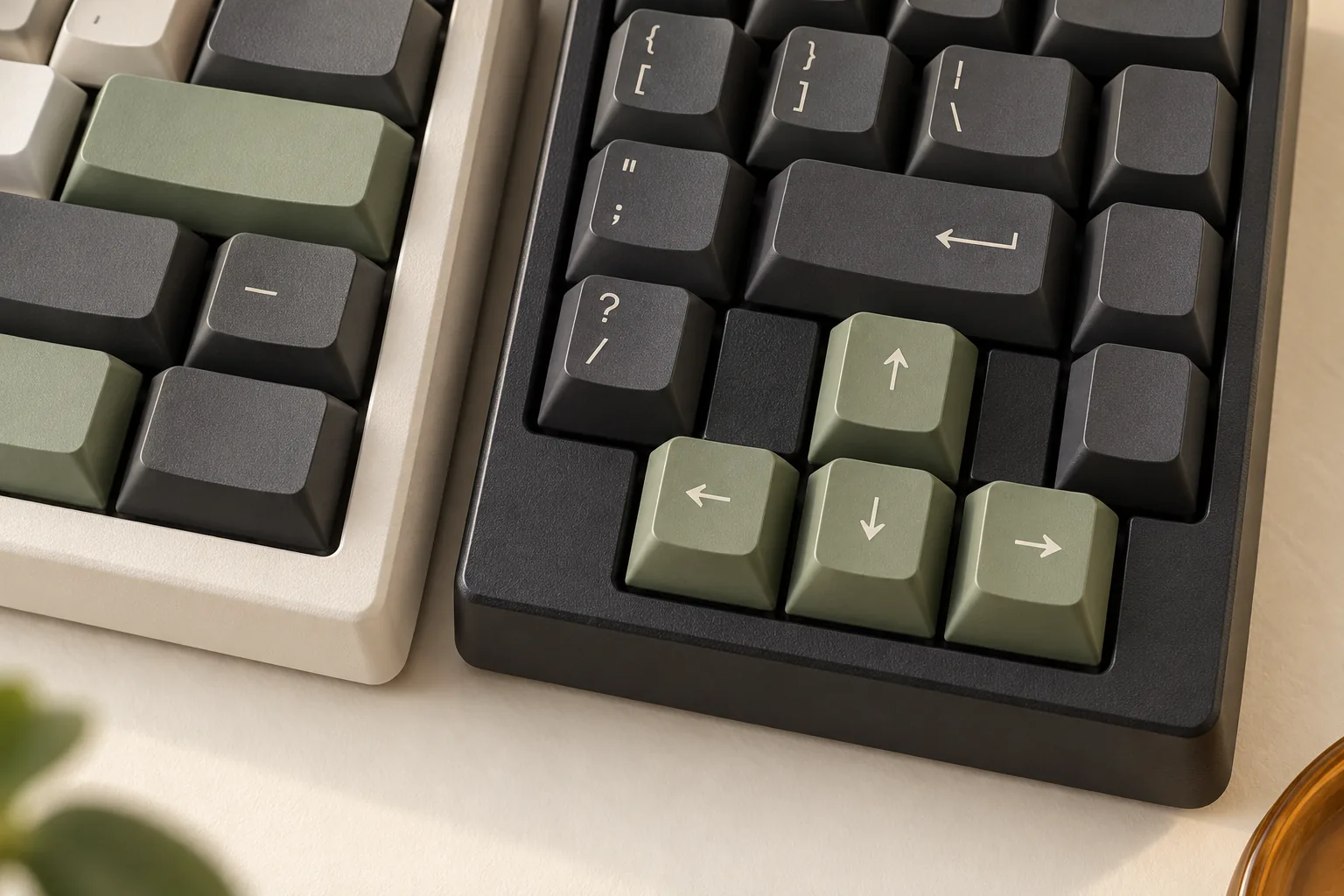
- 65% Layout: This layout is a step further in compactness, typically removing the entire function row and most of the navigation cluster, though it crucially retains a dedicated arrow key cluster. Keys like F1-F12, Print Screen, Scroll Lock, and Pause Break are usually absent as physical keys. This makes it significantly smaller than a 75% but still offers immediate access to directional input.
- 60% Layout: Representing a highly compact form factor, the 60% layout removes the function row, the navigation cluster, and the arrow keys entirely. It typically consists only of the alphanumeric keys, modifiers, and a few basic keys like Enter and Backspace. This layout maximizes desk space and promotes a minimalist aesthetic but relies heavily on layers for almost all non-alphanumeric input.
The Role of Keyboard Layers
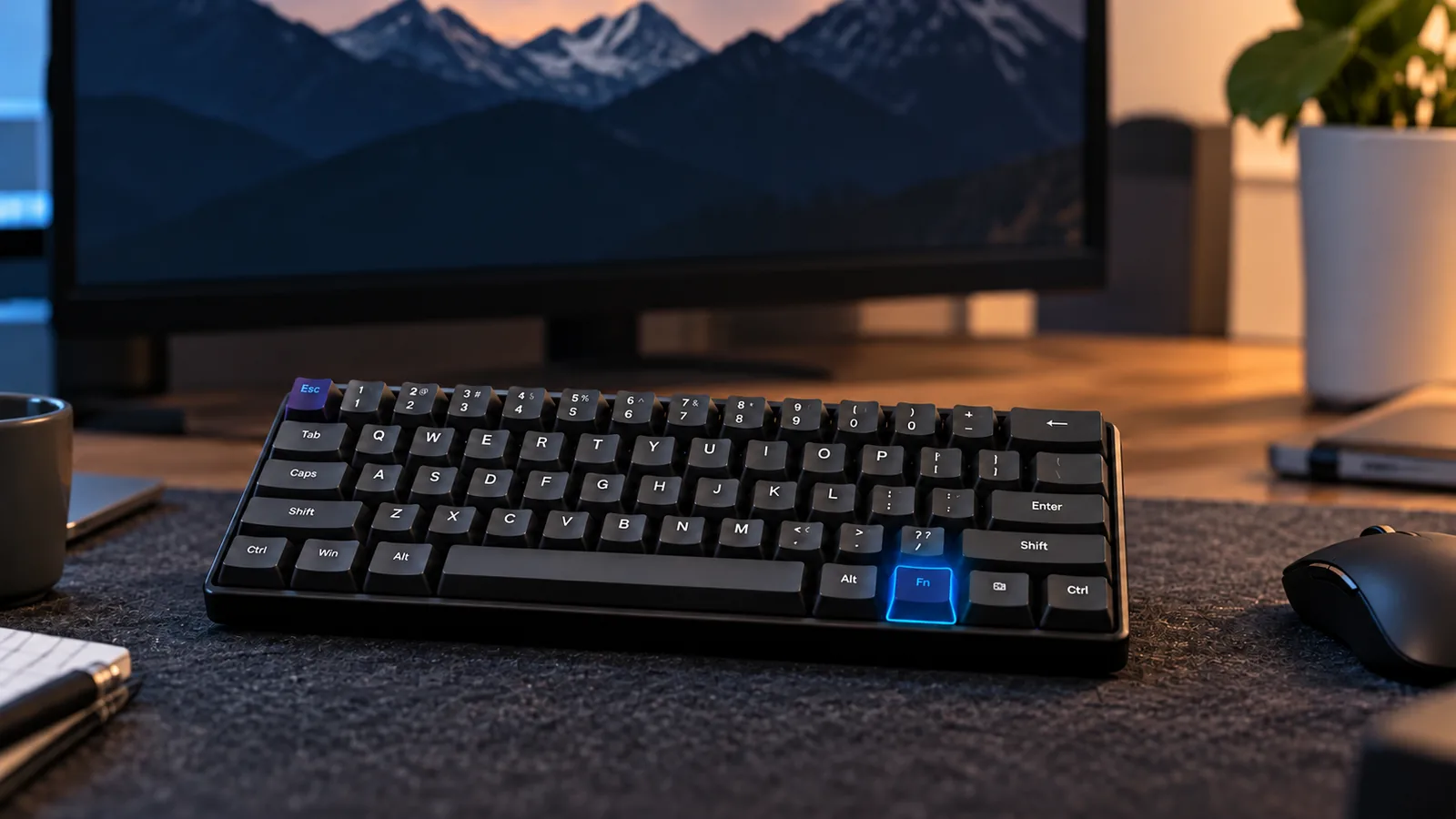
When physical keys are removed from a compact layout, their functions are not lost but are instead assigned to "layers." A keyboard layer is essentially a virtual set of key assignments that can be activated by holding down a special modifier key, commonly labeled "Fn" (Function).
- How Layers Work: Holding the Fn key transforms other keys into their secondary functions. For example, on a 60% keyboard, holding Fn and pressing the '1' key might activate 'F1'. Similarly, Fn + 'W' might become the 'Up Arrow' key. These secondary functions are often printed on the front or side of the keycaps for easy reference.
- Necessity for Full Functionality: Layers are indispensable for compact keyboards. Without them, users would lose access to critical functions like F-keys, media controls, navigation keys, and even the number pad (emulated on a layer). They ensure that despite the reduced physical size, the keyboard can still perform all tasks a full-size board can, albeit with an extra key press.
- Learning Curve and Muscle Memory: Adopting a compact keyboard with layers involves an initial learning curve. Users must memorize the key combinations for frequently used functions. This can temporarily slow down typing or workflow as new muscle memory is developed. However, with consistent use, these layered commands can become intuitive, allowing for efficient input without glancing at the keyboard. The effectiveness of layers often depends on the user's willingness to adapt and the keyboard's programmability to customize these layers to personal preference.
Essential Criteria for Selecting Your Compact Mechanical Keyboard
Choosing a compact mechanical keyboard involves evaluating several core components that collectively define the typing experience, durability, and functional versatility. Understanding these elements is crucial for aligning a keyboard with your specific needs, whether for work, gaming, or general use, especially given the inherent compromises of smaller form factors.
-
Switch Types and Feel The choice of mechanical switch profoundly impacts typing feel and sound.
- Linear switches provide a smooth, consistent keystroke from top to bottom, often favored by gamers for their rapid, unobstructed actuation. Their sound profile tends to be quieter, depending on lubrication and housing.
- Tactile switches feature a noticeable bump during actuation, offering tactile feedback without an audible click. This can aid typists in knowing when a keypress has registered, potentially improving accuracy.
- Clicky switches combine a tactile bump with an audible "click" sound, providing both tactile and auditory confirmation of a keypress. While satisfying for some, the noise level can be a consideration in shared environments. The impact of switch choice on a compact keyboard can be more pronounced due to the closer proximity of keys and the potential for increased noise reflection from a smaller case.
-
Build Quality and Materials The materials and construction methods significantly influence a keyboard's longevity, feel, and acoustic properties.
- Case Material: Plastic cases are typically lighter and more affordable, while aluminum cases offer superior rigidity, weight, and often a more premium sound profile. The choice impacts portability and desk stability.
- Plate Material: The plate sits between the switches and the PCB, affecting typing feel. Materials like steel provide a firm, stiff feel, while polycarbonate or POM can introduce more flex, resulting in a softer typing experience.
- Mounting Style: Common mounting styles, such as tray mount (switches screwed directly to the case) or gasket mount (PCB and plate suspended with soft material), dictate the overall flex and sound. Gasket mount often yields a softer, more cushioned feel and a less harsh sound.
-
Keycaps Keycaps are the primary interface with the keyboard and contribute to both aesthetics and typing comfort.
- Material: ABS (Acrylonitrile Butadiene Styrene) keycaps are common and can develop a shine over time. PBT (Polybutylene Terephthalate) keycaps are generally more durable, resist shine, and often have a textured feel.
- Profile: Keycap profiles, such as OEM, Cherry, XDA, or DSA, vary in height and sculpt, influencing finger comfort and typing ergonomics. Experimenting with profiles can help find one that reduces fatigue.
- Legends: The method by which characters are applied (e.g., doubleshot, dye-sublimation) affects their durability and resistance to fading. Clear, durable legends are particularly important on compact keyboards where many keys serve multiple, layered functions.
-
Connectivity Options How a keyboard connects to your device impacts its versatility and portability.
- Wired (USB-C): Offers reliable, low-latency performance without battery concerns, ideal for stationary setups or gaming where responsiveness is critical.
- Wireless (Bluetooth): Provides a clutter-free desk and high portability, suitable for multi-device users or those who frequently move their keyboard. Latency can be a minor concern for competitive gaming, and battery management is required.
- 2.4GHz Dongle: Often provides lower latency than Bluetooth, making it a good hybrid option for wireless gaming or demanding tasks where minimal delay is desired, while still offering portability.
-
Programmability and Software For compact keyboards, customization software is often essential for unlocking full functionality.
- Key Remapping: The ability to reassign keys is crucial for compact layouts, allowing users to move less-used keys or access layered functions more intuitively.
- Macros: Creating custom key sequences (macros) can significantly enhance productivity for repetitive tasks.
- RGB Lighting: Beyond aesthetics, programmable RGB lighting can serve functional purposes, such as indicating active layers or profiles, which is beneficial for navigating a compact layout.
-
Stabilizers Stabilizers are critical components located under larger keys (like the spacebar, Shift, Enter, and Backspace) that prevent wobbling and ensure consistent, smooth key presses regardless of where the key is pressed. Poorly implemented or untuned stabilizers can lead to a rattling sound or a mushy feel, detracting from the overall typing experience. Prioritizing a keyboard with well-regarded stabilizers can significantly improve the feel of these essential keys.
Navigating the Trade-offs of Compact Keyboards
While compact mechanical keyboards offer distinct advantages in space and aesthetics, their smaller footprint inherently introduces compromises. Understanding these trade-offs is crucial for prospective buyers to manage expectations and ensure the chosen layout aligns with their specific needs and workflow.
Compromised Key Access
The most significant trade-off in compact layouts is the reduction or outright removal of dedicated keys found on full-size keyboards. This often includes the numeric keypad, the function row (F1-F12), the standalone arrow keys, and the navigation cluster (e.g., Home, End, Page Up, Page Down). While these functions are still accessible through "layers" activated by modifier keys (like an Fn key), their absence as dedicated physical buttons means an extra key press and a shift in muscle memory. For tasks heavily reliant on these specific keys, such as intensive data entry or certain software shortcuts, this can initially slow down workflow.
Adjusting to Layered Functions
The reliance on layered functions introduces a learning curve. Users accustomed to a full-size layout will need to adapt to new key combinations to perform actions that previously required a single press. This re-learning of muscle memory can feel cumbersome at first, impacting typing speed and efficiency until the new layout becomes second nature. The duration of this adjustment period varies greatly among individuals, but it's an unavoidable aspect of adopting a more condensed keyboard.
Variations in Construction Quality
The compact mechanical keyboard market includes a wide range of products, and not all are built to the same standards. Some budget-friendly compact options might present challenges with overall construction quality. This can manifest as less stable keycaps, slight wobbling in switches, or less robust casing materials, which could affect the typing experience or long-term durability. While many compact keyboards boast excellent build quality, it's a factor to consider, particularly when evaluating more affordable models.
Adapting to Ergonomic Shifts
While a smaller keyboard can reduce the distance your hand travels between the keyboard and mouse, potentially improving ergonomics for some, it might not suit everyone's comfort needs. The condensed layout means keys are closer together, which could feel cramped for users with larger hands or those accustomed to a more spread-out typing posture. Without a dedicated numeric keypad, users who frequently input numbers might find themselves reaching for the top row, which can be less efficient or comfortable than a dedicated numpad. Some users may find that adding a wrist rest becomes more important for maintaining comfort with a compact form factor.
Task-Specific Limitations
Certain professional tasks or software applications are designed with full-size keyboard layouts in mind, making heavy use of dedicated function keys, navigation clusters, or the numeric keypad. For example, extensive spreadsheet work, CAD design, or video editing often relies on specific keybinds that are less intuitive to execute on a compact layout without remapping or significant adaptation. Before committing to a compact form factor, consider how your primary tasks and software interact with a reduced key set.
Is a Compact Mechanical Keyboard Right for You?
Deciding whether a compact mechanical keyboard is the optimal choice involves evaluating your daily tasks, available space, and willingness to adapt to a different layout. While these smaller form factors offer distinct advantages, they also present trade-offs that may not suit every user.
Consider a compact mechanical keyboard if you:
- Require more mouse space: Gamers often benefit from the reduced keyboard width, allowing for wider, unrestricted mouse movements during intense play.
- Embrace minimalism: For those who prefer a clean, uncluttered desk aesthetic, a compact keyboard significantly reduces desk footprint.
- Travel frequently or work in varied locations: Their smaller size and lighter weight make them highly portable for moving between home, office, or remote workspaces.
- Have limited desk real estate: If your workspace is constrained, a compact model can be a practical solution without sacrificing mechanical key feel.
Conversely, a compact mechanical keyboard might be less suitable if you:
- Perform extensive data entry: Users heavily reliant on a dedicated numeric keypad will find its absence on most compact layouts disruptive, requiring frequent layer switching or external solutions.
- Need constant access to dedicated function keys: Professionals who frequently use F1-F12 keys for software shortcuts may find accessing them via a function layer less efficient.
- Are unwilling to adapt: Compact layouts often necessitate learning new muscle memory for accessing certain keys through combination presses (layers). This adjustment period can be a barrier for some.
Your environment also plays a role. In a home setup, personal preference might dictate a compact board for aesthetics or gaming. In an office, the quietness of certain switch types might be prioritized, and the space-saving aspect could be beneficial, but reliance on specific keys for productivity software should be weighed. Ultimately, the ideal layout aligns with your personal typing habits, workflow, and comfort with adopting new input methods.
Frequently Asked Questions About Compact Mechanical Keyboards
Prospective buyers often have specific questions about transitioning to or selecting a compact mechanical keyboard. Addressing these common concerns can clarify expectations and guide informed decisions.
What Defines a 'Compact' Mechanical Keyboard?
A compact mechanical keyboard is characterized by its reduced physical footprint compared to a full-size (104-key) or tenkeyless (TKL) layout. This reduction is achieved by strategically omitting or consolidating keys, leading to various common form factors such as 75%, 65%, 60%, and even 40% layouts. The primary goal is to save desk space, enhance portability, and potentially improve ergonomics by bringing the mouse closer to the keyboard.
How Do I Access Missing Keys on a Compact Keyboard?
Compact keyboards utilize "layers" to provide access to keys that are physically absent from the main layout. This is typically managed through a dedicated Function (Fn) key, which, when held down in combination with another key, activates a secondary function. For example, a 60% keyboard might use Fn + 1 to produce F1, or Fn + W to act as an up arrow. Many compact keyboards also offer software for programmable layers, allowing users to customize key assignments and create multiple personalized layouts to suit their workflow.
Are Compact Mechanical Keyboards Suitable for All Users?
Compact mechanical keyboards are not universally ideal and involve a learning curve. They are well-suited for users who prioritize desk space, portability, and a minimalist aesthetic. Gamers often appreciate the extra mouse room, and typists may find the reduced hand travel beneficial. However, users who heavily rely on a dedicated numeric keypad for data entry, or those who prefer immediate access to all navigation and function keys without using layers, might find the adjustment challenging. Evaluating your daily tasks and willingness to adapt to layered functions is crucial.
What Should I Look for in Terms of Build Quality for a Compact Keyboard?
Assessing build quality for a compact mechanical keyboard involves several factors that contribute to its durability, typing feel, and longevity. Key considerations include:
- Chassis Material: Look for robust materials like aluminum or high-grade, thick plastic, which can provide stability and a premium feel.
- Switch Quality: Reputable switch manufacturers (e.g., Cherry, Gateron, Kailh) offer consistent performance. Hot-swappable sockets are a plus, allowing users to change switches without soldering.
- Stabilizers: For larger keys (spacebar, Shift, Enter), well-tuned stabilizers are essential to prevent wobbling and rattling, ensuring a smooth and consistent keystroke. Issues like "wobbly keys and loose switches" can detract from the typing experience, highlighting the importance of good stabilizer implementation.
- Keycap Material: PBT keycaps are often preferred for their durability and resistance to shine compared to ABS.
- Mounting Style: The way the keyboard's plate is mounted within its case (e.g., gasket mount, tray mount) can significantly influence the typing feel and sound profile, offering varying levels of flex and acoustic dampening.
Your Path to the Perfect Compact Mechanical Keyboard
Choosing a compact mechanical keyboard is a personal journey that culminates in a tool tailored to your specific demands. The insights into diverse layouts, the necessity of layers, and the inherent trade-offs are designed to clarify this decision. Your ideal keyboard will harmonize with your workflow, space constraints, and typing preferences, rather than being a one-size-fits-all solution.
To make an informed purchase, synthesize the key considerations discussed:
- Layout Preference: Determine how much you value dedicated keys (e.g., arrow keys, function row, navigation cluster) versus maximum space savings. Your daily tasks will dictate whether a 60%, 65%, 75%, or TKL layout is most practical.
- Layer Adaptation: Assess your willingness to learn and utilize function layers. Compact keyboards inherently rely on layers for full functionality, and comfort with this system is crucial for long-term satisfaction.
- Switch Type: While not exclusive to compact boards, the feel and sound of your chosen mechanical switches significantly impact the typing experience. Consider whether you prefer linear, tactile, or clicky feedback.
- Build Quality: Evaluate the materials, construction, and overall finish. A durable build contributes to longevity and a consistent typing feel, which is particularly important for a device used daily.
Ultimately, balance the aesthetic appeal of a minimalist form factor with its functional requirements. Prioritize your most critical needs, whether that's maximizing desk space, ensuring portability for on-the-go work, or achieving a specific typing feel. By carefully weighing these factors, you are well-prepared to select a compact mechanical keyboard that not only looks great but also genuinely enhances your productivity and comfort.